
Coby CBC-52-WHT
Coby Retro LCD Alarm Clock
Model: CBC-52-WHT
Introduction
Thank you for choosing the Coby Retro LCD Alarm Clock, model CBC-52-WHT. This user manual provides essential information for setting up, operating, and maintaining your new alarm clock. Designed for clear and precise visibility, this clock features a sleek 3.5" LCD screen that displays time, date, and indoor temperature.
Key Features:
- Perpetual Calendar Display: Always know the current date.
- On-The-Hour Chime: Optional audible chime for every hour.
- LCD Time and Temperature Display: Clear digital readout of time and indoor temperature.
- Alarm & 10 Minute Snooze Function: Reliable alarm with a convenient snooze option.
- Battery Operated: Portable design, requires 2 AAA batteries (not included).
Package Contents
Please check the package carefully to ensure all items are present and in good condition.
- 1 x Coby Retro LCD Alarm Clock (CBC-52-WHT)
- 1 x User Manual (this document)
Note: 2 AAA batteries are required for operation and are not included in the package.
Product Overview and Controls

Figure 1: Front view of the Coby Retro LCD Alarm Clock, highlighting the digital display and control buttons.
Display Elements:
- Time Display: Shows current time (AM/PM indicator).
- Alarm Time Display: Shows the set alarm time.
- Month/Date Display: Shows the current month and day.
- Temperature Display: Shows indoor temperature in Celsius or Fahrenheit.
- Alarm Icon: Indicates when the alarm is active.
- Chime Icon: Indicates when the hourly chime is active.
Control Buttons (Front Panel):
- TIME SET: Used to enter time/date setting mode.
- DOWN: Decreases values during setting, or navigates options.
- UP/°C/°F: Increases values during setting, navigates options, or switches temperature unit.
- ALARM SET: Used to enter alarm setting mode.
- ALARM ON/OFF: Toggles the alarm function on or off.
Top Button:
- SNOOZE/LIGHT: Activates snooze during an alarm, or temporarily illuminates the display backlight.
Setup
1. Battery Installation
- Locate the battery compartment cover on the back of the alarm clock.
- Slide the cover downwards to open it.
- Insert two (2) new AAA batteries, ensuring the correct polarity (+ and -) as indicated inside the compartment.
- Replace the battery compartment cover by sliding it back into place until it clicks.
Note: The clock will power on automatically once batteries are inserted. The display may show default values or "12:00 AM".
Operating Instructions
1. Setting the Time and Date
- Press and hold the TIME SET button for approximately 3 seconds until the hour digits begin to flash.
- Use the UP/°C/°F or DOWN buttons to adjust the hour. Pay attention to the AM/PM indicator.
- Press TIME SET again to move to the minute setting. Use UP/°C/°F or DOWN to adjust the minutes.
- Press TIME SET again to move to the year setting. Adjust with UP/°C/°F or DOWN.
- Press TIME SET again to move to the month setting. Adjust with UP/°C/°F or DOWN.
- Press TIME SET again to move to the date setting. Adjust with UP/°C/°F or DOWN.
- Press TIME SET one last time to exit the setting mode. The display will stop flashing.
2. Setting the Alarm
- Press and hold the ALARM SET button for approximately 3 seconds until the alarm hour digits begin to flash.
- Use the UP/°C/°F or DOWN buttons to adjust the alarm hour. Observe the AM/PM indicator for the alarm.
- Press ALARM SET again to move to the alarm minute setting. Use UP/°C/°F or DOWN to adjust the alarm minutes.
- Press ALARM SET one last time to exit the alarm setting mode. The alarm time will stop flashing.
3. Activating/Deactivating the Alarm
- To turn the alarm ON: Press the ALARM ON/OFF button once. An alarm icon (bell symbol) will appear on the display, indicating the alarm is active.
- To turn the alarm OFF: Press the ALARM ON/OFF button again. The alarm icon will disappear from the display.
4. Snooze Function
- When the alarm sounds, press the large SNOOZE/LIGHT button on top of the clock. The alarm will temporarily stop and sound again after approximately 10 minutes.
- To cancel the snooze and turn off the alarm completely, press any other button on the front panel (e.g., ALARM ON/OFF).
5. Display Backlight
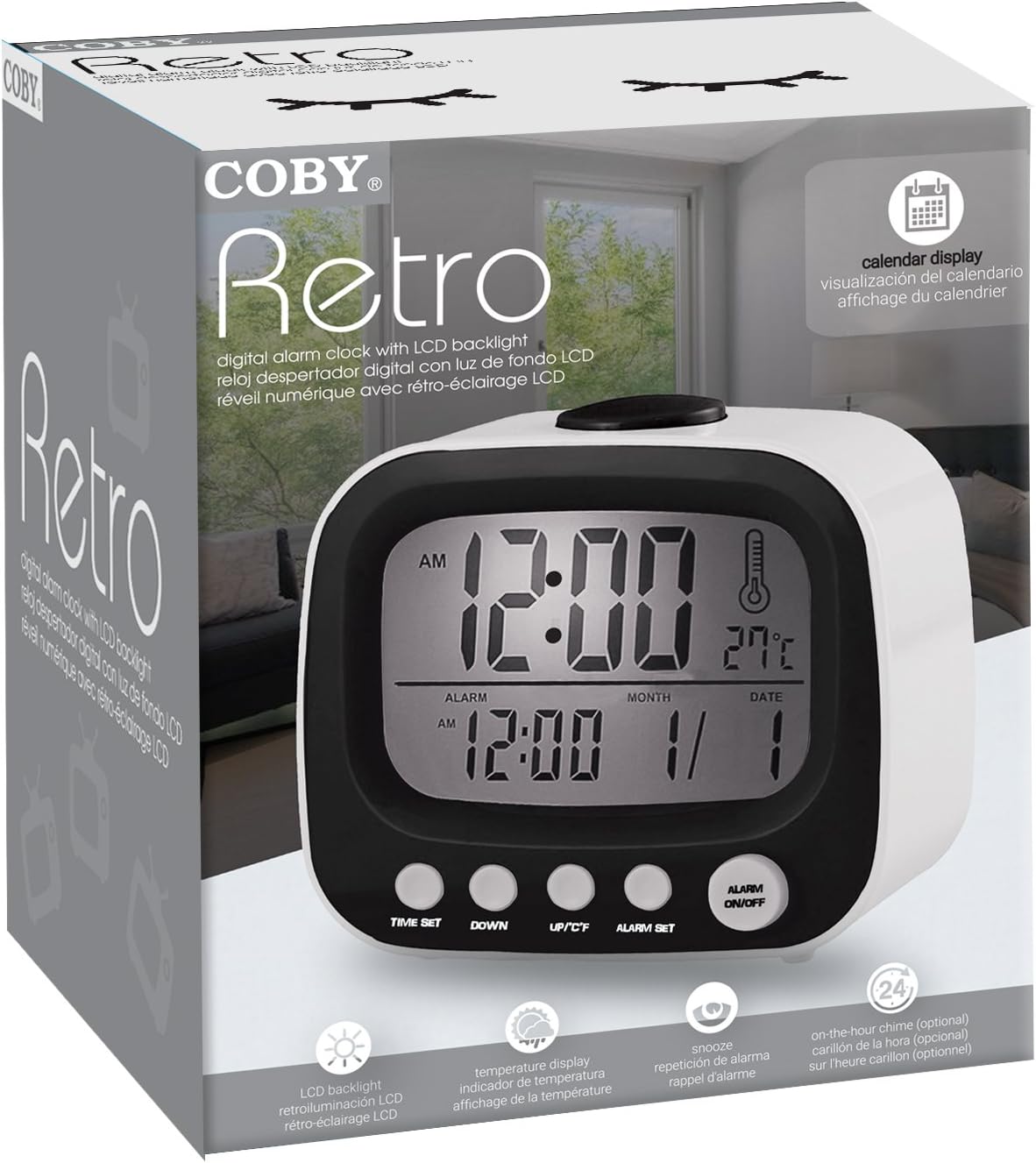
Figure 2: The Coby Retro LCD Alarm Clock with its backlight activated, providing visibility in low-light conditions.
- To temporarily illuminate the display, press the large SNOOZE/LIGHT button on top of the clock. The backlight will stay on for a few seconds.
6. Changing Temperature Unit (°C/°F)
- In normal time display mode, press the UP/°C/°F button once to toggle between Celsius (°C) and Fahrenheit (°F) temperature readings.
7. On-The-Hour Chime
This model features an optional on-the-hour chime. The method to activate/deactivate this feature is typically integrated with the time setting or a dedicated button. If a chime icon is visible on the display, it indicates the chime is active. Consult the quick start guide if provided, or experiment with pressing the UP/°C/°F or DOWN buttons in normal mode to see if a chime icon appears/disappears.
Maintenance
Cleaning:
- Wipe the clock's surface with a soft, dry cloth.
- Do not use abrasive cleaners, waxes, or solvents as they may damage the finish.
- Avoid exposing the clock to excessive moisture or submerging it in water.
Battery Replacement:
- When the display becomes dim or the clock functions erratically, it's time to replace the batteries.
- Follow the "Battery Installation" steps in the Setup section to replace the two AAA batteries.
- Always use new batteries of the same type.
- Dispose of old batteries responsibly according to local regulations.
Troubleshooting
| Problem | Possible Cause | Solution |
|---|---|---|
| Display is blank or dim. | Batteries are dead or inserted incorrectly. | Replace batteries with new ones, ensuring correct polarity. |
| Alarm does not sound. | Alarm function is not activated, or alarm time is incorrect. | Ensure the alarm icon is visible on the display. Re-check alarm time setting. |
| Time/Date is incorrect. | Time/Date was not set correctly or batteries were removed. | Follow the "Setting the Time and Date" instructions to reset. |
| Temperature reading seems inaccurate. | Clock is placed near a heat source or vent. | Move the clock to a location with stable ambient temperature. |
Specifications
| Brand: | Coby |
| Model Number: | CBC-52-WHT |
| Color: | White |
| Display Type: | Digital LCD |
| Power Source: | 2 x AAA Batteries (not included) |
| Product Dimensions: | 20.32 x 7.62 x 10.16 cm (8 x 3 x 4 inches) |
| Item Weight: | 249.47 g (0.55 lbs) |
| Special Features: | Alarm, Calendar Display, Snooze, Temperature Display, On-The-Hour Chime |
| Manufacturer: | Summit Electronics, US |
Warranty and Support
Coby products are designed for reliability and performance. For information regarding warranty coverage, technical support, or service inquiries, please refer to the warranty card included with your purchase or visit the official Coby website. Please retain your proof of purchase for warranty claims.
For further assistance, you may contact Coby customer support through their official channels. Always provide your product model number (CBC-52-WHT) when seeking support.
Ask a question about this manual
Ask about setup, troubleshooting, compatibility, parts, safety, or missing instructions. Manuals+ will review the question and use this page’s manual context to help answer it.