
Uniden DFR7
Uniden DFR7 Super Long Range Wide Band Laser/Radar Detector User Manual
Model: DFR7 | Brand: Uniden
1. Introduction
The Uniden DFR7 is a high-performance laser/radar detector designed to provide advanced warning against various speed monitoring devices. Featuring built-in GPS, voice alerts, and an OLED display, it offers comprehensive protection and an informed driving experience. This manual provides essential information for setting up, operating, and maintaining your DFR7 detector.
2. What's in the Box
- Uniden Super Long Range Radar/Laser Detection with GPS, DFR7 Unit
- Power Cord
- Mounting Bracket (Suction Cup or Visor Clip)
- USB Cable (for updates)
- User Manual (this document)
3. Product Overview
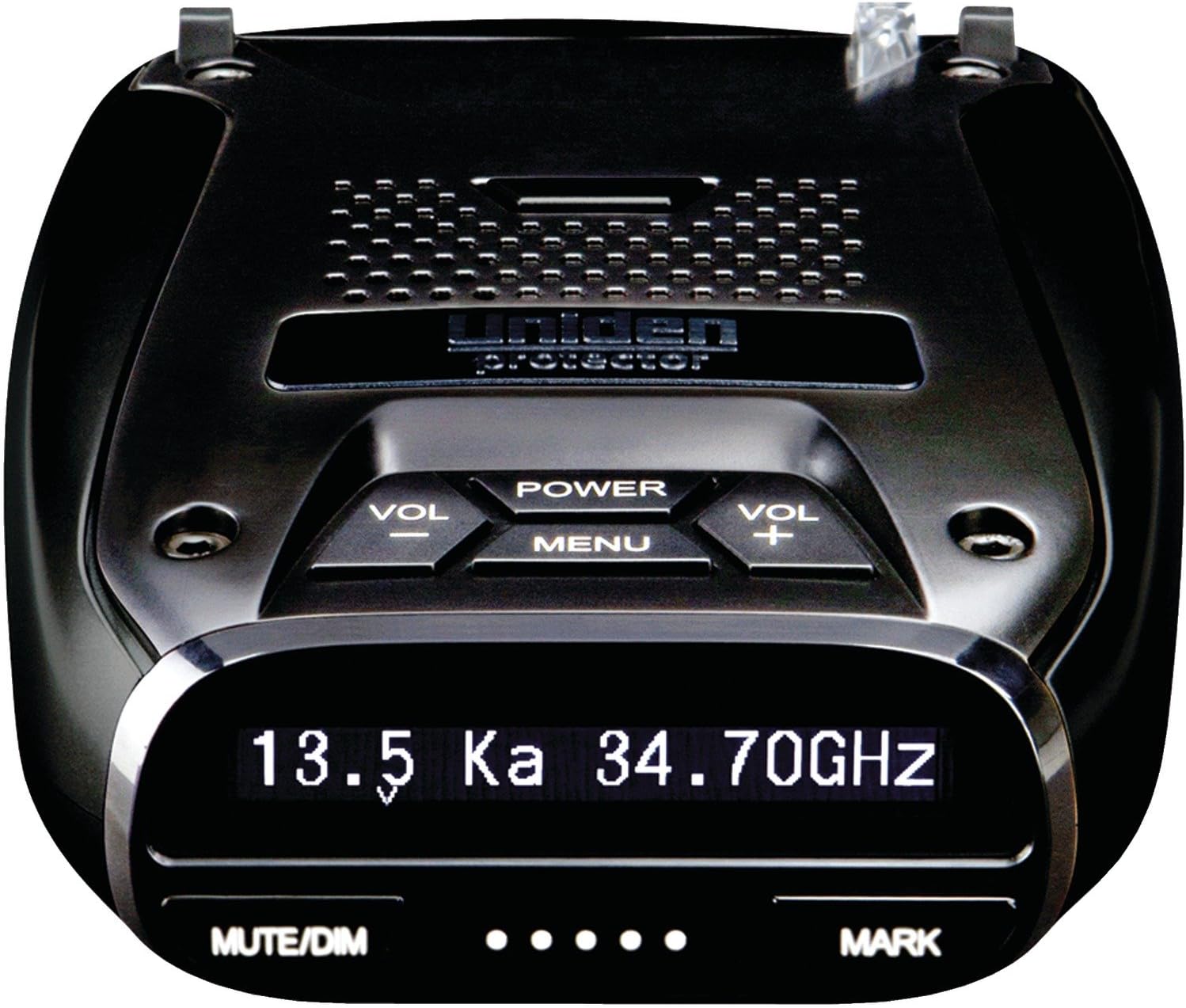
Figure 1: Front view of the Uniden DFR7 Radar Detector, highlighting the OLED display and control buttons.
The Uniden DFR7 features a sleek, compact design with an easy-to-read OLED display. Key controls are intuitively placed for quick access, including volume, power, and menu navigation. The unit is equipped with a front-facing laser/radar sensor and a GPS module for location-based features.
4. Setup
4.1 Mounting the Detector
- Choose a location on your windshield that does not obstruct your view of the road. The detector should have a clear line of sight to the front and rear.
- Clean the windshield area thoroughly before attaching the suction cup mount.
- Attach the suction cup mount to the windshield and secure the DFR7 unit to the mount. Ensure it is firmly in place.
4.2 Power Connection
- Connect the provided power cord to the DFR7 unit's power input.
- Plug the other end of the power cord into your vehicle's 12V accessory outlet (cigarette lighter socket).
- The unit will power on automatically or can be turned on using the Power button.
4.3 Initial GPS Lock
For optimal performance of GPS-dependent features (Red Light/Speed Camera alerts, Mute Memory), ensure the unit has a clear view of the sky to acquire a GPS signal. This may take a few minutes during initial setup or after long periods of inactivity.
5. Operating Instructions
5.1 Basic Operation
- Power On/Off: Press the POWER button.
- Volume Control: Use the VOL + and VOL - buttons to adjust alert volume.
- Mute/Dim: Press the MUTE/DIM button to temporarily silence an alert or to cycle through display brightness settings.
- Menu: Press the MENU button to access settings and customization options.
5.2 Key Features
- Super Long Range Sensitivity: Provides early detection of all radar and laser guns.
- GPS Technology: Allows the DFR7 to remember and mute common false alerts (e.g., automatic doors) along frequently driven routes, reducing unnecessary alerts.
- Red Light and Speed Camera Alerts: Preloaded database of red light and speed camera locations. The database can be updated for free to ensure accuracy.
- Voice Alerts: Provides clear, spoken warnings for hands-free operation. Voice alerts are programmable to suit driving style.
- OLED Display: Displays critical information such as Radar Band Frequency, Numeric Signal Strength, Max. Speed Warning, and Vehicle Battery Voltage.
- Advanced False Alert Filtering: Features advanced K/KA Band filtering to minimize false alerts from other vehicles' blind spot monitoring and collision avoidance systems.
5.3 Customizing Settings
Navigate the menu using the MENU button and VOL + / VOL - buttons to select and adjust various settings, including:
- Sensitivity Modes (City/Highway)
- Band On/Off (X, K, Ka, Laser)
- GPS Features (Mute Memory, Red Light/Speed Camera alerts)
- Voice Alert Preferences
- Display Brightness
6. Maintenance
- Cleaning: Use a soft, dry cloth to clean the exterior of the detector. Do not use abrasive cleaners or solvents.
- Software Updates: Periodically check the Uniden website for firmware and database updates to ensure your detector has the latest features and camera locations. Updates are typically free and can be installed via the provided USB cable.
- Storage: When not in use for extended periods, store the detector in a cool, dry place away from direct sunlight and extreme temperatures.
7. Troubleshooting
| Problem | Possible Cause | Solution |
|---|---|---|
| No Power | Loose power connection; Blown fuse in vehicle; Faulty power cord. | Check power cord connection; Inspect vehicle's fuse; Try a different 12V outlet or power cord. |
| Frequent False Alerts | K/KA band filtering off; Interference from other vehicles (BSM/ACC); Retail store automatic doors. | Enable K/KA band filtering in settings; Utilize GPS Mute Memory feature for common false alert locations. |
| No GPS Signal | Obstructed view of sky; Unit not acquiring signal. | Move the unit to a location with a clear view of the sky; Drive for a few minutes in an open area to allow signal acquisition. |
| No Audio Alerts | Volume too low; Mute function active; Speaker issue. | Increase volume; Press MUTE/DIM button to deactivate mute; Check audio settings in menu. |
8. Specifications
| Feature | Detail |
|---|---|
| Product Dimensions | 8.25 x 2.7 x 7 inches |
| Item Weight | 1.1 pounds |
| Model Number | DFR7 |
| Batteries | 1 Lithium Ion batteries required (included) |
| Color | Black |
| Manufacturer | Uniden |
| Country of Origin | Korea, Republic of |
| Display Type | OLED |
| Frequency Bands Supported | X, K, Ka, Laser |
| Power Source | Corded Electric, Battery Powered |
9. Warranty and Support
For detailed warranty information, technical support, and the most up-to-date user manual, please refer to the official Uniden website or the comprehensive PDF user guide available at: Uniden DFR7 User Manual (PDF).
Uniden provides free database and firmware updates to ensure your detector remains current with the latest speed camera locations and performance enhancements.
Related documentsDFR7


Ask a question about this manual
Ask about setup, troubleshooting, compatibility, parts, safety, or missing instructions. Manuals+ will review the question and use this page’s manual context to help answer it.