1. Introduction
Thank you for choosing the Amewi 22185 Charge Extreme 2 4WD 1:12 RC Truck. This remote-controlled vehicle is designed for off-road performance, featuring a robust 4-wheel drive system, a powerful 380 electric motor, and durable components. This manual provides essential information for the safe and effective operation, setup, and maintenance of your RC truck.

Image 1.1: Amewi Charge Extreme 2 RC Truck (Red/Black variant)
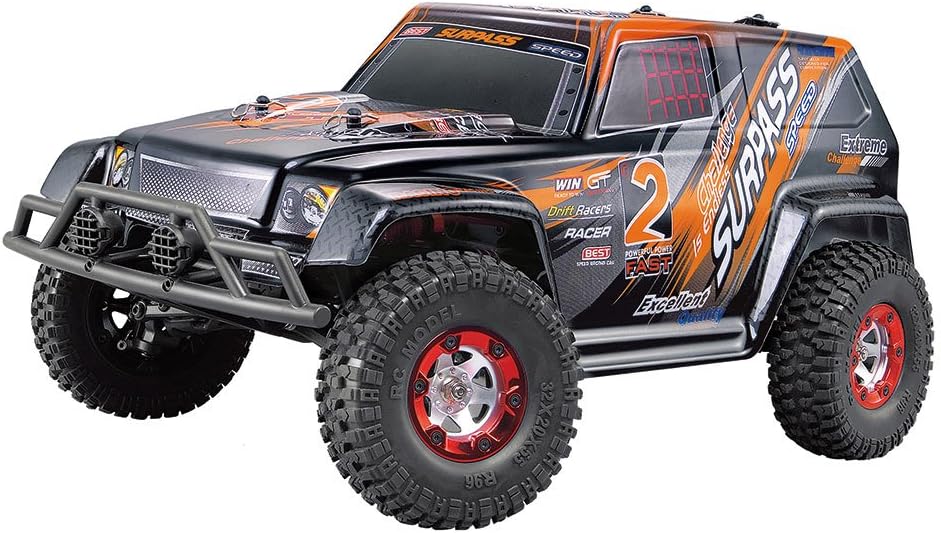
Image 1.2: Amewi Charge Extreme 2 RC Truck (Orange/Black variant)
2. Safety Information
Operating remote-controlled vehicles requires attention to safety to prevent injury or damage. Please observe the following guidelines:
- This product is recommended for users aged 14 years and older.
- Always operate the vehicle in open areas, away from people, pets, and obstacles.
- Do not operate near public roads, water bodies, or high-voltage power lines.
- Avoid operating in wet conditions or through puddles, as this can damage electronic components.
- Ensure all batteries are correctly installed and charged according to instructions.
- Never touch moving parts of the vehicle during operation.
- Store the vehicle and remote control in a cool, dry place when not in use.
- Disconnect the battery from the vehicle when not in use or during storage.
3. Package Contents
Upon unpacking, please verify that all the following items are included:
- Amewi Charge Extreme 2 RC Truck (1:12 scale)
- 2.4 GHz Wireless Remote Control
- 1500mAh 7.4V Li-Ion Battery (for vehicle)
- 220V Charging Plug
- Assembly Wrench
- Spare Gear
- Illustrated Manual (this document)
Required for operation (not included):
- 4 x 1.5V AA Mignon Batteries (for remote control)
4. Setup
4.1. Battery Installation
Vehicle Battery:
- Locate the battery compartment on the underside of the vehicle.
- Carefully open the compartment cover.
- Insert the 1500mAh 7.4V Li-Ion battery, ensuring correct polarity.
- Securely close the battery compartment cover.
Remote Control Batteries:
- Open the battery cover on the back of the 2.4 GHz remote control.
- Insert 4 x 1.5V AA Mignon batteries, observing the correct polarity (+/-).
- Close the battery cover securely.

Image 4.1: 2.4 GHz Remote Control for Amewi RC Truck
4.2. Charging the Vehicle Battery
- Connect the 1500mAh 7.4V Li-Ion battery to the provided 220V charging plug.
- Plug the charger into a standard wall outlet.
- Monitor the charging process. Refer to the charger's indicator lights for charging status (e.g., red for charging, green for fully charged).
- Do not overcharge the battery. Disconnect once fully charged.
4.3. Pairing the Remote Control and Vehicle
The 2.4 GHz remote control system typically pairs automatically. Follow these steps:
- Ensure both the vehicle battery and remote control batteries are installed and charged.
- Turn on the remote control first.
- Turn on the vehicle's power switch.
- The remote control and vehicle should automatically establish a connection. An indicator light on the remote control or vehicle may confirm successful pairing.
- If pairing fails, turn off both devices, then repeat the process.
5. Operating Instructions
5.1. Basic Controls
The 2.4 GHz remote control allows for precise control of the vehicle:
- Steering Wheel: Rotate left or right to steer the vehicle.
- Trigger: Pull the trigger to move forward, push to brake or reverse.
- Trim Adjustments: Use the trim dials on the remote control to fine-tune steering and throttle if the vehicle does not drive straight or stops when the trigger is neutral.
- Right/Left-Handed Operation: The remote control is designed for quick switching between right-handed and left-handed operation. Consult the remote control diagram for specific switch locations.
5.2. Driving Tips
- Start by practicing in an open, flat area to get accustomed to the controls.
- The 4WD system provides excellent traction. The vehicle is well-balanced for various terrains, including fun parks, tracks, and handling jumps.
- The aluminum shock absorbers and robust fiberboard chassis contribute to stability and durability.
- The slip clutch and rear solid axle enhance performance and control.
- Avoid prolonged high-speed driving on rough surfaces to prevent excessive wear.

Image 5.1: Underside view of the Amewi Charge Extreme 2 chassis, showing drivetrain and suspension components.

Image 5.2: Close-up of the aluminum shock absorbers on the Amewi Charge Extreme 2.

Image 5.3: Detailed view of the internal gears and drivetrain components.

Image 5.4: Amewi Charge Extreme 2 RC Truck in action on a sandy surface.
6. Maintenance
Regular maintenance ensures the longevity and optimal performance of your RC truck:
- Cleaning: After each use, especially in dusty or dirty conditions, clean the vehicle with a soft brush or compressed air to remove debris from the chassis, wheels, and suspension. Avoid using water directly on electronic components.
- Inspection: Periodically check for loose screws, damaged parts, or worn tires. Tighten any loose fasteners using the provided assembly wrench.
- Lubrication: Apply a small amount of RC-specific lubricant to moving parts like gears and universal joints as needed to reduce friction and wear.
- Battery Care: Always disconnect the battery after use. Store Li-Ion batteries in a cool, dry place and avoid fully discharging them for extended periods.
- Storage: Store the vehicle and remote control in a dry environment, away from direct sunlight and extreme temperatures.
7. Troubleshooting
If you encounter issues with your Amewi Charge Extreme 2, refer to the following common problems and solutions:
| Problem | Possible Cause | Solution |
|---|---|---|
| Vehicle does not respond | Low or uncharged vehicle battery Low remote control batteries Vehicle or remote control not powered on No successful pairing | Charge vehicle battery Replace remote control batteries Ensure both are switched on Re-pair remote control and vehicle (Section 4.3) |
| Vehicle drives erratically or not straight | Steering trim not adjusted Damaged steering components | Adjust steering trim on remote control Inspect steering linkages and servo for damage |
| Loss of range or intermittent control | Interference from other 2.4 GHz devices Low remote control batteries Obstacles blocking signal | Move to an area with less interference Replace remote control batteries Operate in open areas with clear line of sight |
| Motor runs but wheels do not turn | Damaged gears or drivetrain components Loose wheel nuts | Inspect gears and drivetrain for damage, replace if necessary Tighten wheel nuts |
8. Specifications
- Model: Amewi 22185 Charge Extreme 2
- Scale: 1:12
- Dimensions (LxWxH): 406 x 225 x 185 mm
- Wheelbase: 246 mm
- Axle Width: 190 mm
- Ground Clearance: 50 mm
- Weight: 1135 g (approx. 2.5 lbs)
- Motor: 380 Electric Motor
- Drive System: 4WD (Four-Wheel Drive)
- Battery (Vehicle): 1500mAh 7.4V Li-Ion
- Remote Control: 2.4 GHz Wireless
- Remote Control Batteries (Required): 4 x 1.5V AA Mignon
- Chassis Material: Robust Fiberboard
- Shock Absorbers: Aluminum
- Tires: Grip-resistant and wear-resistant rubber tires
- Special Features: Slip clutch, rear solid axle, switchable right/left-handed remote control operation
9. Warranty and Support
For warranty information and technical support, please refer to the documentation provided with your purchase or contact Amewi customer service directly. Keep your proof of purchase for any warranty claims.
Amewi Contact Information: Please visit the official Amewi website for the most current contact details and support resources.


