
Scheppach HF50-240V
Scheppach HF50 Router Table Instruction Manual
Model: HF50-240V
Introduction
This manual provides essential information for the safe and efficient operation, maintenance, and troubleshooting of your Scheppach HF50 Router Table. Please read this manual thoroughly before operating the machine to ensure proper use and to prevent injury or damage.

Figure 1: Overview of the Scheppach HF50 Router Table. This image displays the complete router table assembly, including the main blue housing, the silver work table, and the black router fence system.
Safety Instructions
Always observe the following safety precautions to reduce the risk of electric shock, fire, and serious injury.
- Read the Manual: Familiarize yourself with all instructions and warnings before operation.
- Personal Protective Equipment (PPE): Always wear safety glasses, hearing protection, and a dust mask. Do not wear loose clothing, gloves, or jewelry that could get caught in moving parts.
- Work Area: Keep the work area clean, well-lit, and free from clutter. Ensure adequate ventilation.
- Electrical Safety: Ensure the power supply matches the machine's requirements (230V, 50Hz). Do not operate in damp or wet conditions. Disconnect power before making adjustments or maintenance.
- Secure Workpiece: Always secure the workpiece firmly. Use push sticks or push blocks when feeding small workpieces.
- Router Bit Selection: Use only router bits designed for the machine and within the specified shank diameters (6.8mm and 12mm). Ensure bits are sharp and free from damage.
- Emergency Stop: Know the location of the emergency stop button and how to use it.
Components Overview
The Scheppach HF50 Router Table consists of several key components:
- Main Housing: The robust blue base containing the motor and spindle mechanism.
- Work Table: The primary work surface, made of aluminum, where the workpiece is guided.
- Table Extensions: Two additional aluminum surfaces that can be attached to extend the work area.
- Router Fence: An adjustable aluminum fence system for guiding the workpiece and ensuring straight cuts.
- Spindle Height Adjustment Wheel: A handwheel for precise adjustment of the router bit height.
- Speed Control Dial: For selecting the appropriate spindle speed (11500 - 24000 min-1).
- Dust Extraction Port: Connection point for a dust collection system to maintain a clean work environment.
- Power Switch: On/Off switch with emergency stop function.
Setup and Assembly
Follow these steps for initial setup and assembly of your router table.
- Unpacking: Carefully remove all components from the packaging. Check for any damage during transit.
- Base Placement: Place the main housing on a stable, level workbench or stand. Secure it if necessary to prevent movement during operation.
- Attach Table Extensions: Mount the two table extensions to the main work table using the provided hardware. Ensure they are flush and securely fastened.
- Install Router Fence: Position the aluminum router fence on the work table and secure it. Adjust its position as required for your specific routing task.
- Connect Dust Extraction: Attach a dust collection hose to the dust extraction port. This is crucial for maintaining a clean and safe work environment.
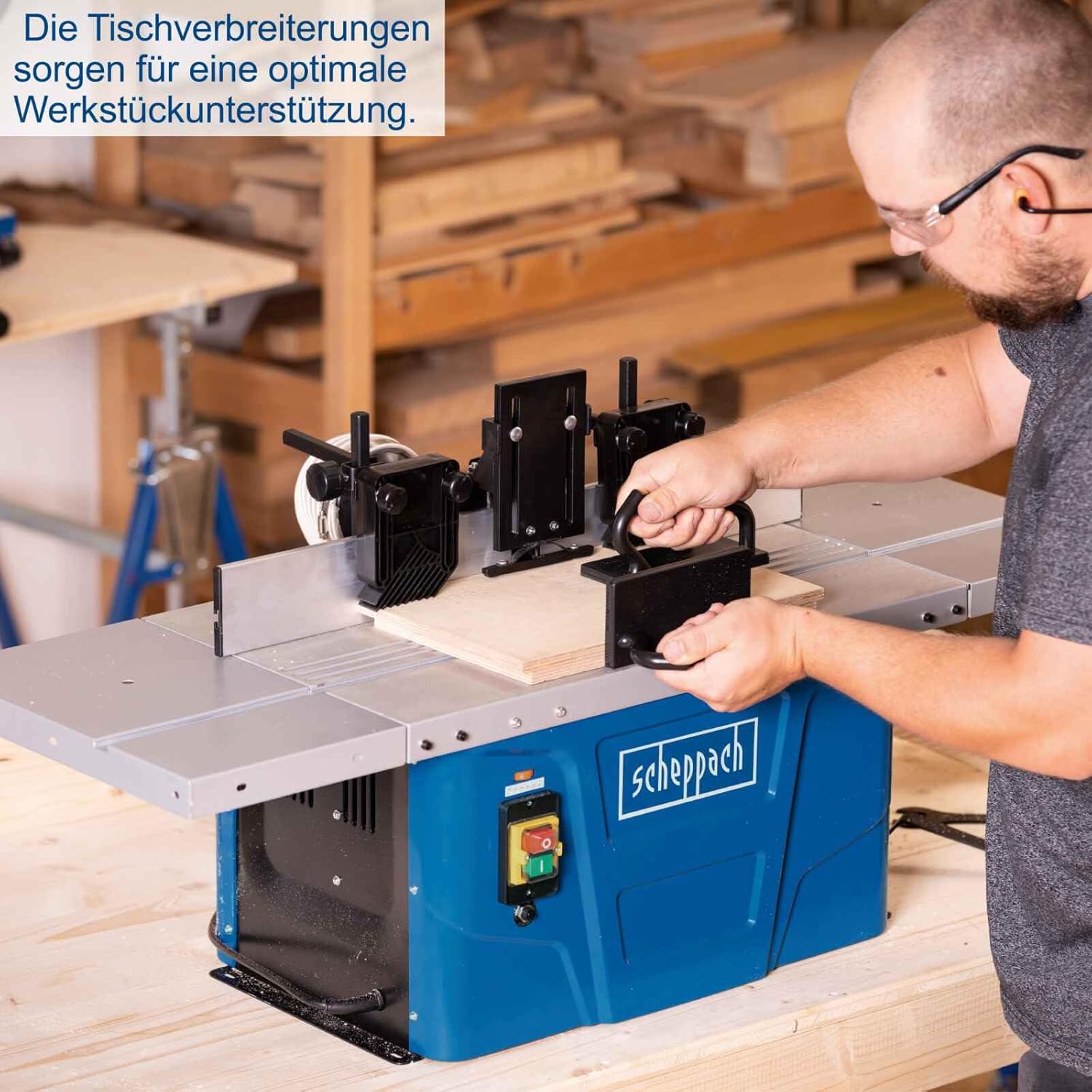
Figure 2: The router table with its table extensions providing optimal workpiece support. The image shows a user operating the router table with a workpiece, highlighting the extended work surface.
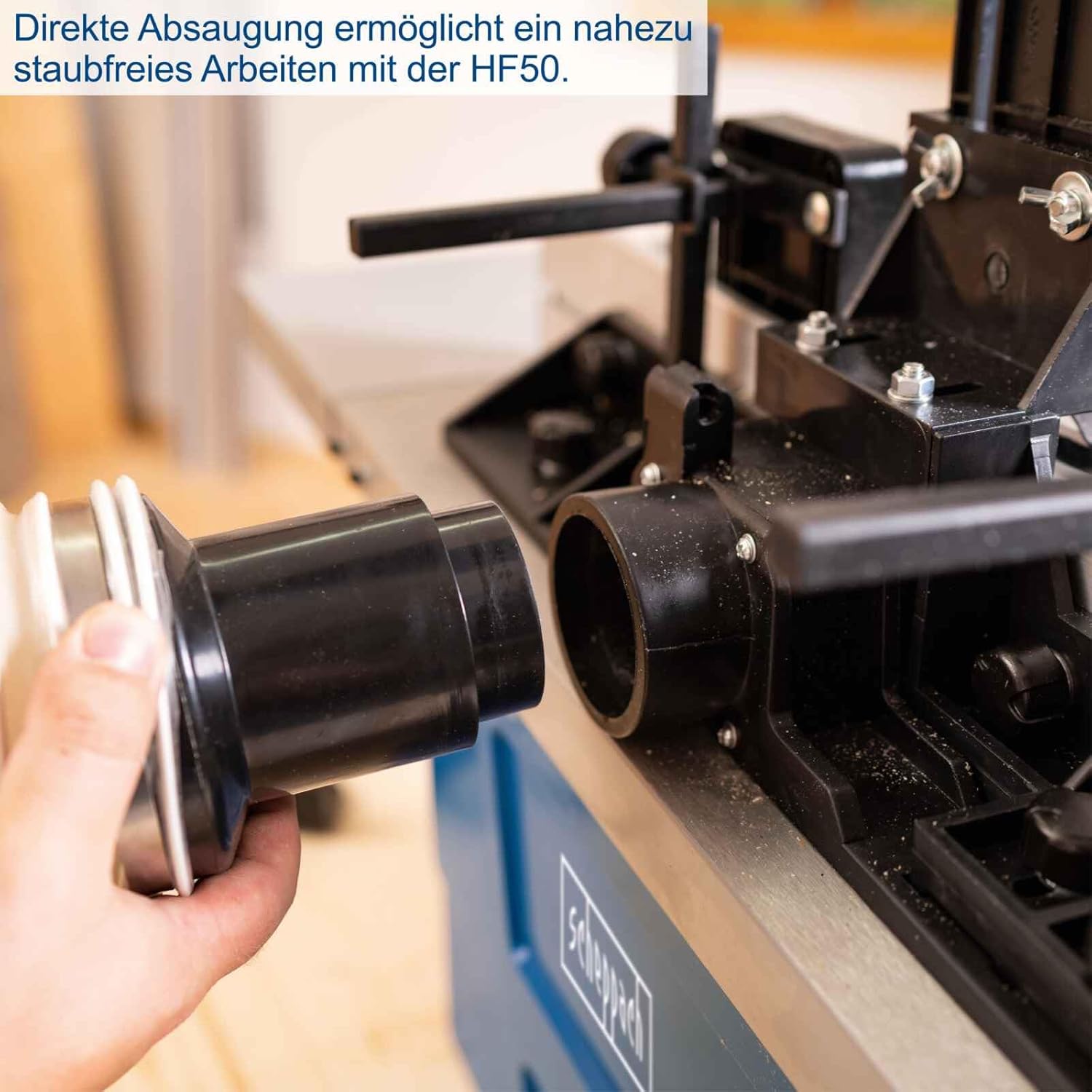
Figure 3: Direct dust extraction connection on the HF50. This image shows a hand connecting a dust collection hose to the machine's dust port, indicating a nearly dust-free operation.
Operating Instructions
Proper operation ensures precision and safety.
1. Installing and Changing Router Bits
- Disconnect Power: Always unplug the machine before installing or changing bits.
- Select Collet: Choose the appropriate collet (6.8mm or 12mm) for your router bit shank.
- Insert Bit: Insert the router bit into the collet, ensuring it is fully seated but not bottomed out.
- Tighten: Use the provided wrenches to securely tighten the collet nut. Do not overtighten.
2. Adjusting Spindle Height
The spindle height is continuously adjustable from 0 to 40 mm.
- Use Handwheel: Rotate the handwheel located on the side of the machine to raise or lower the router bit.
- Check Depth: Use a ruler or depth gauge to verify the desired cutting depth.

Figure 4: Easy and tool-free height adjustment of the spindle via the handwheel. This image shows a hand turning the adjustment wheel on the side of the router table.

Figure 5: The routing depth can be adjusted up to 40 mm. This image illustrates the depth adjustment range with a visual indicator of 0-40mm.
3. Setting Variable Speed
The HF50 offers variable speed control from 11500 to 24000 min-1, allowing optimal adaptation to different materials and router bits.
- Speed Dial: Use the speed control dial to select the desired RPM. Refer to the router bit manufacturer's recommendations for appropriate speeds.
- Lower Speeds: Generally used for larger diameter bits, harder materials, or when more control is needed.
- Higher Speeds: Suitable for smaller diameter bits and softer materials.

Figure 6: The rotational speed is variable and thus always perfectly adaptable to the application. This image shows the orange speed control dial with numerical settings and a corresponding RPM chart.
4. Using the Router Fence
The large aluminum fence and safety devices enable safe and comfortable routing.
- Adjust Fence Position: Loosen the locking knobs on the fence and slide it to the desired position relative to the router bit. Tighten the knobs securely.
- Featherboards: Utilize the integrated featherboards or external ones to hold the workpiece firmly against the fence and table.

Figure 7: The large aluminum fence and safety devices enable safe, comfortable routing. This image provides a close-up view of the router fence, showing its adjustment scale and integrated safety features.
Maintenance
Regular maintenance ensures the longevity and optimal performance of your router table.
- Cleaning: After each use, disconnect the power and clean the machine, especially the work table and fence, from dust and debris. Use a brush or vacuum cleaner.
- Router Bit Care: Keep router bits clean and sharp. Dull bits can cause kickback and poor cut quality.
- Lubrication: Periodically apply a light coat of machine oil to moving parts, such as the spindle height adjustment mechanism, to ensure smooth operation.
- Inspection: Regularly inspect the power cord, switch, and all fasteners for wear or damage. Replace any worn or damaged parts immediately.
Troubleshooting
This section addresses common issues you might encounter.
| Problem | Possible Cause | Solution |
|---|---|---|
| Machine does not start | No power supply; Emergency stop engaged; Faulty switch | Check power connection; Release emergency stop; Contact service for switch replacement |
| Poor cut quality / Burning wood | Dull router bit; Incorrect speed; Too fast feed rate | Replace or sharpen bit; Adjust speed (lower for burning); Reduce feed rate |
| Excessive vibration | Unbalanced router bit; Loose components; Machine not stable | Check bit for damage/balance; Tighten all fasteners; Secure machine to workbench |
| Dust collection ineffective | Clogged dust port/hose; Loose connection | Clear obstruction; Ensure tight hose connection |
Technical Specifications
| Feature | Specification |
|---|---|
| Model | HF50-240V |
| Power Input (P1) | 1500 W |
| Voltage | 230 V |
| Frequency | 50 Hz |
| Spindle Speed (Variable) | 11500 - 24000 min-1 |
| Collet Sizes | 6.8 mm, 12 mm |
| Spindle Height Adjustment | 0 - 40 mm |
| Table Length | 610 mm |
| Table Width | 360 mm |
| Machine Dimensions (L x W x H) | 1030 x 690 x 550 mm |
| Net Weight | 20.3 kg |
| Gross Weight | 23.7 kg |
Warranty and Support
Scheppach products are manufactured to high quality standards. For warranty information, please refer to the warranty card included with your product or visit the official Scheppach website. For technical support, spare parts, or service inquiries, please contact Scheppach customer service or an authorized service center.
Contact Information: Please refer to the contact details provided in your product packaging or on the official Scheppach website for your region.
Additional Information
No official product videos from the seller are available for embedding in this manual.
Ask a question about this manual
Ask about setup, troubleshooting, compatibility, parts, safety, or missing instructions. Manuals+ will review the question and use this page’s manual context to help answer it.