
Brookstone 994080
Brookstone Floating Waterproof Bluetooth Speaker User Manual
Model: 994080
Introduction
The Brookstone Floating Waterproof Bluetooth Speaker is designed to provide high-quality audio in wet environments. Its waterproof and floatable design makes it ideal for use in showers, baths, pools, and hot tubs. This manual provides essential information on setting up, operating, and maintaining your speaker.
Safety Information
- Do not attempt to disassemble or modify the speaker. This may void the warranty and pose a safety risk.
- Keep the charging port dry before connecting the charging cable. Water in the port can cause damage.
- Avoid exposing the speaker to extreme temperatures or direct sunlight for prolonged periods.
- Use only the provided charging cable or a certified equivalent.
- Ensure the speaker is fully charged before first use for optimal battery performance.
Package Contents
- 1 x Brookstone Floating Waterproof Bluetooth Speaker
- 1 x Micro USB charging cable
- 1 x User Manual (this document)
Product Overview
Familiarize yourself with the speaker's components and controls.

Image: Front view of the Brookstone Floating Waterproof Bluetooth Speaker, showing the white speaker grille, blue trim, and control buttons (power, volume down, volume up, phone call, Bluetooth) along the side. A small red LED indicator is visible near the power button. A metal hook is attached to the top right.
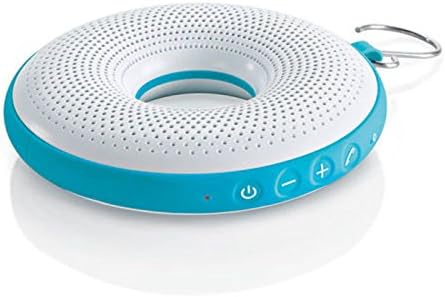
Image: A closer view of the speaker's control panel, highlighting the power button, volume controls (+ and -), phone call button, and Bluetooth pairing button. The blue trim and white grille are clearly visible.
- Power Button: Turns the speaker on or off.
- Volume Down (-): Decreases the volume.
- Volume Up (+): Increases the volume.
- Phone Call Button: Answers or ends phone calls.
- Bluetooth Button: Initiates Bluetooth pairing mode.
- Micro USB Charging Port: Located under a waterproof seal, used for charging the speaker.
- Hanging Hook: For convenient placement in showers or other areas.
Setup
1. Charging the Speaker
- Locate the Micro USB charging port, usually protected by a waterproof rubber flap.
- Carefully open the flap and insert the small end of the provided Micro USB cable into the speaker's charging port.
- Connect the larger end of the USB cable to a USB power adapter (not included) or a computer's USB port.
- The LED indicator light will illuminate to show charging status. Once fully charged, the light may change color or turn off.
- Ensure the rubber flap is securely closed after charging to maintain waterproof integrity.
2. Bluetooth Pairing
- Ensure the speaker is charged. Press and hold the Power Button to turn on the speaker.
- The speaker will automatically enter Bluetooth pairing mode, indicated by a flashing LED light or an audible prompt. If not, press and hold the Bluetooth Button.
- On your Bluetooth-enabled device (smartphone, tablet, laptop), go to the Bluetooth settings menu.
- Search for available devices. The speaker will appear as "Brookstone Speaker" or a similar name.
- Select the speaker from the list to connect. Once paired, the speaker will provide an audible confirmation, and the LED light will stop flashing.
- The speaker has a wireless range of up to 30 feet (9 meters).
Operating Instructions
Power On/Off
- To turn on: Press and hold the Power Button until the indicator light illuminates and you hear a power-on sound.
- To turn off: Press and hold the Power Button again until the indicator light turns off and you hear a power-off sound.
Playing Music
- Once paired, open your music application on your connected device and begin playback.
- Play/Pause: Press the Power Button once to play or pause music.
- Volume Control: Press the Volume Up (+) button to increase volume. Press the Volume Down (-) button to decrease volume.
Answering Calls
- When a call comes in, the speaker will ring. Press the Phone Call Button once to answer the call.
- To end a call, press the Phone Call Button once again.
- To reject an incoming call, press and hold the Phone Call Button.
Waterproof Usage
The speaker is fully waterproof (IPX7 rated) and floatable, making it suitable for use in various wet environments.

Image: A hand holding the Brookstone Floating Waterproof Bluetooth Speaker above the water of a swimming pool, demonstrating its intended use in aquatic environments.

Image: The Brookstone Floating Waterproof Bluetooth Speaker hanging by its metal hook from a shower head in a tiled bathroom, illustrating its use in a shower setting.
- Ensure the charging port's rubber flap is completely sealed before exposing the speaker to water.
- The speaker is designed to float, allowing for easy retrieval and continued listening in pools or tubs.
- Use the integrated hook to hang the speaker in a shower or other convenient location.
Maintenance
- Cleaning: Wipe the speaker with a soft, damp cloth. Do not use abrasive cleaners or solvents.
- Drying: After use in water, gently shake off excess water and allow the speaker to air dry completely, especially around the charging port, before recharging.
- Storage: Store the speaker in a cool, dry place away from direct sunlight and extreme temperatures.
Troubleshooting
| Problem | Possible Cause | Solution |
|---|---|---|
| Speaker does not turn on. | Battery is depleted. | Charge the speaker using the provided USB cable. |
| Cannot pair with Bluetooth device. | Speaker is not in pairing mode; device is too far; previously paired device is connected. | Ensure speaker is in pairing mode (flashing LED). Move device closer. Disconnect from other devices or turn off Bluetooth on them. |
| No sound or low volume. | Volume on speaker or device is too low; speaker is not connected. | Increase volume on both the speaker and your connected device. Ensure the speaker is properly paired. |
| Sound distortion. | Device is too far; interference; volume too high. | Move device closer to the speaker. Reduce volume. Avoid obstacles between speaker and device. |
| Speaker stopped working after contact with water. | Charging port flap was not securely closed; speaker was submerged beyond IPX7 limits. | Ensure the charging port flap is always securely closed before water exposure. If damage occurs, contact customer support. |
Specifications
- Model Name: 994080
- Connectivity Technology: Bluetooth 4.0
- Wireless Range: Up to 30 feet (9 meters)
- Water Resistance Level: IPX7 (Fully Waterproof)
- Battery Life: Up to 8 hours
- Power Source: Battery Powered (Lithium Ion)
- Audio Output Mode: Stereo (with 2 full-range drivers and passive radiator)
- Dimensions (LxWxH): 7.72 x 7.8 x 2.44 inches
- Item Weight: 15.2 ounces
- UPC: 883594053931
Warranty and Support
Brookstone products are designed for quality and reliability. For information regarding warranty coverage, technical support, or service inquiries, please refer to the official Brookstone website or contact their customer service department. Keep your proof of purchase for warranty claims.
For further assistance, visit: www.brookstone.com
Related documents994080

Ask a question about this manual
Ask about setup, troubleshooting, compatibility, parts, safety, or missing instructions. Manuals+ will review the question and use this page’s manual context to help answer it.