
VideoSecu ML14B WS2
VideoSecu Articulating Swivel Tilt TV Wall Mount Bracket User Manual
Model: ML14B WS2
Brand: VideoSecu
1. Introduction
This user manual provides comprehensive instructions for the installation, operation, and maintenance of your VideoSecu Articulating Swivel Tilt TV Wall Mount Bracket. This mount is designed to provide a secure and flexible mounting solution for small to medium-sized flat panel displays.
Key features of this mount include:
- High grade steel material offering a loading capacity of up to 44 lbs.
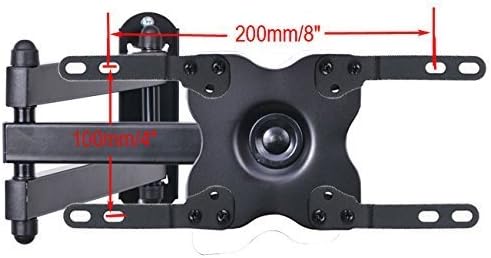
- Compatibility with VESA 75x75mm (3"x3"), 100x100mm (4"x4") without adapters, and VESA 200x200 (8"x8"), 200x100mm (8"x4") with included plate adapters.
- Adjustable +/-5 degrees tilt, 180 degrees swivel, and 360 degrees rotation for optimal viewing angles.
- Retracts to 2.4" from the wall to save space and extends up to 15" from the wall.
- Post-installation level adjustment for perfect TV leveling.

2. Safety Information
Please read all instructions carefully before installation and use. Incorrect installation or use may result in property damage, serious injury, or death. If you do not understand these instructions, or have doubts about the safety of the installation, please contact a qualified installer.
- Weight Capacity: Do not exceed the maximum weight capacity of 44 lbs (20 kg). This mount is intended for use only with the maximum weights indicated. Use with products heavier than the maximum weights indicated may result in instability causing possible injury.
- VESA Compatibility: Ensure your TV's VESA mounting pattern (distance between mounting holes on the back of your TV) is compatible with this mount (75x75mm, 100x100mm, 200x100mm, 200x200mm).
- Wall Structure: This mount is designed for installation into wood stud walls or solid concrete/brick walls. Do not install into drywall alone. Ensure the mounting surface can safely support the combined weight of the mount and the display.
- Tools: Use appropriate tools for installation. Always wear safety glasses.
- Children: Keep children away from the installation area. Small parts may be a choking hazard.
- Movement: Do not allow children to climb on the mount or TV. Do not hang anything from the mount.
- Maintenance: Periodically check that the mount is secure and safe to use.
3. Package Contents
Verify that all components are present and undamaged before beginning installation. If any parts are missing or defective, contact VideoSecu customer support.


Typical package contents include:
- Wall Plate Assembly
- TV Plate Assembly
- Articulating Arm
- Mounting Hardware (various screws, anchors, washers)
- VESA Adapter Plates (4 pieces)
- Spanner/Wrench
4. Specifications
| Specification | Value |
|---|---|
| Brand | VideoSecu |
| Mounting Type | Wall Mount |
| Movement Type | Articulating |
| Material | Alloy Steel |
| Color | Black |
| Maximum Compatible Size | 39 Inches |
| Minimum Compatible Size | 19 Inches |
| Maximum Weight Capacity | 44 lbs (20 kg) |
| VESA Compatibility | 75x75mm, 100x100mm, 200x100mm, 200x200mm |
| Tilt Angle | +/-5 Degrees |
| Swivel Angle | 180 Degrees |
| Rotation Angle | 360 Degrees |
| Extension from Wall | 2.4" (retracted) to 15" (extended) |


5. Setup and Installation
Before starting, ensure you have all necessary tools (e.g., drill, stud finder, level, screwdriver, measuring tape) and have read the safety information.
5.1. Wall Plate Installation
- Locate Wall Studs: Use a stud finder to locate the center of two adjacent wood studs. Mark their positions. For concrete/brick walls, mark desired drilling locations.
- Position Wall Plate: Hold the wall plate assembly against the wall at the desired height. Use a level to ensure it is perfectly horizontal. Mark the drilling holes.
- Drill Pilot Holes: Drill pilot holes at the marked locations. For wood studs, use a 5/32" (4mm) drill bit. For concrete/brick, use a 3/8" (10mm) masonry drill bit and insert plastic anchors.
- Secure Wall Plate: Attach the wall plate assembly to the wall using the provided lag bolts and washers. Tighten securely, but do not overtighten.
5.2. TV Plate Installation
- Determine VESA Pattern: Measure the horizontal and vertical distance between the mounting holes on the back of your TV.
- Attach Adapter Plates (if needed): If your TV's VESA pattern is 200x100mm or 200x200mm, attach the four VESA adapter plates to the TV plate assembly using the smaller screws provided. Ensure they are oriented correctly to match your TV's pattern.
- Attach TV Plate to TV: Carefully place your TV face down on a soft, clean surface. Align the TV plate assembly (with or without adapters) with the mounting holes on the back of your TV.
- Secure TV Plate: Use the appropriate screws (M4, M5, or M6) and washers from the hardware pack to secure the TV plate assembly to your TV. Ensure the screws are not too long, which could damage internal components. Tighten firmly.
5.3. Mounting TV to Wall Plate
- Hook TV onto Wall Plate: With assistance, carefully lift the TV with the attached TV plate. Align the hooks on the TV plate with the corresponding slots on the wall plate arm. Gently lower the TV until it is securely seated.
- Secure TV: Locate the lock screws on the TV plate (refer to Figure 5.1). Tighten these screws to prevent the TV from accidentally lifting off the mount.

6. Operating and Adjustments
Your VideoSecu wall mount offers various adjustment options to achieve the optimal viewing experience.
6.1. Tilt Adjustment
The mount allows for a tilt adjustment of +/-5 degrees. To adjust the tilt, gently push or pull the top or bottom of your TV to the desired angle. The friction mechanism will hold the TV in place. If the tilt is too loose or too stiff, check the tension bolts on the tilt mechanism and adjust with the provided spanner if necessary.
6.2. Swivel Adjustment
The articulating arm allows for 180 degrees of swivel at the wall connection and 360 degrees of swivel at the TV connection. Simply grasp the sides of your TV and gently pivot it left or right to achieve the desired viewing angle. The arm can also be extended or retracted to adjust the distance from the wall.
6.3. Rotation Adjustment
The TV plate allows for 360 degrees of rotation, enabling you to level the screen horizontally after installation. Gently rotate the TV clockwise or counter-clockwise until it is perfectly level. This feature is particularly useful for minor adjustments after the initial setup.
7. Maintenance
Regular maintenance helps ensure the longevity and safe operation of your TV wall mount.
- Cleaning: Wipe the mount with a soft, dry cloth to remove dust. Do not use abrasive cleaners or solvents, as they may damage the finish.
- Periodic Checks: Every few months, check all screws and bolts to ensure they are still securely tightened. Over time, vibrations or adjustments can cause fasteners to loosen.
- Movement Check: Periodically test the tilt, swivel, and extension mechanisms to ensure they operate smoothly. If any part feels stiff, do not force it.
- Weight Limit: Never exceed the stated weight capacity of the mount.
8. Troubleshooting
If you encounter issues with your VideoSecu TV wall mount, refer to the following common problems and solutions:
- TV is not level: Use the 360-degree rotation feature to adjust the TV horizontally. Ensure the wall plate was installed level during initial setup.
- Mount feels loose/wobbly: Check all mounting bolts on the wall and all screws connecting the TV plate to the TV. Tighten any loose fasteners. Ensure the wall structure is sound and capable of supporting the weight.
- TV is tilting too easily/not holding position: The tilt mechanism may need adjustment. Locate the tension bolts on the tilt mechanism and tighten them slightly with the provided spanner until the desired friction is achieved.
- Mount does not extend/retract smoothly: Check for any obstructions. Ensure no cables are caught in the articulating arm. The joints are designed for smooth movement; excessive force should not be required.
- Missing parts: Refer to the 'Package Contents' section. If parts are missing upon unboxing, contact VideoSecu customer support immediately.
9. Warranty and Support
For warranty information or technical support, please refer to the documentation included with your purchase or visit the official VideoSecu website. Keep your purchase receipt as proof of purchase for any warranty claims.
If you require further assistance, please contact VideoSecu customer service. Provide your product model number (ML14B WS2) and a detailed description of the issue to expedite support.
Ask a question about this manual
Ask about setup, troubleshooting, compatibility, parts, safety, or missing instructions. Manuals+ will review the question and use this page’s manual context to help answer it.