
Introduction
Welcome to the user manual for your new Lorell Walnut Laminate Commercial Steel Desk Series. This desk is designed for commercial-quality performance and durability, featuring a robust steel chassis and a thick laminated top. It offers integrated wire management and secure storage options, making it an ideal solution for any office environment.
Key Features
- Delivers commercial-quality performance
- Durable steel chassis for long-lasting stability
- Integrated grommets for efficient wire management, reducing clutter
- Locking pedestal to secure your belongings
- Upscale look and feel with rich walnut laminate and black paint finish
- Stain-resistant and scratch-resistant laminated top
- Includes one box drawer for supplies and one file drawer for documents
- File drawers with premium arch-pull handles and steel ball-bearing suspension for quiet operation
Setup and Assembly
Assembly is required for this desk. Please follow these general guidelines for a smooth setup process. It is recommended to have at least two people for assembly due to the size and weight of the components.
- Unpack Components: Carefully remove all parts from the packaging. Verify that all components listed in the packing list are present and undamaged. Lay out all hardware (screws, bolts, etc.) in an organized manner.
- Identify Parts: Familiarize yourself with the different desk components, such as the desktop, side panels, back panel, and drawer units.
- Assemble Frame: Begin by assembling the steel chassis and main frame components according to the provided diagrams (if available). Ensure all connections are secure.
- Install Drawer Units: Attach the box drawer and file drawer units to the designated side of the desk frame. Ensure the ball-bearing suspensions are properly aligned for smooth drawer operation.
- Attach Desktop: Carefully place the laminated desktop onto the assembled frame, aligning it with pre-drilled holes. Secure the desktop using the provided fasteners.
- Cable Management: Utilize the integrated grommets on the desktop for routing power and data cables.
- Final Checks: Once assembled, gently move the desk to its desired location. Ensure all connections are tight and the desk is stable.
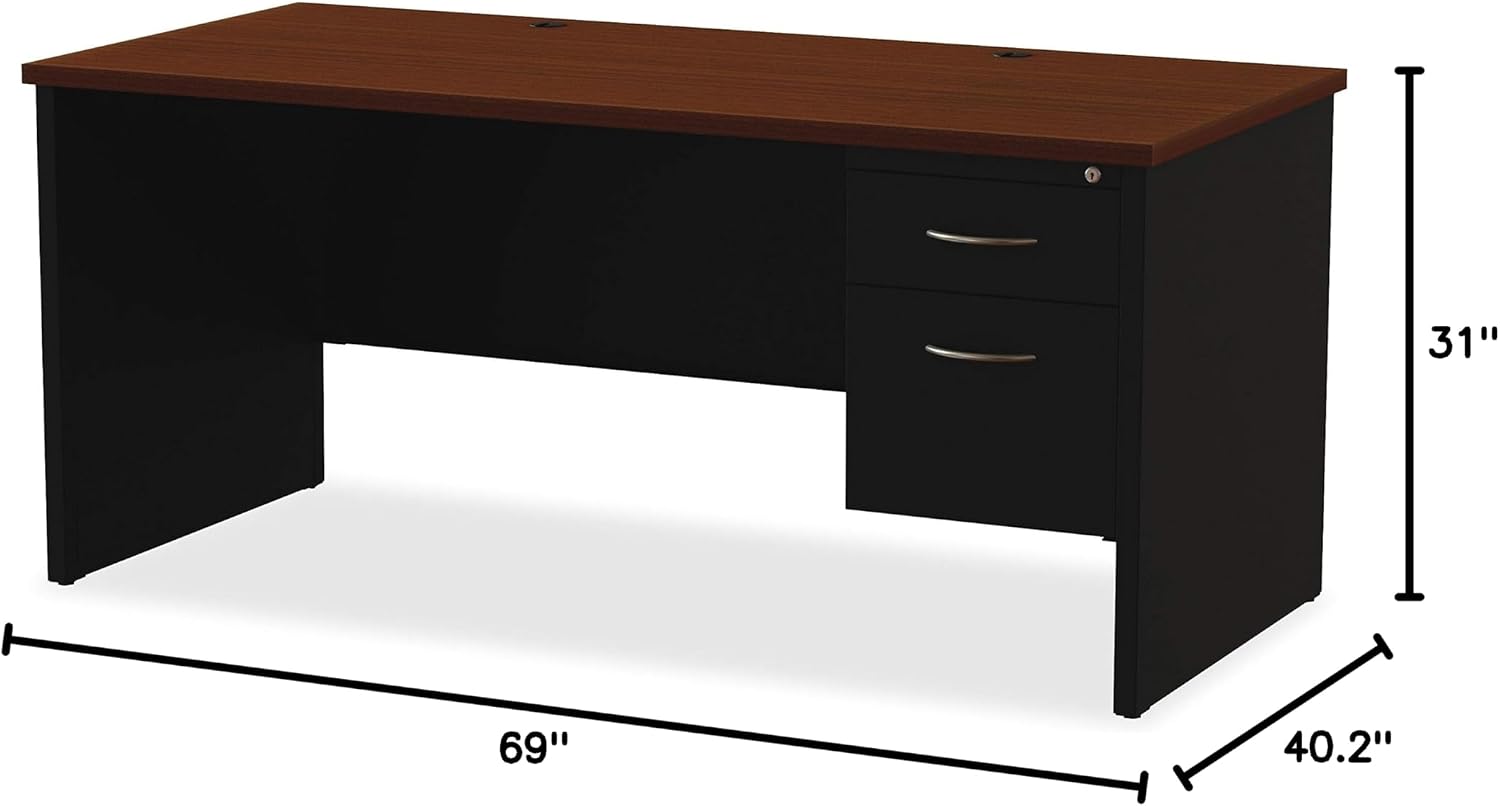
Figure 1: Dimensions of the Lorell Walnut Laminate Commercial Steel Desk. The desk measures 40.2 inches deep, 69 inches wide, and 31 inches high, providing ample workspace and storage.
Operating Instructions
Your Lorell desk is designed for ease of use and functionality in a commercial setting.
- Drawer Usage: The desk features one box drawer for small office supplies and one file drawer designed to accommodate hanging file folders. Both drawers operate on steel ball-bearing suspensions for smooth and quiet opening and closing.
- Locking Pedestal: The file drawer includes a locking mechanism to secure sensitive documents and valuables. Insert the key into the lock on the top drawer and turn to engage or disengage the lock. Ensure the drawer is fully closed before locking.
- Wire Management: Utilize the integrated grommets on the desktop to route power cords, network cables, and other wires from your electronic devices. This helps maintain a tidy and organized workspace, preventing cable clutter.

Figure 2: Front view of the Lorell Walnut Laminate Commercial Steel Desk, showcasing the two drawers and the overall design.
Maintenance and Care
Proper care will ensure the longevity and appearance of your Lorell desk.
- Cleaning: To clean the laminated surfaces, simply wipe with a damp cloth. For stubborn marks, a mild, non-abrasive cleaner can be used. Avoid harsh chemicals or abrasive materials that could damage the finish.
- Spills: Wipe up spills immediately to prevent staining, especially on the laminated top.
- Drawer Maintenance: Periodically check the drawer slides for any debris that might hinder smooth operation. If necessary, clean the tracks.
- General Inspection: Regularly inspect all fasteners and connections to ensure they remain tight. Tighten any loose screws as needed.
Troubleshooting
This section addresses common issues you might encounter with your desk.
| Problem | Possible Cause | Solution |
|---|---|---|
| Drawers are stiff or difficult to open/close. | Debris in drawer slides; misaligned slides; overloaded drawer. | Clean drawer slides. Check alignment and adjust if necessary. Reduce weight in the drawer. |
| Desk feels wobbly or unstable. | Loose assembly fasteners; uneven floor. | Check and tighten all assembly screws and bolts. Use shims under desk legs if the floor is uneven. |
| Locking mechanism not working. | Drawer not fully closed; key not fully inserted or turned. | Ensure the drawer is completely closed. Insert the key fully and turn firmly. |
Product Specifications
| Brand | Lorell |
| Model Number | LLR79145 |
| Product Dimensions (D x W x H) | 40.2"D x 69"W x 31"H |
| Item Weight | 161 Pounds |
| Color | Black Walnut |
| Style | Modern |
| Base Material | Alloy Steel |
| Top Material Type | Laminate |
| Finish Type | Laminated |
| Number of Drawers | 2 (Box Drawer, File Drawer) |
| Drawer Glide Mechanism | Ball-bearing |
| Required Assembly | Yes |
| Product Care Instructions | Wipe with Damp Cloth |
Warranty and Support
Manufacturer's Warranty: This Lorell desk comes with a Lifetime Limited Warranty, ensuring peace of mind regarding its quality and durability. Please refer to the official Lorell warranty documentation for full terms and conditions.
Customer Support: For any questions, assistance with assembly, or troubleshooting not covered in this manual, please contact Lorell customer support. You can often find contact information on the manufacturer's website or through your point of purchase.
For more information about Lorell products, visit the official Lorell Store on Amazon.