
Introduction
This manual provides comprehensive instructions for the safe and effective use of your Escali DHR1-B Touch Screen Digital Thermometer and Timer. Please read all instructions carefully before operating the device and retain this manual for future reference.

Image: The Escali DHR1-B digital thermometer and timer unit, displaying 'BEEF' and temperature readings, with its stainless steel probe and cord.
Product Features
The Escali DHR1-B is designed to assist with precise temperature monitoring and timing for various cooking applications. Key features include:
- Large Backlit LCD Display: Provides clear visibility of temperature and timer settings under various lighting conditions.
- Touch Sensitive Controls: Integrated into the display for easy operation and cleaning.
- Oven Safe Stainless Steel Probe: Designed to withstand high temperatures in ovens or grills, suitable for leave-in use.
- Preset Target Cooking Temperatures: Includes pre-programmed temperature alerts for beef, pork, chicken, turkey, veal, lamb, hamburger, and fish, with varying levels of doneness.
- Custom Temperature Setting: Allows users to set their own desired target temperatures.
- Timer & Stopwatch Functions: Counts up or down to a maximum of 99 minutes and 59 seconds.
- Recall Last Timer Setting: Quickly access the previous timer setting for repetitive tasks.
- Magnetic Back & Kickstand: Offers versatile placement options, allowing the unit to be attached to metal surfaces or stood upright on a countertop.

Image: A diagram highlighting the features of the Escali DHR1-B, including presets, custom temps, alarm, temperature range, timer, cord, and probe.
Setup
- Battery Installation: Open the battery compartment on the back of the unit. Insert two AAA batteries, ensuring correct polarity (+/-). Close the compartment securely.
- Power On: Slide the ON/OFF switch located on the back of the unit to the 'ON' position. The display will illuminate.
- Probe Connection: Insert the stainless steel probe's connector firmly into the port on the side of the main unit. Ensure a secure connection for accurate readings.
- Placement: Utilize the magnetic back to attach the unit to a refrigerator or oven door, or deploy the integrated kickstand for countertop placement.

Image: The rear view of the Escali DHR1-B unit, showing the battery compartment, ON/OFF switch, and the deployed kickstand.
Operating Instructions
Temperature Monitoring
- Insert Probe: Carefully insert the stainless steel probe into the thickest part of the food, avoiding bone or gristle. Ensure the probe tip is fully embedded.
- Select Meat Type (M/M Button): Press the 'M/M' button to cycle through preset meat types (BEEF, PORK, CHICKEN, TURKEY, VEAL, LAMB, HAMBURGER, FISH).
- Select Doneness (M/M Button): After selecting a meat type, continue pressing 'M/M' to cycle through doneness levels (e.g., WELL, MEDIUM, MED-RARE, RARE for beef). The 'ALERT TEMP' display will show the target temperature for the selected doneness.
- Set Custom Temperature (S/T Button): To set a custom target temperature, press the 'S/T' button. The 'ALERT TEMP' will flash. Use the 'M/M' button to adjust the temperature up or down. Press 'S/T' again to confirm.
- Monitor Temperature: The 'COOKING TEMP' display will show the current internal temperature of the food.
- Temperature Alert: When the 'COOKING TEMP' reaches the 'ALERT TEMP', the unit will sound an alarm. Press any button to silence the alarm.

Image: The Escali DHR1-B thermometer unit positioned next to a roasted chicken, with its probe inserted into the chicken, displaying 'CHICK' and temperature readings.
Timer Function
- Switch to Timer Mode: Press the 'S/S' button to switch between thermometer and timer modes. In timer mode, the display will show '00:00'.
- Set Countdown Timer: Press the 'M/M' button to set minutes and the 'S/T' button to set seconds. Press 'S/S' to start the countdown. The timer will beep when it reaches zero.
- Start Count-Up Timer: If the timer is at '00:00', press 'S/S' to start counting up.
- Pause/Resume Timer: Press 'S/S' to pause or resume the timer.
- Reset Timer: While the timer is paused, press and hold 'S/S' to reset it to '00:00'.
- Recall Last Timer Setting: In timer mode, press the 'M/M' button to recall the last set countdown time.

Image: The Escali DHR1-B thermometer unit placed on a kitchen countertop, with its probe extending towards a stove, displaying 'BEEF' and temperature readings.
Care and Maintenance
- Cleaning the Unit: Wipe the main unit with a damp cloth. Do not immerse the unit in water or place it in a dishwasher.
- Cleaning the Probe: The stainless steel probe can be washed with warm, soapy water. Ensure the probe connector is dry before reattaching it to the main unit.
- Storage: Store the thermometer and probe in a clean, dry place when not in use.
- Battery Replacement: Replace batteries when the display dims or the unit fails to power on. Always use two new AAA batteries.
Troubleshooting
- Unit Not Powering On: Check battery installation and ensure batteries are new and correctly oriented. If issues persist, replace batteries.
- Inaccurate Temperature Readings: Ensure the probe is fully inserted into the thickest part of the food and not touching bone. Verify the probe connection to the main unit is secure.
- Alarm Not Sounding: Check if the volume setting is enabled (if applicable, though this model typically has a fixed alarm). Ensure the target temperature has been set correctly and reached.
- Display Issues: If the display is dim or flickering, replace the batteries.
Specifications
| Model Number | DHR1-B |
| Temperature Range | -4°F to 482°F (-20°C to 250°C) |
| Probe Length | 7.25 inches (18.4 cm) |
| Cord Length | 40 inches (1 m) |
| Timer Range | 99 minutes : 59 seconds |
| Increments | 1 second |
| Dimensions (Unit) | 3 x 3 x 1 inches (approximate) |
| Power Source | 2 x AAA batteries (included) |
| Display Type | LCD with Backlight |
| Outer Material | Plastic (unit), Stainless Steel (probe) |
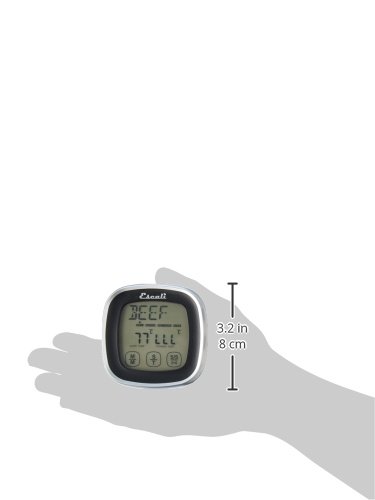
Image: A hand holding the Escali DHR1-B thermometer, illustrating its compact size with measurements of 3.2 inches (8 cm) in height.
Warranty and Support
For warranty information, product support, or to inquire about replacement parts, please visit the official Escali website or contact their customer service department. Keep your purchase receipt as proof of purchase.
Escali is committed to providing quality products and support to its customers.


