
Product Overview
The Alphasonik APP122 is a complete car audio bass package designed to deliver powerful low-frequency sound. This system includes a ported enclosure with two 12-inch subwoofers, a monoblock amplifier, and a comprehensive amplifier wiring kit, providing all necessary components for installation.
Key features include:
- Dual 12-inch subwoofers in a custom ported enclosure.
- 1500 Watts Max power handling (500 Watts RMS).
- Monoblock amplifier with thermal protection and bass boost control.
- Complete 8-gauge amplifier installation kit.
- Durable MDF enclosure construction with aviation-grade black carpet.

Image: The complete Alphasonik APP122 system, featuring the dual 12-inch subwoofer enclosure, monoblock amplifier, and remote bass knob.
Setup and Installation
Proper installation is crucial for optimal performance and safety. It is recommended that installation be performed by a qualified professional. Ensure the vehicle's battery is disconnected before beginning any wiring.
Components Included:
- (1) Dual 12-inch Ported Subwoofer Enclosure
- (1) Monoblock Amplifier
- (1) Remote Bass Knob
- (1) 8-Gauge Amplifier Wiring Kit (includes power cable, ground cable, remote turn-on wire, RCA cable, ATC fuse, and wire ties)
Wiring Instructions:
- Power Cable: Connect the 17-foot 8 AWG power cable directly to the positive terminal of your vehicle's battery. Install the ATC fuse holder within 18 inches of the battery.
- Ground Cable: Connect the 3-foot 8 AWG ground cable from the amplifier to a clean, unpainted metal surface on the vehicle's chassis. Ensure a secure connection for proper grounding.
- Remote Turn-On Wire: Connect the 17-foot remote turn-on wire from your head unit's remote output to the amplifier's remote input terminal. This will turn the amplifier on and off with your head unit.
- RCA Cable: Connect the 17-foot RCA cable from your head unit's subwoofer pre-out to the amplifier's RCA input jacks.
- Speaker Connections: Connect the subwoofer enclosure to the amplifier's speaker output terminals using appropriate speaker wire. The enclosure features spring-loaded push terminals for secure connections.
- Remote Bass Knob: Connect the remote bass knob to the amplifier using the provided cable. This allows for convenient bass level adjustment from the driver's seat.

Image: Front view of the Alphasonik APP122 dual 12-inch subwoofer enclosure, showing the two subwoofers and port design.
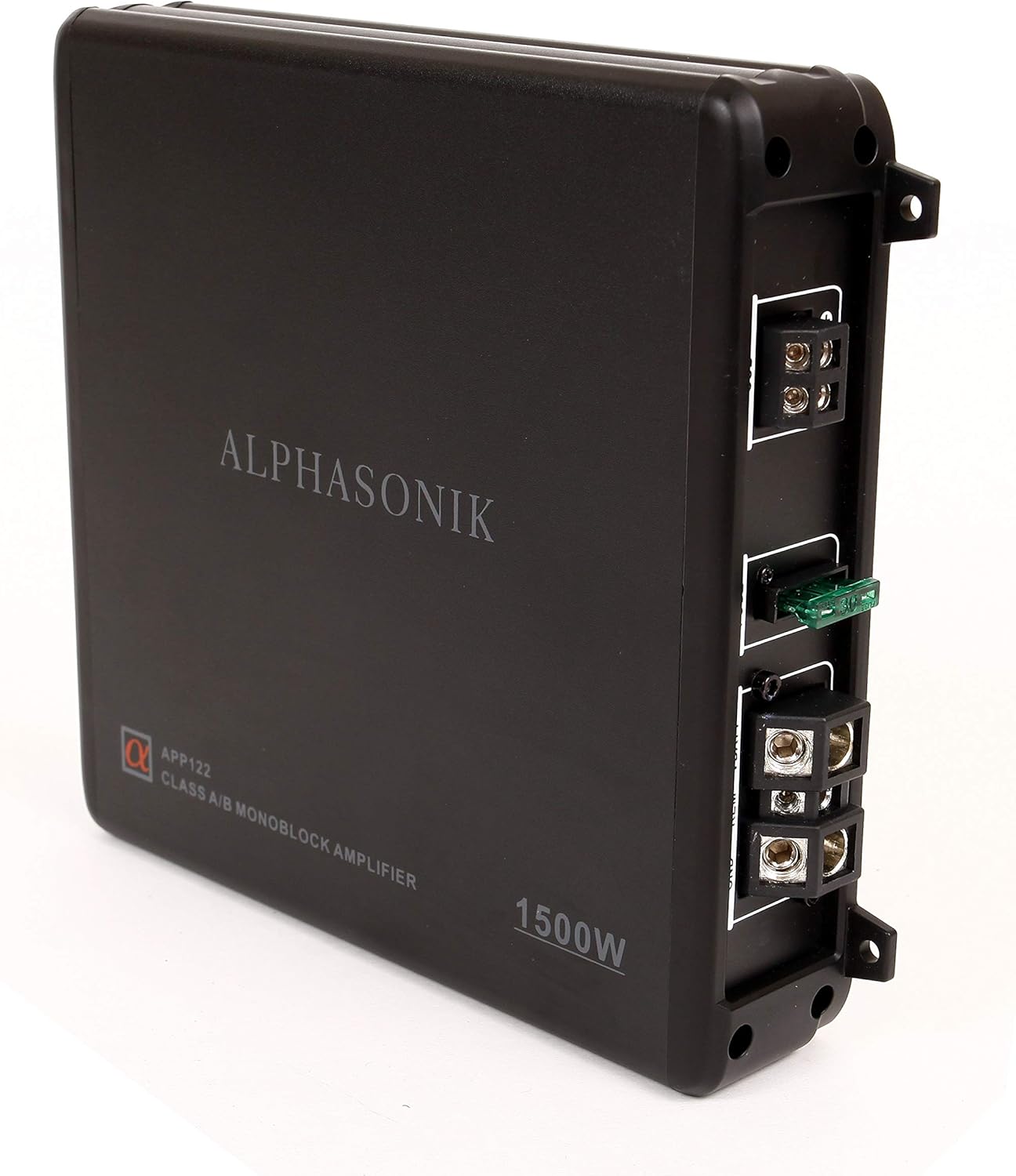
Image: Side view of the Alphasonik APP122 monoblock amplifier, highlighting the power and ground input terminals with the fuse holder.

Image: Top view of the Alphasonik APP122 monoblock amplifier, showing the RCA inputs, gain control, LPF (Low Pass Filter) adjustment, and remote bass knob port.

Image: The remote bass knob for the Alphasonik APP122 system, allowing for convenient bass level adjustment.
Operation
Once the system is properly installed and connected, turn on your vehicle's ignition and head unit. The amplifier should power on, indicated by an illuminated LED on the unit. Adjust the volume on your head unit to a comfortable listening level.
Adjusting Bass Levels:
- Remote Bass Knob: Use the included remote bass knob to adjust the subwoofer's output level conveniently from your driving position. Turn clockwise to increase bass, counter-clockwise to decrease.
- Amplifier Gain Control: The amplifier features a gain control knob. This should be set to match the output voltage of your head unit. Start with the gain at its minimum setting and slowly increase it until the desired bass level is achieved without distortion.
- Low Pass Filter (LPF): The LPF control allows you to set the upper frequency limit for the subwoofer. Adjust this to blend the subwoofer's output seamlessly with your main speakers. A common starting point is around 80-100 Hz.
Avoid operating the system at excessively high volumes for extended periods to prevent potential damage to the speakers and amplifier.
Maintenance
Regular maintenance ensures the longevity and optimal performance of your Alphasonik APP122 system.
- Cleaning: Periodically wipe down the subwoofer enclosure and amplifier with a soft, dry cloth. Avoid using harsh chemicals or abrasive cleaners.
- Connection Checks: Annually, inspect all wiring connections (power, ground, remote, RCA, and speaker wires) to ensure they are secure and free from corrosion. Loose connections can lead to poor performance or damage.
- Fuse Inspection: If the amplifier fails to power on, check the ATC fuse in the power cable. Replace it with a fuse of the same rating if blown.
- Ventilation: Ensure the amplifier has adequate ventilation. Do not obstruct the cooling fins or mount the amplifier in an enclosed space without proper airflow.
Troubleshooting Guide
If you experience issues with your APP122 system, refer to the following common problems and solutions:
- No Sound from Subwoofers:
- Check all power, ground, remote, and RCA connections. Ensure they are secure and correctly wired.
- Verify the amplifier is powered on (LED indicator). If not, check the fuse in the power cable.
- Confirm the head unit's subwoofer output is enabled and the volume is turned up.
- Ensure speaker wires are correctly connected to both the amplifier and the subwoofer enclosure.
- Distorted Sound:
- Reduce the amplifier's gain setting. If the gain is set too high, it can cause distortion.
- Check the head unit's volume level. Excessive volume from the source can lead to distortion.
- Inspect speaker wires for any frayed strands or short circuits.
- Amplifier Goes into Protection Mode (LED illuminates):
- The amplifier's built-in protection circuitry activates to prevent damage from input overload, short circuits, or high temperatures.
- Check for proper ventilation around the amplifier. Ensure it is not overheating.
- Inspect speaker wiring for any short circuits (e.g., positive and negative wires touching).
- Verify the impedance of the subwoofer load matches the amplifier's specifications.
- Reduce the input signal level (gain) from the head unit.
- Weak or Insufficient Bass:
- Increase the remote bass knob setting.
- Adjust the amplifier's gain control.
- Check the LPF setting; ensure it is not set too low.
- Verify the phase setting on your head unit or amplifier (if available) for optimal bass response.
Technical Specifications
| Feature | Specification |
|---|---|
| Model Name | APP122 |
| Brand | Alphasonik |
| Speaker Type | Subwoofer |
| Subwoofer Diameter | 12 Inches (x2) |
| Max Power Output | 1500 Watts |
| RMS Power Output | 500 Watts |
| Amplifier Type | Class A/B Monoblock |
| Enclosure Type | Ported, MDF Construction |
| Enclosure Dimensions (D x W x H) | 16"D x 32"W x 16"H |
| Item Weight | 52.31 Pounds |
| Wiring Kit Gauge | 8 AWG |
| Connectivity Technology | Wired, RCA |
| Input Voltage | 12 Volts |
| Special Feature | Protection Circuitry, Remote Bass Control |

Image: Diagram illustrating the dimensions of the Alphasonik APP122 dual 12-inch subwoofer enclosure.
Warranty Information
The Alphasonik APP122 Car Subwoofer Bass Package comes with a limited warranty. For specific details regarding warranty coverage, duration, and terms, please refer to the warranty card included with your product or visit the official Alphasonik website. Keep your proof of purchase for warranty claims.
Customer Support
For technical assistance, troubleshooting beyond this guide, or service inquiries, please contact Alphasonik customer support. Contact information can typically be found on the product packaging, the official Alphasonik website, or through your retailer.
When contacting support, please have your product model number (APP122) and proof of purchase readily available.