
1. Introduction
The Azden SMX-30 is a high-quality stereo/mono switchable video microphone designed to significantly improve audio recording for DSLR and mirrorless cameras. Engineered in Japan, it features a built-in +20dB gain booster to deliver a strong, clean audio signal, reducing reliance on noisy camera preamps. Its versatile design allows users to switch between stereo and mono (shotgun) modes, adapting to various recording environments and needs.

Image 1: The Azden SMX-30 microphone with its foam windscreen attached, showcasing its compact design.
2. Key Features
- Stereo/Mono Switchable: Offers flexibility to record in wide stereo for immersive soundscapes or focused mono (shotgun) for clear dialogue.
- Integrated +20dB Gain Booster: Provides a strong audio signal to the camera, minimizing noise from internal camera preamps.
- Low-Cut Filter: Reduces unwanted low-frequency noise below 120Hz, such as wind, air conditioning, or traffic.
- Shock-Absorbing Shoe Mount: Isolates the microphone from camera motor and handling noise, ensuring cleaner audio.
- Auto Power Function: Automatically turns the microphone on and off with the camera, conserving battery life.
- Broadcast Quality Sound: Utilizes high-quality microphone elements for superior audio capture.
3. Package Contents
Verify that all items are present in the package:
- Azden SMX-30 Microphone
- Foam Windscreen
- Soft Pouch
- User Guide
4. Installation
4.1 Battery Installation
The SMX-30 requires two (2) AA batteries for operation. To install:
- Locate the battery compartment on the microphone body.
- Open the compartment and insert two AA batteries, ensuring correct polarity.
- Close the battery compartment securely.
4.2 Mounting the Microphone
The microphone features an integrated shock-absorbing shoe mount for attachment to your camera's hot shoe or cold shoe adapter. It also includes a 1/4-20 threaded mount for compatibility with boom poles and other camera accessories.
- Slide the microphone's shoe mount into your camera's hot shoe.
- Tighten the locking wheel on the shoe mount to secure the microphone in place.
- Alternatively, use the 1/4-20 thread to attach to other mounting solutions.

Image 2: The Azden SMX-30 microphone securely mounted on a Lumix camera, ready for use.
4.3 Connecting to Camera
Connect the microphone to your camera using the standard 3.5mm stereo mini-jack output cable.
- Plug one end of the 3.5mm cable into the microphone's output jack.
- Plug the other end into your camera's microphone input jack.
5. Operation
The SMX-30 offers several controls for optimizing your audio recording.
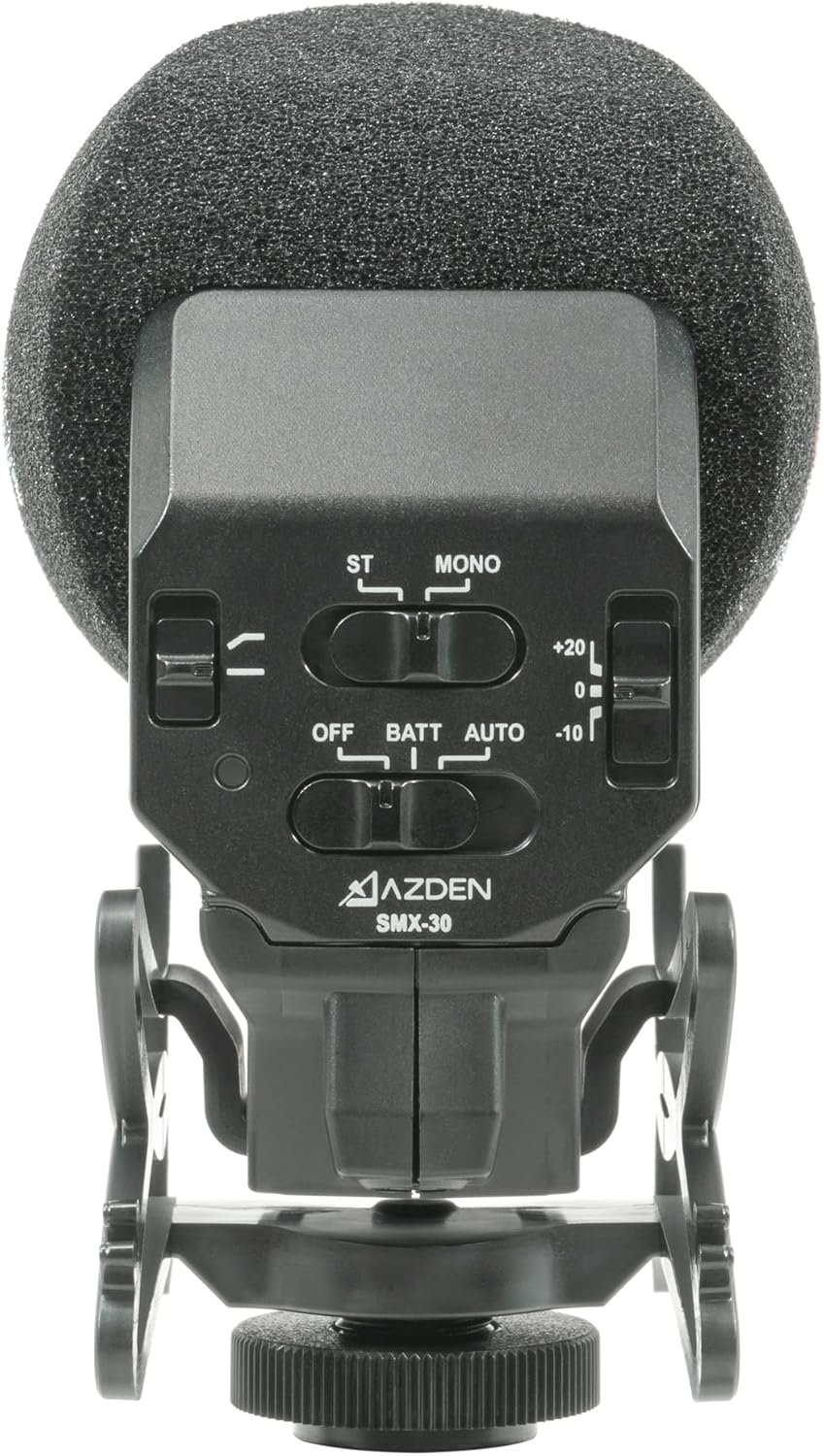
Image 3: A detailed view of the control panel on the Azden SMX-30, showing switches for mode, power, and gain.
5.1 Power and Auto Function
- OFF: Turns the microphone off.
- BATT: Manually turns the microphone on.
- AUTO: Enables the auto power function. When connected to a compatible camera, the microphone will automatically power on when the camera is turned on, and power off when the camera is turned off.
5.2 Stereo/Mono Mode Selection
Use the 'ST/MONO' switch to select your desired recording mode:
- ST (Stereo): Activates the two cardioid microphone elements positioned at the top, spaced at a 120-degree angle, for capturing a natural-sounding stereo image. Ideal for recording ambient sounds, music, or general environments.
- MONO (Shotgun): Activates the super-cardioid shotgun microphone element, which is highly directional. This mode is best for focusing on sound directly in front of the camera, such as dialogue, while minimizing extraneous noise from the sides and rear.
5.3 Gain Control
The gain control switch allows you to adjust the microphone's output level:
- +20dB: Boosts the audio signal by 20 decibels. This is particularly useful for cameras with noisy preamps, allowing you to set your camera's input gain lower and achieve a cleaner signal.
- 0dB: Standard gain setting.
- -10dB: Attenuates the audio signal by 10 decibels. Use this setting in loud environments to prevent audio clipping and distortion.
5.4 Low-Cut Filter
The low-cut filter switch helps to eliminate unwanted low-frequency sounds:
- On: Activates the low-cut filter, reducing frequencies below 120Hz. This is effective for minimizing rumble, wind noise, or hum from air conditioning units.
- Off: Disables the low-cut filter, allowing full frequency response.
5.5 Official Product Video: Overview and Features
Video 1: An official overview of the Azden SMX-30 and SMX-15 microphones, detailing their features and benefits for video recording.
5.6 Official Product Video: Quick Look and Listen
Video 2: A quick demonstration and audio test of the Azden SMX-30 microphone, showcasing its sound quality in different modes.
6. Care and Maintenance
- Foam Windscreen: Always use the included foam windscreen to reduce wind noise during outdoor recordings and protect the microphone capsule.
- Soft Pouch: Store the microphone in its soft pouch when not in use to protect it from dust, scratches, and minor impacts.
- Battery Removal: Remove batteries if the microphone will not be used for an extended period to prevent leakage.
- Cleaning: Clean the microphone body with a soft, dry cloth. Avoid using harsh chemicals or abrasive materials.
7. Troubleshooting
- No Audio Output:
- Ensure batteries are correctly installed and charged.
- Check that the microphone is powered on (BATT or AUTO mode).
- Verify the 3.5mm cable is securely connected to both the microphone and the camera.
- Confirm camera's audio input settings are correct and enabled.
- Excessive Noise/Hiss:
- If using the +20dB gain, ensure your camera's input gain is set as low as possible.
- Check for environmental noise sources.
- Ensure the microphone is properly isolated by its shock mount.
- Distorted Audio:
- If recording in a loud environment, switch the gain control to -10dB.
- Reduce your camera's input gain.
- Wind Noise:
- Ensure the foam windscreen is properly installed.
- Activate the low-cut filter.
8. Specifications
| Feature | Specification |
|---|---|
| Brand | AZDEN |
| Model Number | SMX-30 |
| Microphone Form Factor | Mini |
| Polar Pattern | Unidirectional (Mono), Cardioid (Stereo) |
| Frequency Response | 40Hz-20kHz |
| Signal-to-Noise Ratio | 58 dB |
| Impedance | 200 Ohms |
| Power Source | Battery Powered (2 AA batteries required) |
| Battery Life | Up to 24 hours operation |
| Connectivity Technology | Auxiliary |
| Connector Type | 3.5 mm Jack |
| Special Features | Adjustable gain (+20dB, 0dB, -10dB), Mono/Stereo switchable, Low-cut filter |
| Compatible Devices | Camera (DSLR, Mirrorless) |
| Item Dimensions (L x W x H) | 7 x 2.5 x 4.5 inches |
| Item Weight | 5.6 ounces |
| Manufacturer | Azden Corporation |
| Date First Available | January 29, 2016 |
| UPC | 095528122235 |
9. Warranty and Support
The Azden SMX-30 is backed by Azden's 10-year warranty. For warranty claims, technical support, or additional product information, please visit the official Azden website or contact their customer service department.
Official Azden Website: www.azden.com


