
Introduction
This manual provides essential information for the safe and efficient operation of your Behringer Xenyx QX602MP3 mixer. Please read this manual thoroughly before using the device to ensure proper setup, operation, and maintenance. Keep this manual for future reference.
Important Safety Instructions
Observe the following safety precautions to prevent electric shock, injury, or damage to the device.
- Power Supply: Connect the device only to the specified AC input (100-240V~50/60Hz 15W). Ensure the power outlet provides the correct voltage.
- Electrical Shock Hazard: Do not open the mixer casing. There are no user-serviceable parts inside. Refer all servicing to qualified service personnel. The device contains dangerous voltages.
- FCC Compliance: This device complies with Part 15 of the FCC Rules. Operation is subject to two conditions: (1) this device may not cause harmful interference, and (2) this device must accept any interference received, including interference that may cause undesired operation.
- Canadian ICES-003: This Class B digital apparatus complies with Canadian ICES-003.
- Ventilation: Do not block any ventilation openings. Install in accordance with the manufacturer's instructions.
- Water and Moisture: Do not use this apparatus near water or expose it to dripping or splashing.
- Cleaning: Clean only with a dry cloth.
- Power Cord Protection: Protect the power cord from being walked on or pinched, particularly at plugs, convenience receptacles, and the point where they exit from the apparatus.
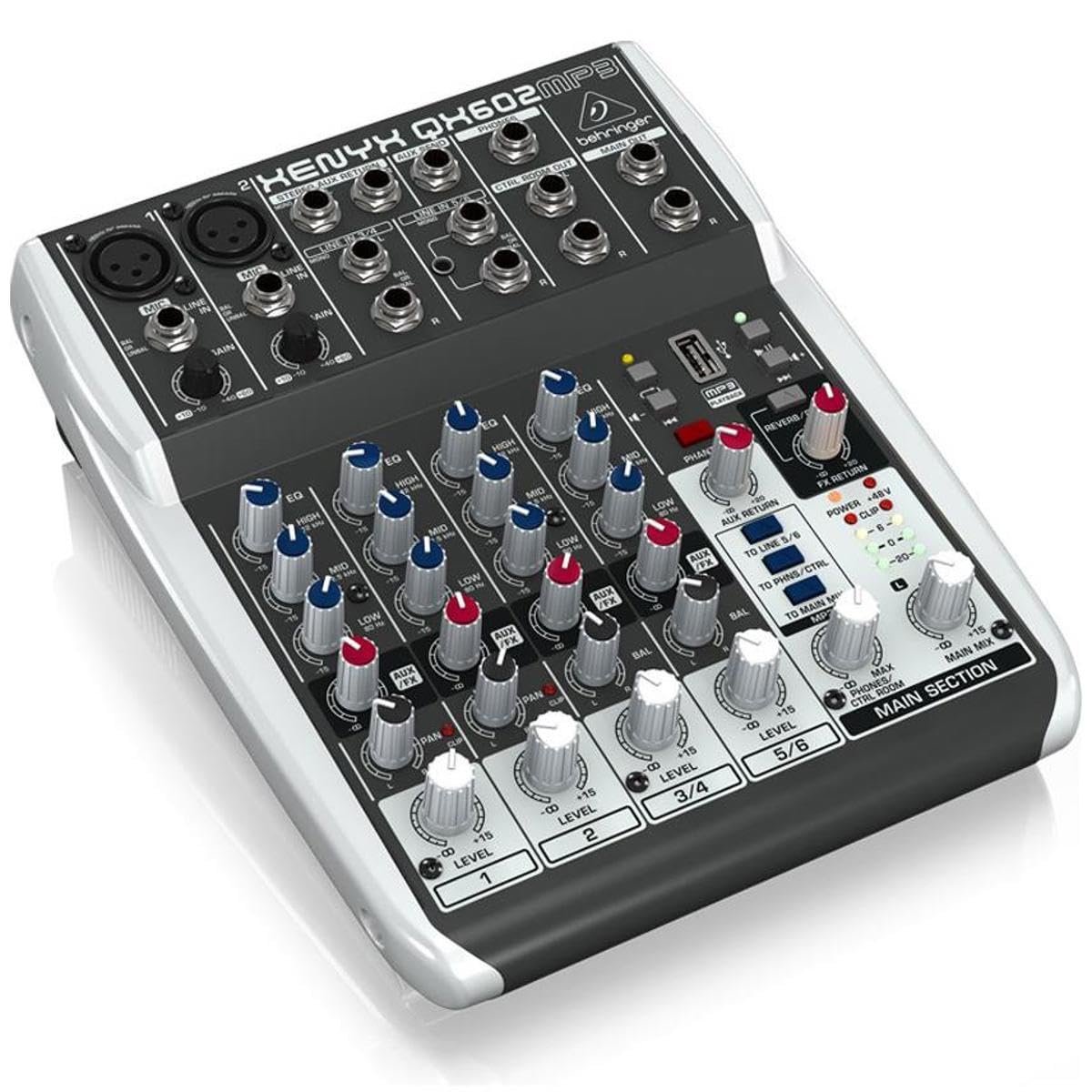
Figure 1: Rear Panel Overview. This image displays the rear panel of the Behringer Xenyx QX602MP3 mixer. Key features visible include the AC power input socket (100-240V~50/60Hz 15W), the main power ON/OFF switch, and various safety certifications and warnings. These warnings include "CAUTION RISK OF ELECTRIC SHOCK! DO NOT OPEN!" in multiple languages, along with FCC and Canadian ICES-003 compliance statements. The model number QX602MP3 and manufacturing details are also present.
Setup
1. Unpacking
Carefully unpack the mixer and inspect it for any signs of damage during transit. Retain the original packaging for future transport or storage.
2. Power Connection
Connect the supplied power cable to the AC INPUT socket on the rear panel of the mixer. Plug the other end into a suitable electrical outlet. The mixer operates on 100-240V~, 50/60Hz, consuming 15W. Ensure the power source matches these specifications.
3. Initial Connections
- Microphone Inputs: Connect microphones to the XLR inputs (channels 1-2) on the mixer. These channels feature Xenyx Mic Preamps.
- Line Inputs: Connect line-level devices (e.g., keyboards, CD players) to the 1/4" TRS or RCA inputs.
- Main Output: Connect the main outputs of the mixer to your amplifier or powered speakers.
- USB MP3 Player: Insert a USB stick containing MP3 audio files into the dedicated USB port for playback.
4. Powering On/Off
Locate the ON/OFF switch on the rear panel (refer to Figure 1). Press the switch to the 'ON' position to power on the mixer. Press it to 'OFF' to power down the unit. Always ensure all volume controls are at their minimum before powering on or off to prevent sudden loud noises.
Operating Instructions
1. Channel Controls
- Gain Control: Adjusts the input sensitivity for each channel. Set this to achieve a healthy signal level without clipping.
- EQ (Equalizer): The 3-band EQ allows you to shape the tone of each channel. Adjust the HIGH, MID, and LOW controls to enhance or cut specific frequencies.
- FX Send: Controls the amount of signal sent from the channel to the internal multi-FX processor.
- Pan/Balance: Positions the channel's signal within the stereo field.
- Level Control: Adjusts the output volume of the individual channel to the main mix.
2. MP3 Player Operation
Insert a USB stick formatted with MP3 audio files into the USB port. Use the dedicated controls on the mixer to navigate tracks, play, pause, and adjust the MP3 player's output level. The MP3 player integrates directly into the mixer's signal path.
3. Multi-FX Processor
The built-in 24-bit stereo multi-FX processor offers various presets for reverb and delay. Use the FX program selector to choose an effect and the FX return control to blend the effect into the main mix. Adjust the FX send on individual channels to control how much of that channel's signal is processed by the effect.
4. Main Mix
The main mix fader or knob controls the overall output volume of the mixer. Monitor the main output level meters to ensure the signal is not clipping.
Maintenance
Cleaning
Regularly clean the exterior of the mixer with a soft, dry, lint-free cloth. Do not use liquid cleaners, aerosols, or solvents, as these can damage the finish or internal components. Ensure the device is powered off and unplugged before cleaning.
Storage
When not in use for extended periods, store the mixer in a cool, dry place, away from direct sunlight and extreme temperatures. It is recommended to use the original packaging for storage to protect against dust and physical damage.
Troubleshooting
| Problem | Possible Cause | Solution |
|---|---|---|
| No power | Power cable not connected; power switch off; faulty power outlet. | Check power cable connection; ensure power switch is ON; try a different outlet. |
| No sound output | Main mix fader/knob down; channel level down; incorrect input/output connections; amplifier/speakers off or muted. | Increase main mix and channel levels; verify all cables are correctly connected; check external audio equipment. |
| Distorted sound | Input gain too high; main mix level too high; faulty cable. | Reduce input gain and main mix levels to prevent clipping; test with different cables. |
| MP3 player not working | USB stick not inserted correctly; unsupported file format; corrupted files. | Ensure USB stick is fully inserted; verify files are MP3 format; try a different USB stick or files. |
Specifications
- Model: QX602MP3
- Type: 6-Input, 2-Bus Analog Mixer
- Mic Preamps: Xenyx Mic Preamps
- EQ: 3-band EQ per channel
- Effects: Built-in 24-bit stereo multi-FX processor (reverb, delay)
- MP3 Player: USB MP3 Playback
- Power Input: 100-240V~, 50/60Hz, 15W
- Item Weight: 2 pounds (0.91 kg)
- Product Dimensions: 11.75 x 9.75 x 5 inches (29.8 x 24.8 x 12.7 cm)
- Material: Stainless Steel
- Connectivity Technology: Auxiliary
Warranty
For detailed warranty information, please refer to the warranty card included with your product or visit the official Behringer website. Keep your purchase receipt as proof of purchase for any warranty claims.
Support
If you encounter issues not covered in this manual or require technical assistance, please contact Behringer customer support. You can find contact information and additional resources on the official Behringer website: www.behringer.com.


