
Introduction
This manual provides essential instructions for the safe and efficient operation, installation, and maintenance of your Southbend BGS/12SC Gas Convection Oven. Please read this manual thoroughly before operating the appliance and retain it for future reference. The Southbend BGS/12SC is a single-deck, standard-depth gas convection oven designed for commercial use, featuring solid-state controls, electronic ignition, and a durable stainless steel exterior with a porcelain interior.
Product Overview
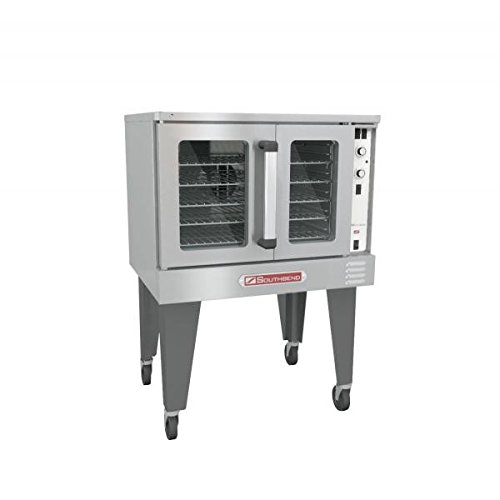
Figure 1: Front view of the Southbend BGS/12SC Gas Convection Oven. This image displays the stainless steel exterior, dual glass doors, control panel on the right side, and the black triangular legs with casters.
Important Safety Information
Always follow basic safety precautions when using this appliance to reduce the risk of fire, electric shock, or injury. This oven operates on natural gas or propane and requires proper ventilation and electrical connection. Installation and service must be performed by a qualified installer, service agency, or gas supplier.
- Do not store or use gasoline or other flammable vapors and liquids in the vicinity of this or any other appliance.
- Keep the appliance area clear and free from combustible materials.
- Never obstruct the flow of combustion and ventilation air.
- Ensure proper grounding for electrical connections.
- Do not attempt to repair or replace any part of the oven unless specifically recommended in this manual. All other servicing should be referred to a qualified technician.
- Always disconnect power before servicing.
Unpacking and Installation (Setup)
1. Unpacking
Carefully remove the oven from its packaging. Inspect the oven for any shipping damage. Report any damage immediately to the carrier and your dealer. Ensure all components listed in the "What's in the Box" section are present.
2. Location
Place the oven on a level, non-combustible surface. Ensure adequate clearance around the oven for proper ventilation and maintenance. The oven is equipped with black triangular legs for stability.
3. Gas Connection
This appliance is designed for use with natural gas or propane. The gas supply line must be of adequate size to provide the specified BTU rating (54,000 Btu). All gas connections must comply with local codes and be performed by a licensed gas technician.
4. Electrical Connection
The oven requires a 120V/60Hz/1-phase electrical supply with a Nema 5-15p plug. Ensure the electrical circuit is properly grounded and protected by a circuit breaker. The oven's blower motor is 1/2hp.
5. Ventilation
Proper ventilation is crucial for safe operation. Install the oven under an approved commercial exhaust hood system that complies with all local and national codes.
Operating Instructions
1. Initial Startup
Before first use, wipe down the interior with a damp cloth. Turn on the gas supply and connect the electrical power. The oven features electronic ignition.
2. Controls
The oven is equipped with solid-state controls for precise temperature management. A 60-minute cook timer allows for accurate cooking durations. Refer to the control panel for specific temperature and timer settings.
3. Preheating
Set the desired temperature using the control panel. Allow the oven to preheat fully before placing food inside. The convection fan will circulate hot air for even heating.
4. Cooking
Place food items on the oven racks. Close the oven doors securely. Monitor cooking progress through the oven interior light and adjust the timer as needed. The oven features a porcelain interior for easy cleaning.
5. Shutting Down
When cooking is complete, turn off the oven controls. For extended periods of non-use, it is recommended to turn off the gas supply and disconnect electrical power.
Maintenance and Cleaning
Regular cleaning and maintenance will ensure the longevity and optimal performance of your Southbend BGS/12SC oven.
- Daily Cleaning: Wipe down the stainless steel exterior (front, top, sides, and door) with a mild detergent and a soft cloth. Clean the porcelain interior after each use to prevent food buildup.
- Crumb Tray: The oven includes a crumb tray. Remove and empty the crumb tray regularly to prevent accumulation of debris.
- Oven Racks: Remove and clean oven racks as needed. They can typically be washed with warm, soapy water.
- Inspection: Periodically inspect gas connections and electrical cords for any signs of wear or damage.
- Professional Service: Annual inspection and maintenance by a qualified service technician are recommended to ensure safe and efficient operation.
Troubleshooting
Before contacting service, review the following common issues and solutions:
| Problem | Possible Cause | Solution |
|---|---|---|
| Oven not heating | No gas supply; electrical power off; ignition failure. | Check gas valve; ensure power is connected; consult service technician for ignition issues. |
| Uneven cooking | Overloading oven; blocked air circulation; fan malfunction. | Do not overload; ensure proper rack spacing; check for obstructions; contact service if fan is faulty. |
| Oven interior light not working | Bulb burnt out; loose connection. | Replace bulb (ensure oven is cool and power disconnected); check connections. |
For issues not listed or if solutions do not resolve the problem, contact a qualified service technician.
Specifications
| Model | BGS/12SC |
| Brand | SouthBend |
| Type | Gas Convection Oven, Single Deck, Standard Depth |
| Controls | Solid State, 60-minute cook timer |
| Ignition | Electronic |
| Interior Material | Porcelain |
| Exterior Material | Stainless Steel (front, top, sides, door) |
| Power Requirements | 120V/60Hz/1-phase, Nema 5-15p |
| Blower Motor | 1/2hp |
| BTU Rating | 54,000 Btu |
| Certifications | CSA, NSF, Energy Star |
| Legs | Black triangular |
What's in the Box
- Southbend BGS/12SC Gas Convection Oven Unit
- Crumb tray
- User Manual (this document)
Warranty and Support
Specific warranty information for the Southbend BGS/12SC Gas Convection Oven is typically provided with the purchase documentation or can be obtained directly from Southbend or your authorized dealer. Please retain your proof of purchase for warranty claims.
For technical support, service, or to order replacement parts, please contact your authorized Southbend service provider or visit the official Southbend website.


