
1. Introduction
The RYOBI RXBC01 Expand-It Brush Cutter Attachment is designed to efficiently cut through brush and thick grass. Featuring a 20 cm Tri-Arc hardened blade and a lightweight design, it offers powerful performance when used with compatible powerheads. This attachment integrates Smart Tool technology to optimize motor performance with AC powerheads, ensuring maximum cutting efficiency.

Figure 1: RYOBI RXBC01 Expand-It Brush Cutter Attachment, showcasing its design and blade.
2. Safety Information
WARNING: Always prioritize safety when operating power tools. Failure to follow safety instructions can result in serious injury.
- Wear appropriate safety gear, including eye protection, sturdy gloves, and hearing protection.
- Be aware of potential flying debris and keep bystanders at a safe distance (minimum 15 meters/50 feet).
- Always follow manufacturer's instructions for safe operation of both the attachment and the powerhead.
- Inspect the blade and attachment for damage before each use. Do not operate with damaged parts.
- Ensure the attachment is securely fastened to the powerhead before starting.
- Keep hands and feet away from the cutting blade at all times.
- Avoid operating in wet conditions or on slippery surfaces.
3. Product Overview
The RXBC01 brush cutter attachment is designed for heavy-duty clearing tasks. Its key features include:
- 20 cm Tri-Arc Blade: Hardened steel blade for effective cutting of dense vegetation.
- Lightweight Design: Weighing approximately 1.4 kg (3.08 pounds), it reduces user fatigue during extended use.
- Smart Tool Technology: Optimizes motor performance when paired with compatible corded powerheads for enhanced power.
- Expand-It Compatibility: Designed to seamlessly integrate with RYOBI Expand-It powerheads.
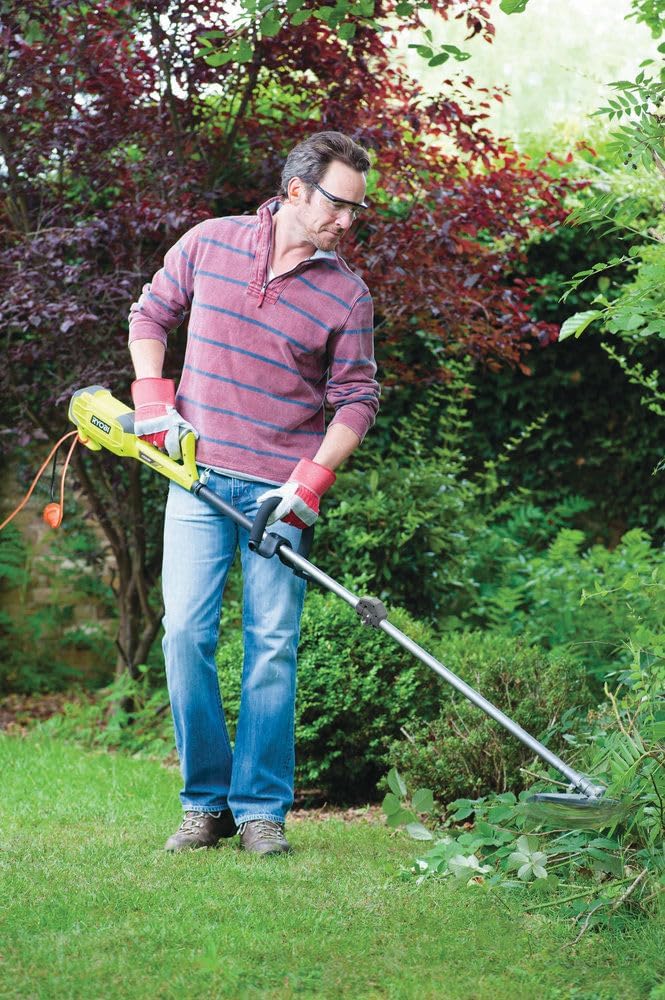
Figure 2: Front view of the RYOBI RXBC01 Brush Cutter Attachment, highlighting the blade and guard.
4. Setup and Assembly
Follow these steps to properly assemble and attach the brush cutter to your compatible powerhead:
- Unpack Components: Carefully remove all parts from the packaging. Ensure all components listed in the product manual are present.
- Attach Guard: Secure the protective guard to the attachment shaft using the provided fasteners. Ensure it is firmly in place to prevent debris from striking the user.
- Install Blade: Align the Tri-Arc blade onto the spindle. Place the washer and nut, then tighten securely using the appropriate wrench. Ensure the blade is oriented correctly for cutting.
- Connect to Powerhead: Insert the brush cutter attachment shaft into the powerhead's coupling. Align the locking mechanism (e.g., push button or screw clamp) and secure it firmly. Refer to your powerhead's manual for specific attachment instructions.
- Final Check: Before operation, double-check all connections and fasteners to ensure they are tight and secure.
Video 1: Demonstration of installing a string trimmer attachment, which shares similar assembly principles for the brush cutter blade and guard. This video provides a visual guide for securing the cutting head and protective components.
5. Operating Instructions
Proper operation ensures safety and efficiency:
- Starting the Powerhead: Follow the starting procedure for your specific RYOBI powerhead.
- Holding the Tool: Grip the tool firmly with both hands. Maintain a balanced stance.
- Cutting Technique: Use a sweeping motion, moving the blade from side to side. Allow the blade to do the work; do not force it through dense material.
- Clearing Brush: For thicker brush, approach from the top and work downwards in small sections. Be mindful of kickback.
- Avoid Obstacles: Do not strike hard objects like rocks, fences, or metal. This can damage the blade and cause kickback.
- Stopping the Tool: Release the throttle and allow the blade to come to a complete stop before setting the tool down or making adjustments.
Figure 3: A user demonstrating the brush cutter attachment in action, clearing overgrown areas.
6. Maintenance
Regular maintenance extends the life of your brush cutter attachment:
- Clean After Each Use: Remove grass, debris, and sap from the blade and guard. Use a stiff brush and mild detergent if necessary.
- Blade Inspection: Regularly check the blade for sharpness, cracks, bends, or other damage. Sharpen or replace the blade as needed.
- Lubrication: Apply a light coat of oil to the blade and moving parts to prevent rust and ensure smooth operation.
- Storage: Store the attachment in a dry, secure location, away from children and pets.
- Fastener Check: Periodically check all nuts, bolts, and screws for tightness and re-tighten as necessary.
7. Troubleshooting
Common issues and their solutions:
- Blade Not Cutting Effectively:
- Check if the blade is dull or damaged. Sharpen or replace.
- Ensure the blade is installed correctly and securely.
- Excessive Vibration:
- Inspect the blade for damage or imbalance. Replace if necessary.
- Ensure the attachment is securely fastened to the powerhead.
- Attachment Not Engaging:
- Verify the powerhead is running correctly.
- Check the connection between the attachment and powerhead for proper seating and locking.
8. Specifications
| Feature | Specification |
|---|---|
| Brand | RYOBI |
| Model Number | RXBC01 |
| Item Weight | 1.4 Kilograms (3.08 pounds) |
| Cutting Width | 200 Millimeters (20 cm) |
| Blade Type | Tri-Arc Hardened Blade |
| Recommended Use | Gardening, cutting grass and weeds |
| Assembly Required | Yes |
9. Warranty and Support
For warranty information, product registration, or technical support, please refer to the official RYOBI website or contact their customer service directly. Keep your purchase receipt as proof of purchase for any warranty claims.


