
Introduction
This manual provides essential information for the safe and effective operation, maintenance, and troubleshooting of your Ryobi R18S18G-0 5133002516 Cordless Stapler. Please read these instructions carefully before use and retain them for future reference.
Important Safety Information
Always observe general power tool safety warnings and instructions. Failure to follow these warnings may result in electric shock, fire, and/or serious injury.
- Work Area Safety: Keep the work area clean and well-lit. Cluttered or dark areas invite accidents.
- Personal Safety: Always wear eye protection. Hearing protection, gloves, and appropriate clothing are also recommended.
- Tool Use and Care: Do not force the tool. Use the correct tool for your application. Disconnect the battery pack before making any adjustments, changing accessories, or storing power tools.
- Battery Tool Use and Care: Recharge only with the charger specified by the manufacturer. Use power tools only with specifically designated battery packs.
Product Features
The Ryobi R18S18G-0 Cordless Stapler incorporates advanced features for efficient stapling:
- AirStrike Technology: In-Tool Air Compression eliminates the need for a compressor, air hose, or air cartridges, reducing maintenance and operating costs.
- Staple Compatibility: Designed for staples with a thickness of 5.5 - 6.1 mm and lengths from 10 - 38 mm.
- Operating Modes: Supports both single and continuous firing modes.
- LED Work Light: Integrated LED lighting illuminates the work area for improved visibility.
- Tool-Free Depth Adjustment: Easily adjust stapling depth without additional tools.
- Jam Clearing: Simple, tool-free removal of jammed staples from the firing channel.
- GripZone: Rubberized grip surface ensures a secure hold and comfortable operation.
- Belt Hook: Reversible belt hook for convenient carrying.
- Workpiece Protection: Rubber spacers prevent damage to the workpiece surface.

Figure 1: Front view of the Ryobi R18S18G-0 Cordless Stapler, highlighting its compact design and staple magazine.
Setup
1. Battery Installation
- Ensure the stapler is switched off.
- Align the battery pack with the battery port on the tool.
- Slide the battery pack into the tool until it clicks securely into place.
- To remove, press the release button on the battery pack and slide it out.
Note: Battery and charger are not included with this model (R18S18G-0).
2. Loading Staples
- Ensure the stapler is disconnected from the battery.
- Locate the magazine release latch, typically at the rear or bottom of the magazine.
- Open the staple magazine.
- Insert a strip of compatible staples (5.5 - 6.1 mm crown, 10 - 38 mm length) into the magazine with the staple points facing down.
- Close the magazine securely until it latches.
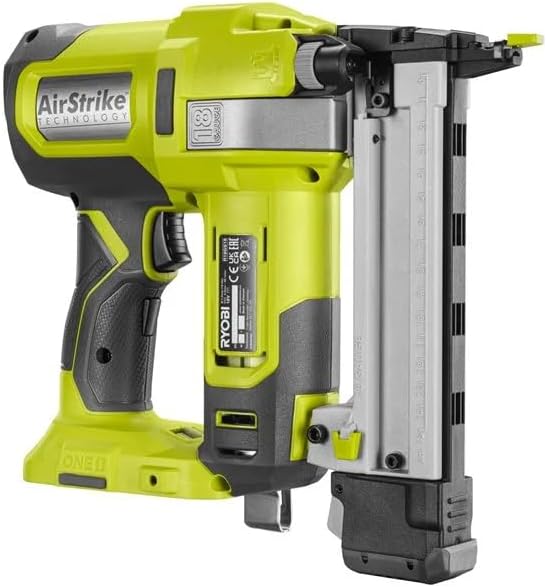
Figure 2: Side view of the Ryobi R18S18G-0 Cordless Stapler, showing the battery port and magazine area.
Operating Instructions
1. Powering On/Off
Insert a charged 18V battery. The tool is ready for use once the battery is installed.
2. Selecting Firing Mode
The stapler supports two firing modes:
- Single Firing: For precise placement, depress the trigger for each staple.
- Continuous Firing: For rapid stapling, hold the trigger down and press the stapler against the workpiece.
3. Adjusting Stapling Depth
The stapler features tool-free depth adjustment. Locate the depth adjustment dial or lever on the tool and rotate or slide it to achieve the desired stapling depth. Test on a scrap piece of material before final application.
4. Using the LED Work Light
The integrated LED light activates when the trigger is partially depressed, illuminating the work area for better visibility in low-light conditions.
5. Clearing Staple Jams
If a staple jam occurs:
- Immediately disconnect the battery pack.
- Locate the jam clearing mechanism, usually a latch or lever on the front of the tool.
- Open the mechanism to access the firing channel.
- Carefully remove any jammed staples or debris using pliers or a similar tool. Do not use excessive force.
- Close the jam clearing mechanism securely before reconnecting the battery.

Figure 3: An operator using the Ryobi R18S18G-0 Cordless Stapler for flooring installation, demonstrating its application.

Figure 4: An operator using the Ryobi R18S18G-0 Cordless Stapler to attach wooden lattice, showcasing its versatility in various projects.
Maintenance
Regular maintenance ensures optimal performance and extends the life of your tool.
- Cleaning: Keep the tool's ventilation openings clean and free of debris. Use a soft, damp cloth to clean the exterior. Do not use solvents.
- Lubrication: This tool features AirStrike technology and generally requires no internal lubrication. Refer to the manufacturer's guidelines for specific lubrication needs if any.
- Staple Magazine: Periodically inspect the staple magazine for any wear or damage. Ensure it operates smoothly.
- Battery Care: Store battery packs in a cool, dry place. Do not store discharged battery packs.
Troubleshooting
This section addresses common issues you might encounter with your Ryobi R18S18G-0 Cordless Stapler.
| Problem | Possible Cause | Solution |
|---|---|---|
| Stapler does not fire. | Battery not installed or discharged. | Ensure battery is fully charged and properly installed. |
| Staples are jamming frequently. | Incorrect staple size or type. Debris in magazine/firing channel. | Use recommended staples. Clear any debris from the magazine and firing channel (refer to "Clearing Staple Jams"). |
| Staples not fully driven. | Depth adjustment too shallow. Low battery charge. | Adjust depth setting deeper. Recharge or replace battery. |
| Tool feels sluggish or lacks power. | Low battery charge. | Recharge or replace battery. |
Specifications
The following are the technical specifications for the Ryobi R18S18G-0 Cordless Stapler:
- Model Number: R18S18G-0 (5133002516)
- Voltage: 18 V
- Staple Capacity (Crown): 5.5 - 6.1 mm
- Staple Length: 10 - 38 mm
- Magazine Capacity: 100 staples
- Weight (without battery): Approximately 2.9 kg
- Product Dimensions: 30 x 9.7 x 26.2 cm
- Power Source: Battery-operated (Battery and charger sold separately)
- Operating Mode: Automatic
Warranty and Support
For warranty information, service, or technical support, please refer to the documentation included with your purchase or visit the official RYOBI website. Keep your proof of purchase for warranty claims.


