
1. Introduction
The TROND BT-DUO is a versatile 2-in-1 Bluetooth V5.0 audio adapter designed to function as both a transmitter (TX) and a receiver (RX). It enables wireless audio streaming for a wide range of devices, enhancing your audio experience with convenience and flexibility. Featuring AptX Low Latency technology, it minimizes audio delay for synchronized sound, especially beneficial for video content.

Figure 1: TROND BT-DUO Bluetooth V5.0 Transmitter Receiver
2. Package Contents
Please ensure all items are present in the package:
- 1 × TROND BT-DUO Bluetooth Transmitter Receiver (with CSR8670 chipset)
- 1 × USB to Micro USB Charging Cable (80cm)
- 1 × 3.5mm Male to 3.5mm Male Audio Cable (50cm)
- 1 × 3.5mm Male to 3.5mm Male Aluminum Pin
- 1 × 3.5mm Female to RCA Male Audio Cable (20cm)

Figure 2: Included cables and accessories
3. Product Overview
The TROND BT-DUO is designed for ease of use with a compact form factor.
3.1 Physical Features
- Multi-Function Button (MFB): Used for power on/off and pairing.
- LED Indicator: Displays device status (power, pairing, codec).
- TX/RX Switch: Toggles between Transmitter and Receiver modes.
- 3.5mm Aux-in Port: For audio input/output connection.
- Micro USB Charging Port: For charging the internal battery.

Figure 3: TROND BT-DUO with Micro USB Charging Port and 3.5mm Aux-in

Figure 4: Compact design of TROND BT-DUO
4. Setup and Operation
4.1 Power On/Off
- To Power On: Long-press the Multi-Function Button (MFB) for 3 seconds until the LED indicator flashes blue.
- To Power Off: Long-press the MFB for 3 seconds until the LED indicator turns red and then off.
4.2 Initial Pairing Mode
The first time you power on the TROND BT-DUO, it will automatically enter pairing mode, with the LED indicator flashing blue and red alternately.
4.3 Switching Modes (TX/RX)
Use the TX/RX switch on the side of the device to select the desired operating mode before powering on.
5. Operating Modes
5.1 Transmitter Mode (TX)
In TX mode, the TROND BT-DUO transmits audio wirelessly from non-Bluetooth devices to Bluetooth-enabled headphones or speakers. This is ideal for TVs, PCs, iPods, or CD players.
- Switch the BT-DUO to TX mode.
- Power on the BT-DUO. If it's not the first time use, quickly double-tap the MFB to activate its pairing mode (LED flashes blue & red alternately).
- Turn on your Bluetooth headphones/speaker and activate its pairing mode.
- Place the BT-DUO and your headphones/speaker close to each other (within 1 foot). They should pair within 30 seconds. Once successfully paired, the LED indicator on the BT-DUO will stay solid blue.
- Connect the BT-DUO to the audio OUT port of your non-Bluetooth audio source (e.g., TV, PC, iPod) using the provided 3.5mm audio cable or 3.5mm to RCA cable.

Figure 5: TX Mode Connection Diagram

Figure 6: TX Mode Pairing Steps
Dual Stream (Pairing with Two Headphones)
In TX mode, the BT-DUO can stream audio to two Bluetooth headphones or speakers simultaneously. Please follow the instructions below:
- Pair the first headphone (Device A) as described above.
- Once Device A is paired, power off both the BT-DUO and Device A.
- Power on the BT-DUO (it will automatically enter pairing mode).
- Power on the second headphone (Device B) and activate its pairing mode.
- Once Device B is paired, power off the BT-DUO.
- Power on the BT-DUO. It will automatically find and connect to both Device A and Device B within 30 seconds.

Figure 7: Dual Link Functionality
Important Notes for TX Mode:
- For AptX Low Latency, both the BT-DUO and your receiving device (headphones/speaker) must support AptX Low Latency. If not, the codec will downgrade to AptX or SBC, potentially causing noticeable audio lag.
- When pairing with two Bluetooth devices simultaneously, the codec will be downgraded to SBC.
- If your TV only offers a digital optical audio out port, you may need a digital to analog audio converter (not included) or a different TROND model (e.g., TROND BT-DUO X).
- The latency of 40ms (AptX LL) is still unacceptable for live sound monitoring (e.g., musical instruments).
5.2 Receiver Mode (RX)
In RX mode, the TROND BT-DUO receives audio wirelessly from Bluetooth-enabled devices (e.g., smartphones, tablets) and outputs it to non-Bluetooth audio devices (e.g., wired headphones, wired speakers, car stereos).
- Switch the BT-DUO to RX mode.
- Power on the BT-DUO. If it's not the first time use, quickly double-tap the MFB to activate its pairing mode (LED flashes blue & red alternately).
- Activate the Bluetooth function on your phone/tablet and search for new devices. Select "TROND BT-DUO" for pairing. Once successfully paired, the blue indicator will stay on.
- Connect the BT-DUO to the audio IN port of your wired audio device using the provided 3.5mm audio cable or 3.5mm to RCA cable.
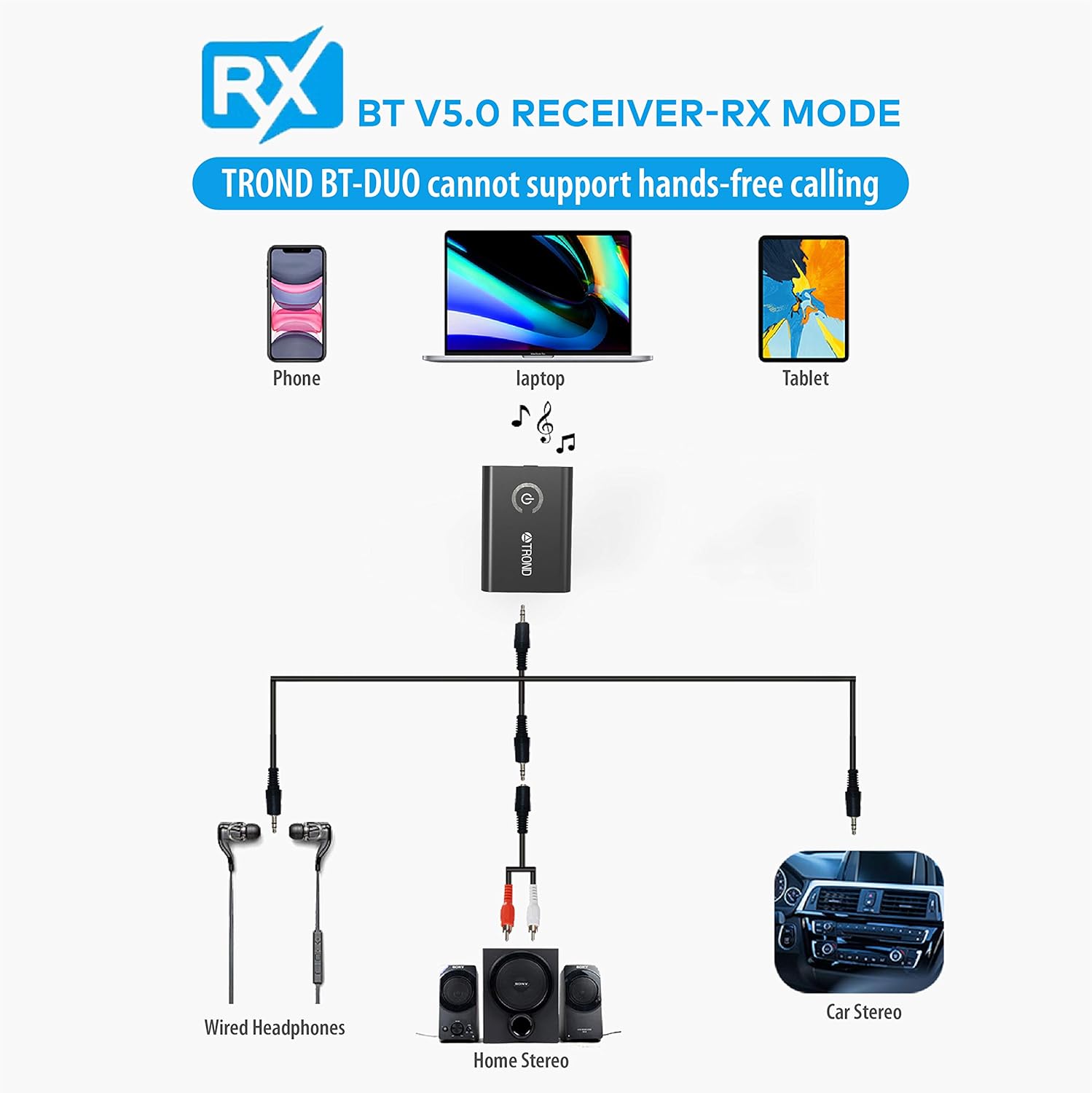
Figure 8: RX Mode Connection Diagram
Important Notes for RX Mode:
- The BT-DUO does not support hands-free phone calls as it lacks a built-in microphone.
- It can be paired to two phones or tablets, but it can only receive audio from one device at a time.
- The receiver will automatically power off if no device is paired within 6 minutes in standby or pairing mode.
- Car Bluetooth systems may require a pin code for pairing, which the BT-DUO cannot input. Therefore, it may not be able to stream music from an iPod to a car stereo in TX mode. However, it can function as a Bluetooth receiver for cars with an AUX jack.
6. Video Demonstrations
6.1 Short Tutorial for BT-DUO in TX/RX
Video 1: A concise guide demonstrating the basic setup and functionality of the TROND BT-DUO in both Transmitter and Receiver modes.
6.2 Tutorial for the usage of BT-DUO in Transmitter mode
Video 2: Detailed instructions on how to set up and use the TROND BT-DUO specifically in Transmitter mode, including connecting to various audio sources.
6.3 Pair with Headphones/Speakers
Video 3: A step-by-step guide on pairing the TROND BT-DUO with Bluetooth headphones or speakers for seamless audio connectivity.
7. Charging the Device
The TROND BT-DUO has a built-in 160mAh rechargeable lithium battery, providing approximately 8-10 hours of working time (TX/RX) on a full charge.
- Connect the provided USB to Micro USB charging cable to the BT-DUO's charging port and to a power source (e.g., USB wall adapter, computer USB port).
- The LED indicator will turn red while charging and turn off once fully charged (approximately 2 hours).
- The device can be used while charging.
Figure 9: Charging the TROND BT-DUO
8. Specifications
| Feature | Specification |
|---|---|
| Model Number | BT-DUO |
| Bluetooth Version | V5.0 |
| Internal Chipset | CSR8670, Class II |
| Transmit Range | Up to 33ft / 10m |
| Frequency | 2.402GHz - 2.480GHz |
| Codec (TX mode) | aptX Low Latency, aptX, SBC |
| Codec (RX mode) | aptX Low Latency, aptX, SBC |
| Built-in Battery | 160mAh / 3.7V Rechargeable Lithium battery |
| Working Time | Approx. 8-10 hours (TX/RX) |
| Charging Time | Around 2 hours, DC 5V / 300mA |
| Product Dimensions | 1.77 x 1.3 x 0.35 inches |
| Item Weight | 0.5 ounces |
9. Troubleshooting
- Sound Cut Out at Lower Volumes: When watching movies at very low volumes, the CSR chipset might not detect the signal, causing audio cut-outs. Try turning the TV's volume up for better performance.
- AptX Low Latency Not Working: Ensure both the TROND BT-DUO and your Bluetooth headphones/speaker support AptX Low Latency. If only one device supports it, the codec will downgrade, leading to potential audio lag.
- No Hands-Free Calls in RX Mode: The BT-DUO does not have a built-in microphone. When connected as a receiver, the in-line microphone of your wired headset will be disabled, preventing phone calls.
- Car Bluetooth Pairing Issues: Some car Bluetooth systems require a pin code for pairing. Unlike phones, Bluetooth transmitters like the BT-DUO do not have a keypad to enter pin codes, which may prevent direct streaming from an iPod to a car stereo in TX mode. However, it can function as a Bluetooth receiver for cars with an AUX jack.
- No Auto-Power On in Car: Due to its rechargeable battery design, the BT-DUO cannot be powered on automatically after you start the car engine.
10. Warranty & Support
TROND products come with an 18-month product warranty and a 30-day money-back guarantee. If you encounter any defective product or require technical assistance, please email our service team at support@trond.com. Our service team will usually respond to you within 24 hours.


