
Prime 23A
Prime 23A 12V Alkaline Battery User Manual
Model: 23A
1. Product Overview
The Prime 23A 12V Alkaline Battery is a compact and powerful battery designed for various small electronic devices. This pack typically includes multiple batteries, providing a reliable power source for your needs.
It is commonly used in:
- Small remote controls, including key fobs
- Garage door openers
- Security systems
- Keyless entry systems
- Compatible replacement for Craftmade Ceiling fan remote controls

Image: A pack of five Prime 23A 12V Alkaline Batteries, showing their compact size and labeling.
This battery is equivalent to several other common battery types, including 8LR23, ANSI-1181A, MN21, MS21, V23GA, VR22, A23, 1811A, 3LR50, LR-V08, SES-23A, EL12, 21/23, 23GA, MN21, and GP23AE.
2. Specifications
| Attribute | Detail |
|---|---|
| Brand | Prime |
| Model Number | 23A |
| Battery Cell Composition | Alkaline |
| Voltage | 12V |
| Number of Batteries | 5 (included in pack) |
| Item Weight | 0.798 ounces |
| Package Dimensions | 1.7 x 0.9 x 0.4 inches |
| Recommended Uses | Remote Controls |
3. Setup and Installation
Installing the Prime 23A 12V Alkaline Battery is a straightforward process. Always refer to the specific instructions for the device you are powering, as battery compartments and installation methods may vary.
- Identify Battery Compartment: Locate the battery compartment on your device (e.g., remote control, garage door opener). This often involves sliding a cover or unscrewing a small panel.
- Remove Old Batteries (if applicable): Carefully remove any old batteries from the compartment. Dispose of old batteries responsibly according to local regulations.
- Insert New Battery: Observe the polarity markings (+ and -) inside the battery compartment. Insert the new Prime 23A 12V Alkaline Battery, ensuring that the positive (+) end aligns with the positive terminal and the negative (-) end aligns with the negative terminal. Incorrect insertion can prevent the device from functioning and may damage the battery or device.
- Secure Compartment: Close the battery compartment cover securely.
- Test Device: Test your device to ensure it is functioning correctly with the new battery.

Image: A single Prime 23A 12V Alkaline Battery, highlighting its size and the warning label.
Important Safety Warning: As indicated on the battery, these batteries are not rechargeable. Attempting to recharge them may cause them to explode or leak. Always ensure correct polarity when inserting batteries. Do not mix with different battery types or use in an enclosed mixer.
4. Operation
Once properly installed, the Prime 23A 12V Alkaline Battery will provide power to your compatible electronic device. The battery operates by delivering a consistent 12-volt current to the device's circuitry.
No specific operational steps are required for the battery itself beyond correct installation. The device it powers will function as designed, drawing energy from the battery as needed.
5. Maintenance and Storage
Proper maintenance and storage can help maximize the lifespan and safety of your Prime 23A 12V Alkaline Batteries.
Storage
- Store unused batteries in their original packaging in a cool, dry place at room temperature.
- Avoid extreme temperatures, both hot and cold, as these can reduce battery performance and lifespan.
- Keep batteries away from direct sunlight and sources of heat.
- Do not store batteries loose in a drawer or bag where they could come into contact with metal objects (like coins or keys), which can cause a short circuit.
Disposal
When batteries are depleted, dispose of them responsibly. Do not dispose of batteries in household trash. Many communities have recycling programs for batteries. Check with your local waste management facility for proper disposal guidelines in your area.
Safety Precautions
- Do not attempt to recharge these alkaline batteries.
- Do not disassemble, crush, or puncture batteries.
- Do not expose batteries to fire or water.
- Keep batteries out of reach of small children and pets. If swallowed, seek immediate medical attention.
- If a battery leaks, avoid contact with the fluid. If contact occurs, wash thoroughly with soap and water.
6. Troubleshooting
If your device is not functioning after installing a new Prime 23A 12V Alkaline Battery, consider the following troubleshooting steps:
- Check Battery Orientation: Ensure the battery is inserted with the correct positive (+) and negative (-) polarity as indicated in the device's battery compartment.
- Verify Battery Contact: Make sure the battery is seated firmly and making good contact with the device's terminals. Sometimes, terminals can be slightly bent or corroded.
- Test Another Battery: If you have another new battery from the pack, try installing it to rule out a rare defective battery.
- Inspect Device: Check the device itself for any signs of damage, corrosion in the battery compartment, or other issues that might prevent it from working.
- Consult Device Manual: Refer to the instruction manual for the specific device you are using, as it may have device-specific troubleshooting tips.
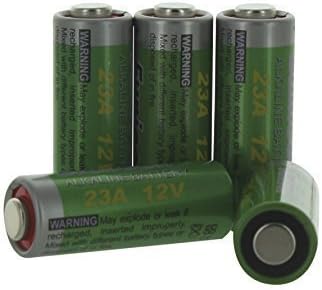
Image: A group of Prime 23A 12V Alkaline Batteries, illustrating the typical packaging and individual units.
7. Warranty and Support
Prime 23A 12V Alkaline Batteries are designed for reliable performance. The manufacturer guarantees these batteries are fresh from the factory.
Warranty: If the batteries do not last for more than 1 year from the date of purchase, please contact the seller or manufacturer for a replacement.
For further assistance or inquiries, please refer to the contact information provided by your retailer or the Prime brand's official support channels.
Related documents23A


Ask a question about this manual
Ask about setup, troubleshooting, compatibility, parts, safety, or missing instructions. Manuals+ will review the question and use this page’s manual context to help answer it.