
1. Introduction
This manual provides instructions for the installation, operation, and maintenance of the UHPPOTE Wiegand 26/34 Bit 125KHz EM RFID Card Door Entry Reader Keypad. This device is designed to be an integral part of a Wiegand protocol access control system, providing secure entry via 125KHz EM RFID cards or keypad input. It features a waterproof design suitable for both indoor and outdoor applications.
Important: This RFID card reader keypad is not a standalone access control unit. It must be connected to and controlled by a compatible Wiegand protocol access controller (e.g., an access control panel or fingerprint device).
2. Safety Information
- Ensure all wiring is performed by qualified personnel and complies with local electrical codes.
- Disconnect power before performing any installation or maintenance.
- Use only the specified 12V DC power supply.
- Avoid exposing the device to extreme temperatures or corrosive environments beyond its operating specifications.
- Do not attempt to disassemble or modify the device, as this will void the warranty and may cause damage or injury.
3. Product Overview
The UHPPOTE RFID Card Door Entry Reader Keypad is a robust and versatile access control component. It features a durable plastic housing, a backlit keypad for code entry, and an integrated RFID reader for card-based access. Visual and audible feedback is provided through an LED indicator and a buzzer.
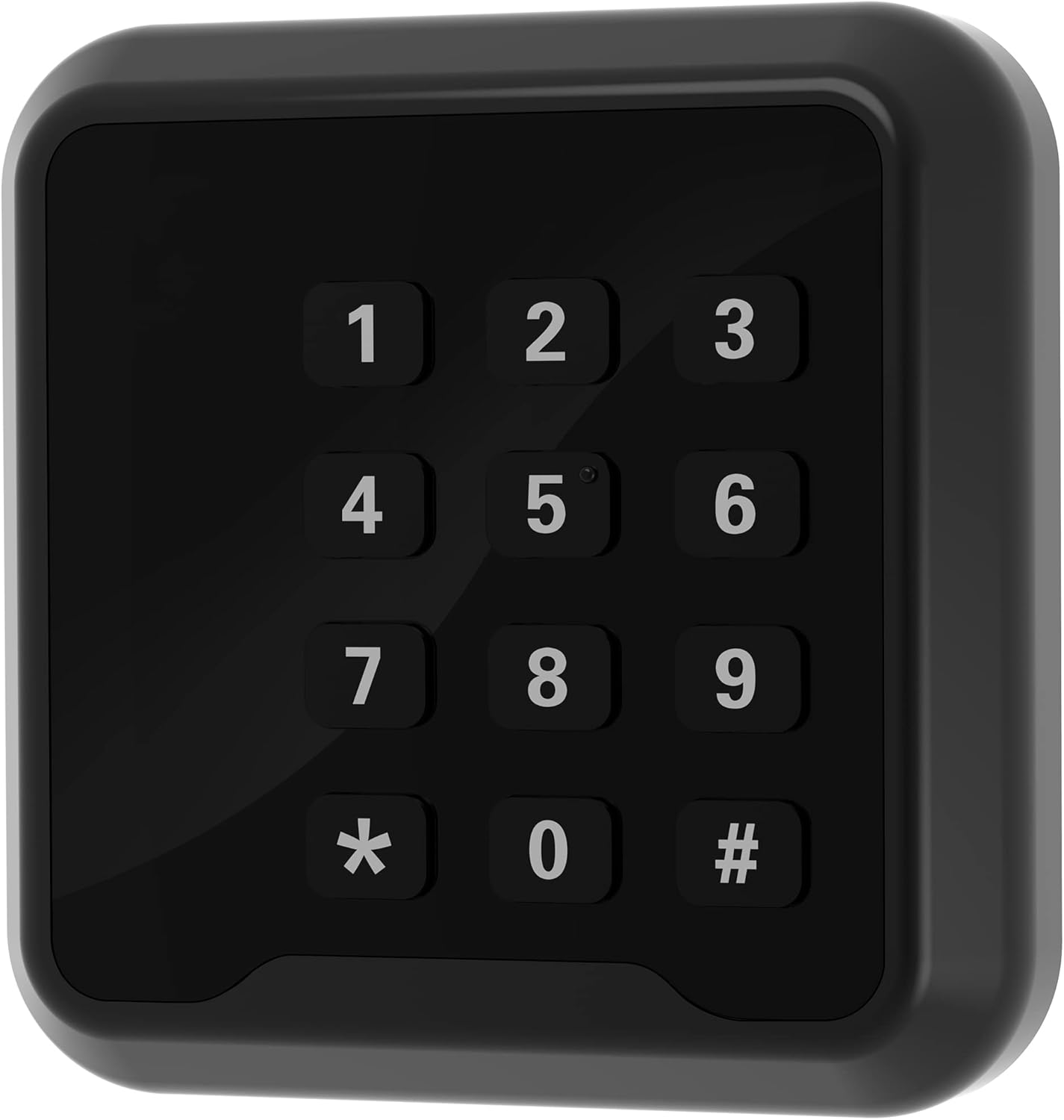
Figure 3.1: Front view of the RFID Keypad with illuminated keys.

Figure 3.2: Back view of the RFID Keypad showing wiring harness and model label.
Key Features:
- Wiegand 26/34 Bit Output: Compatible with most standard access control panels.
- 125KHz EM RFID Reader: Supports standard EM cards for proximity access.
- Waterproof Structure: Epoxy potting design allows for reliable outdoor installation.
- LED Light & Buzzer Alert: Provides visual (red/green LED) and audible feedback for card swipes and keypad entries.
- Durable Keypad: For secure code entry.
4. Setup and Installation
Proper installation is critical for the reliable operation of your RFID reader keypad. Ensure you have a compatible Wiegand access controller before proceeding.
4.1 Wiring Diagram
Connect the reader to your access control panel according to the following wiring color code. Refer to your access controller's manual for specific Wiegand input connections.
| Wire Color | Function |
|---|---|
| Red | +12V DC Power Input |
| Black | GND (Ground) |
| Green | D0 (Wiegand Data 0) |
| White | D1 (Wiegand Data 1) |
| Yellow | BEEP (Buzzer Control) |
| Blue | LED (LED Indicator Control) |
| Gray | WG34 (Wiegand 34 Bit Selection) |
Note: The Gray wire (WG34) is typically connected to GND for Wiegand 34-bit output. If left unconnected, it defaults to Wiegand 26-bit output. Consult your access controller's specifications for the required Wiegand format.
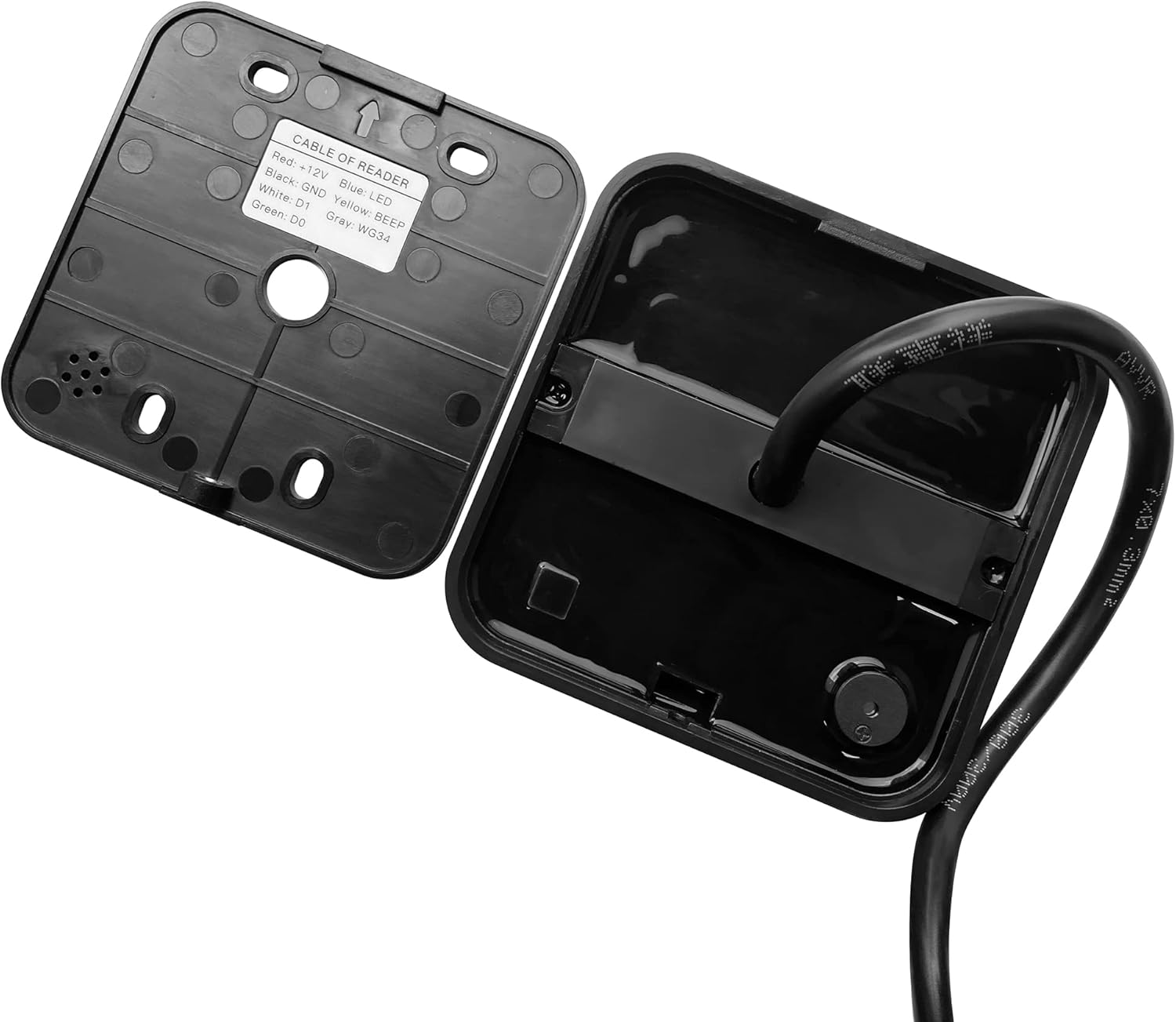
Figure 4.1: Internal wiring connections and label.
4.2 Mounting
The keypad is designed for wall mounting. Its waterproof construction allows for both indoor and outdoor installation. Secure the backplate to a flat surface using appropriate screws, then attach the keypad unit.
4.3 Wiring Demonstration Video
For a visual guide on connecting the Wiegand access control system, please refer to the video below:
Video 4.1: Wiring of Wiegand Access Control System. This video demonstrates the general wiring process for a Wiegand access control system, including connections to an access controller and an electric lock.
5. Operating Instructions
Once properly installed and connected to an access controller, the UHPPOTE RFID reader keypad facilitates entry through two primary methods:
5.1 RFID Card Access
- Present a valid 125KHz EM RFID card or key fob to the reader's surface.
- The reader will transmit the card data to the connected access controller.
- If the card is authorized by the access controller, the LED indicator will typically turn green, and the buzzer will sound once, indicating successful access.
- If the card is unauthorized, the LED indicator may remain red or flash, and the buzzer may sound multiple times, indicating denied access.

Figure 5.1: Using an RFID card for access.
5.2 Keypad Code Entry
- Enter your authorized access code using the numeric keypad.
- Press the '#' key (or designated enter key) to submit the code.
- The keypad will transmit the entered code to the connected access controller.
- The access controller will process the code and grant or deny access, indicated by the LED and buzzer feedback from the reader.

Figure 5.2: Red LED indicating denied access or standby.

Figure 5.3: Green LED indicating successful access.
6. Maintenance
- Cleaning: Wipe the surface of the reader with a soft, damp cloth. Do not use abrasive cleaners or solvents.
- Connection Check: Periodically inspect wiring connections for any signs of corrosion or loosening, especially in outdoor installations.
- Firmware: This device does not typically require user-upgradable firmware. Any updates would be handled by the access control system it is connected to.
7. Troubleshooting
| Problem | Possible Cause | Solution |
|---|---|---|
| Reader is unresponsive (no LED, no buzzer). | No power or incorrect power connection. | Check the +12V and GND wiring. Ensure the power supply is active and providing 12V DC. |
| RFID card not detected or access denied. | Incorrect card type, card not enrolled, or Wiegand data issue. | Ensure you are using a 125KHz EM RFID card. Verify the card is correctly enrolled in your access control system. Check Wiegand D0/D1 wiring to the controller. |
| Keypad entry does not grant access. | Incorrect code, code not enrolled, or Wiegand data issue. | Verify the entered code is correct and enrolled in your access control system. Check Wiegand D0/D1 wiring. |
| LED or Buzzer not functioning as expected. | Incorrect wiring for BEEP/LED control, or controller not sending signals. | Check the Yellow (BEEP) and Blue (LED) wire connections. Ensure your access controller is configured to send appropriate signals to these inputs. |
8. Specifications
- Model: UT0112-1003A
- Operating Voltage: 12V DC
- Material: Plastic
- Item Weight: 168 g
- RFID Frequency: 125KHz EM
- Output Format: Wiegand 26-bit (default), Wiegand 34-bit (selectable via Gray wire)
- Waterproof Rating: Yes (Epoxy potting design)
- Color: Black
- Operating Temperature: -20°C to +60°C (approx. -4°F to 140°F)
- Operating Humidity: 10% to 90% RH (non-condensing)
9. Warranty and Support
This UHPPOTE product comes with a 3-Year Manufacturer Warranty from the date of purchase. This warranty covers defects in materials and workmanship under normal use.
For technical support, warranty claims, or further inquiries, please contact UHPPOTE customer service or visit the official UHPPOTE store on Amazon: UHPPOTE Store.