
1. Introduction
Thank you for choosing the DUNLOP Men's Chronograph Watch, Model DUN-272-G01. This watch combines classic analog display with modern digital functionalities, including a chronograph, dual timezone, calendar, alarm, and backlight. This manual provides detailed instructions to help you understand and operate your watch effectively.
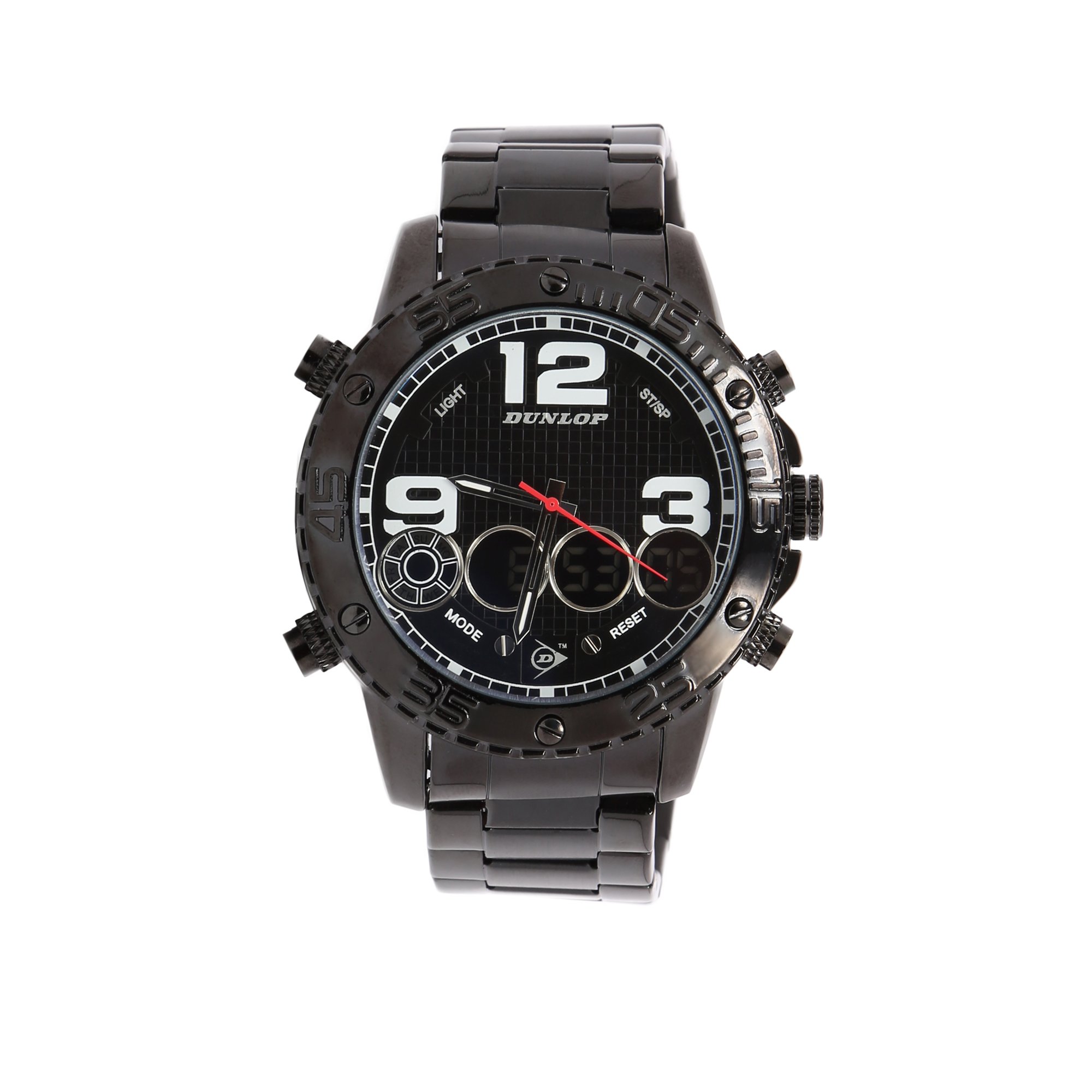
Figure 1: Front view of the DUNLOP Men's Chronograph Watch.
Key Features:
- Analog and Digital Display
- Multi-Functional: Chronograph, Dual Timezone, Calendar (Day and Date), Alarm, Stop Watch
- EL Backlight for low-light conditions
- Quartz Movement for accurate timekeeping
- Water Resistant up to 50 meters
- Durable Stainless Steel Platinum Plated Band
2. Initial Setup
2.1 Setting the Time and Date
- Pull the Crown: Gently pull the crown (the knob on the side of the watch) out to the first or second click position. Refer to the diagram for crown positions.
- Set Time: Rotate the crown to adjust the hour and minute hands to the correct time. For digital time, use the 'MODE' button to navigate and 'RESET' button to adjust.
- Set Date: If your watch has a date display, pull the crown to the first click (if it has two clicks) and rotate it to set the date.
- Push the Crown Back: Once the time and date are set, push the crown back into its normal position to start the watch movement.

Figure 2: Side view illustrating the crown and function buttons.
2.2 Adjusting the Watch Band
The stainless steel band can be adjusted by removing links. This procedure typically requires specialized tools and is best performed by a professional watch repair service to avoid damage to the band or clasp.
3. Operating Your Watch
3.1 Using the Chronograph (Stopwatch)
- Start: Press the 'START' button (usually top right) to begin timing.
- Stop/Lap: Press the 'START' button again to stop the timer or record a lap time.
- Reset: Press the 'RESET' button (usually bottom right) to clear the chronograph to zero.
3.2 Dual Timezone Function
To set the second timezone, refer to the digital display settings. Use the 'MODE' button to cycle through functions until you reach the dual timezone setting, then use the 'RESET' button to adjust the time.
3.3 Alarm Function
Access the alarm setting via the 'MODE' button. Once in alarm mode, use the 'RESET' button to set the desired alarm time. Press 'START' to activate or deactivate the alarm.
3.4 EL Backlight
Press the 'LIGHT' button (usually top left) to illuminate the digital display for a few seconds, allowing visibility in low-light conditions.
4. Care and Maintenance
4.1 Cleaning Your Watch
Wipe the watch case and band regularly with a soft, dry cloth. For stainless steel bands, a slightly damp cloth can be used, followed by immediate drying. Avoid using harsh chemicals or abrasive materials.
4.2 Battery Replacement
Your watch is powered by a quartz battery. When the watch stops or the display fades, it indicates the battery needs replacement. Battery replacement should be performed by a qualified watch technician to ensure proper sealing and water resistance.

Figure 3: Rear view of the watch, showing the stainless steel case back.
4.3 Water Resistance (50 Meters)
This watch is water resistant up to 50 meters (5 ATM). This means it is suitable for short periods of recreational swimming, but not for diving or snorkeling. Do not operate the crown or buttons while the watch is wet or submerged, as this can compromise the water resistance.
- Avoid: Hot water, steam (saunas, hot tubs), chemical exposure.
- Ensure: Crown is fully pushed in before contact with water.
5. Troubleshooting
| Problem | Possible Cause | Solution |
|---|---|---|
| Watch not running / Digital display blank | Depleted battery | Replace battery (professional service recommended). |
| Incorrect time / Date | Time/date not set correctly or crown pulled out | Refer to Section 2.1 to reset time and date. Ensure crown is fully pushed in. |
| Chronograph not resetting to zero | Calibration issue | Consult a watch technician for recalibration. |
| Moisture inside watch | Compromised water resistance | Immediately take to a professional watch repair service to prevent further damage. |
6. Specifications
| Feature | Detail |
|---|---|
| Model Number | DUN-272-G01 |
| Brand | DUNLOP |
| Display Type | Analog-Digital |
| Movement Type | Quartz |
| Case Material | Stainless Steel |
| Case Diameter | 48 Millimetres |
| Case Thickness | 7.5 Millimetres |
| Band Material | Stainless Steel Platinum Plated |
| Band Width | 20 Millimetres |
| Water Resistance Depth | 50 Metres (5 ATM) |
| Special Features | Chronograph, Dual Timezone, Calendar, Alarm, Stop Watch, EL Backlight |
| Clasp Type | Buckle (Push-Button) |
7. Warranty and Support
7.1 Warranty Information
Your DUNLOP watch is covered by a limited warranty against manufacturing defects. Please retain your proof of purchase for warranty claims. The warranty typically covers the watch movement, hands, and dial. It does not cover damage resulting from improper handling, accidents, unauthorized repairs, or normal wear and tear of the case, crystal, or strap.
For specific warranty terms and conditions, please refer to the warranty card included with your purchase or visit the official DUNLOP website.
7.2 Customer Support
If you encounter any issues or have questions regarding your DUNLOP watch, please contact our customer support. You can find contact details on the official DUNLOP website or through your retailer.
When contacting support, please have your watch model number (DUN-272-G01) and purchase details readily available.