
Introduction
Thank you for choosing the Eheim Pro 4+ Canister Filter. This manual provides essential information for the proper setup, operation, and maintenance of your filter to ensure optimal performance and longevity. Please read these instructions carefully before initial use.
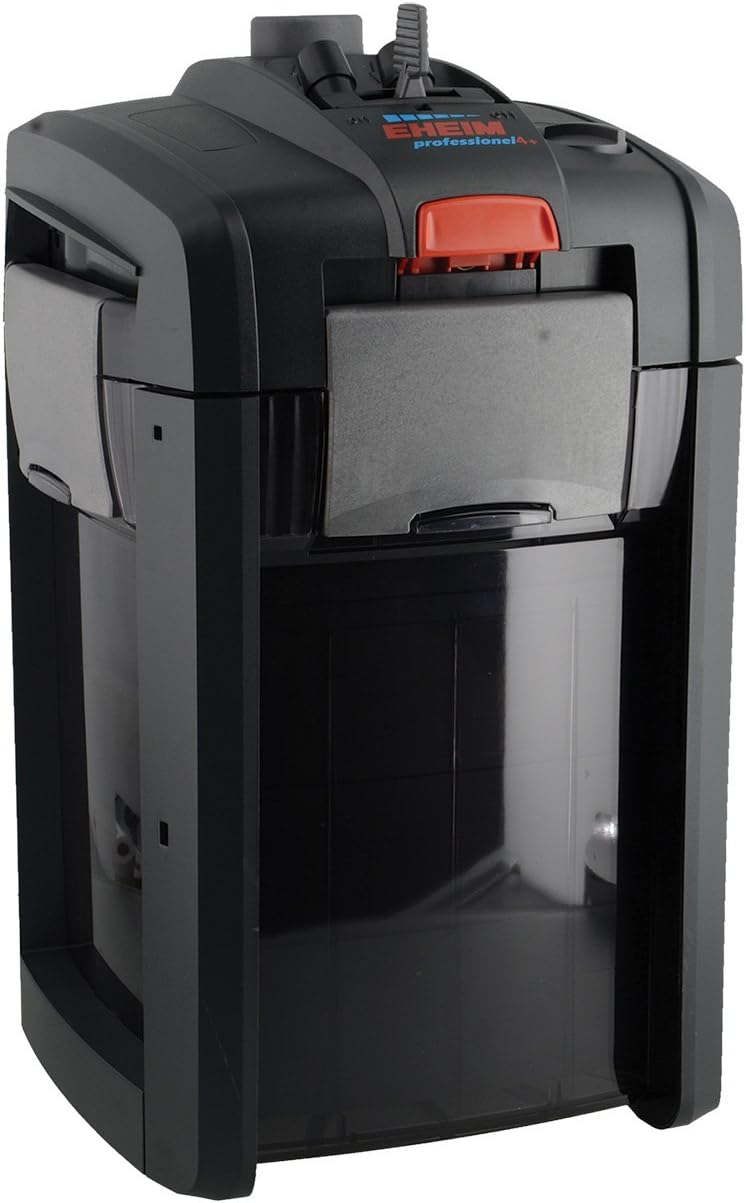
Image: The Eheim Pro 4+ Canister Filter, a compact and efficient external filter system for aquariums.
Safety Instructions
- Always disconnect the filter from the power supply before performing any maintenance or cleaning.
- Ensure all electrical connections are dry and secure.
- Do not operate the filter if any part is damaged. Contact customer support for replacement parts.
- This appliance is designed for indoor use only and for filtering aquarium water.
- Keep out of reach of children.
Package Contents
Verify that all components are present before beginning installation:
- Eheim Pro 4+ Canister Filter Unit
- Filter Media Baskets (pre-filled with filter pads and media)
- Inlet and Outlet Hoses
- Inlet Pipe with Strainer
- Outlet Pipe (Spray Bar)
- Installation Accessories (suction cups, clips, connectors)
- Quick-release Adapter
Setup
1. Preparing the Filter Media
The Eheim Pro 4+ comes with pre-installed filter media. It is recommended to rinse the mechanical filter pads (blue sponges) and biological media (e.g., Eheim Substrat Pro) thoroughly under lukewarm tap water to remove any manufacturing dust. Do not rinse biological media with chlorinated water, as this can harm beneficial bacteria.
2. Connecting Hoses and Pipes
- Attach the inlet pipe with the strainer to one end of the inlet hose. Secure with a hose clamp if provided.
- Attach the spray bar (outlet pipe) to one end of the outlet hose. Secure with a hose clamp if provided.
- Connect the other end of the inlet hose to the 'IN' port on the filter head.
- Connect the other end of the outlet hose to the 'OUT' port on the filter head.
- Position the inlet pipe and spray bar inside your aquarium using the provided suction cups. The inlet strainer should be near the bottom of the tank, and the spray bar should be positioned to create good surface agitation.
3. Priming the Filter
Before plugging in the filter, it must be filled with water to prevent airlock and damage to the impeller.
- Ensure the quick-release adapter on the filter head is in the 'open' position (lever down).
- Press the priming button (often a large red button on top of the filter head) repeatedly until water begins to flow into the filter canister from the aquarium. This may take several presses.
- Once the canister is full and water flows freely through the outlet hose, you can plug the filter into a grounded electrical outlet.
Operating Instructions
Starting the Filter
After successful priming, plug the filter into a suitable power outlet. The filter should start immediately, and water will begin to circulate. A small amount of air may be expelled initially; this is normal. The filter is designed for continuous operation.
Flow Adjustment (if applicable)
Some Eheim Pro 4+ models feature a flow adjustment lever on the quick-release adapter. This allows you to regulate the water flow rate. Adjust as needed for your aquarium's requirements.
"Xtender" Function (Pro 4+ specific)
The Eheim Pro 4+ series includes an "Xtender" function. If the fine filter pad becomes clogged and flow significantly reduces, you can activate the Xtender function by moving a lever on the filter head. This bypasses the fine filter pad, allowing water to flow through the coarser media, extending the time between cleanings. This is a temporary solution and indicates that the filter needs cleaning soon.
Maintenance
Regular maintenance is crucial for the efficient operation and longevity of your Eheim filter. The frequency of cleaning depends on your aquarium's bioload.
Routine Cleaning (Monthly/Bi-monthly)
- Disconnect Power: Always unplug the filter from the power outlet.
- Close Valves: Close the inlet and outlet valves on the quick-release adapter.
- Remove Adapter: Press the red release button and detach the quick-release adapter from the filter head.
- Transport Filter: Carefully carry the filter to a sink or bucket.
- Open Canister: Release the clips on the sides of the filter and remove the motor head.
- Clean Media:
- Rinse mechanical filter pads (blue sponges) thoroughly in old aquarium water (from a water change) or dechlorinated tap water. This preserves beneficial bacteria. Replace heavily soiled or degraded pads.
- Rinse biological media (e.g., Substrat Pro) gently in old aquarium water. Avoid aggressive cleaning that could remove beneficial bacteria.
- Clean the fine filter pad (white pad) or replace it if necessary.
- Clean Impeller: Remove the impeller cover and carefully clean the impeller and its shaft. Ensure no debris is obstructing its movement.
- Reassemble: Reassemble the filter in reverse order, ensuring all seals are properly seated and clips are securely fastened.
- Restart: Reconnect the quick-release adapter, open the valves, prime the filter, and plug it back in.
Hose and Pipe Cleaning (Every 3-6 Months)
Over time, algae and debris can build up in the hoses and pipes, reducing flow. Use a flexible brush (hose brush) to clean the inside of the hoses and pipes. This can be done during a routine filter cleaning.
Troubleshooting
| Problem | Possible Cause | Solution |
|---|---|---|
| Filter not starting / No flow |
|
|
| Reduced flow rate |
|
|
| Loud noise / Vibrations |
|
|
| Leaking |
|
|
Specifications
| Feature | Detail |
|---|---|
| Model | 6666 (Pro 4+) |
| Brand | Eheim |
| Dimensions (L x W x H) | 10 x 8 x 6 inches (approximate) |
| Weight | 8 Pounds (approximate) |
| Country of Origin | Germany |
| Target Audience | Fish (Aquarium Use) |
| Filter Type | Canister Filter |
| Special Features | Xtender function, easy priming, quiet operation |
Warranty and Support
Eheim products are known for their quality and durability. For specific warranty information and terms, please refer to the warranty card included with your product or visit the official Eheim website. In case of technical issues or questions not covered in this manual, please contact Eheim customer support.
Manufacturer: Prime Pet Deals - Code 2 (as listed on Amazon, but Eheim is the brand)
Brand Website: www.eheim.com (Example link, actual link might vary)

