
1. Important Safety Information
Please read all instructions carefully before using the SOAIY Aurora Borealis Light Projector. Keep this manual for future reference.
- Do not expose the device to water or moisture.
- Do not attempt to disassemble or modify the device. This will void the warranty.
- Keep the device away from direct heat sources.
- Use only the provided power adapter or a compatible 5V USB power source.
- Avoid direct eye exposure to the laser light.
- This device is intended for indoor use only.
2. Product Overview
The SOAIY Aurora Borealis Light Projector creates a relaxing and immersive light show with multiple color modes and a built-in speaker. It can function as both a night light and a projector.
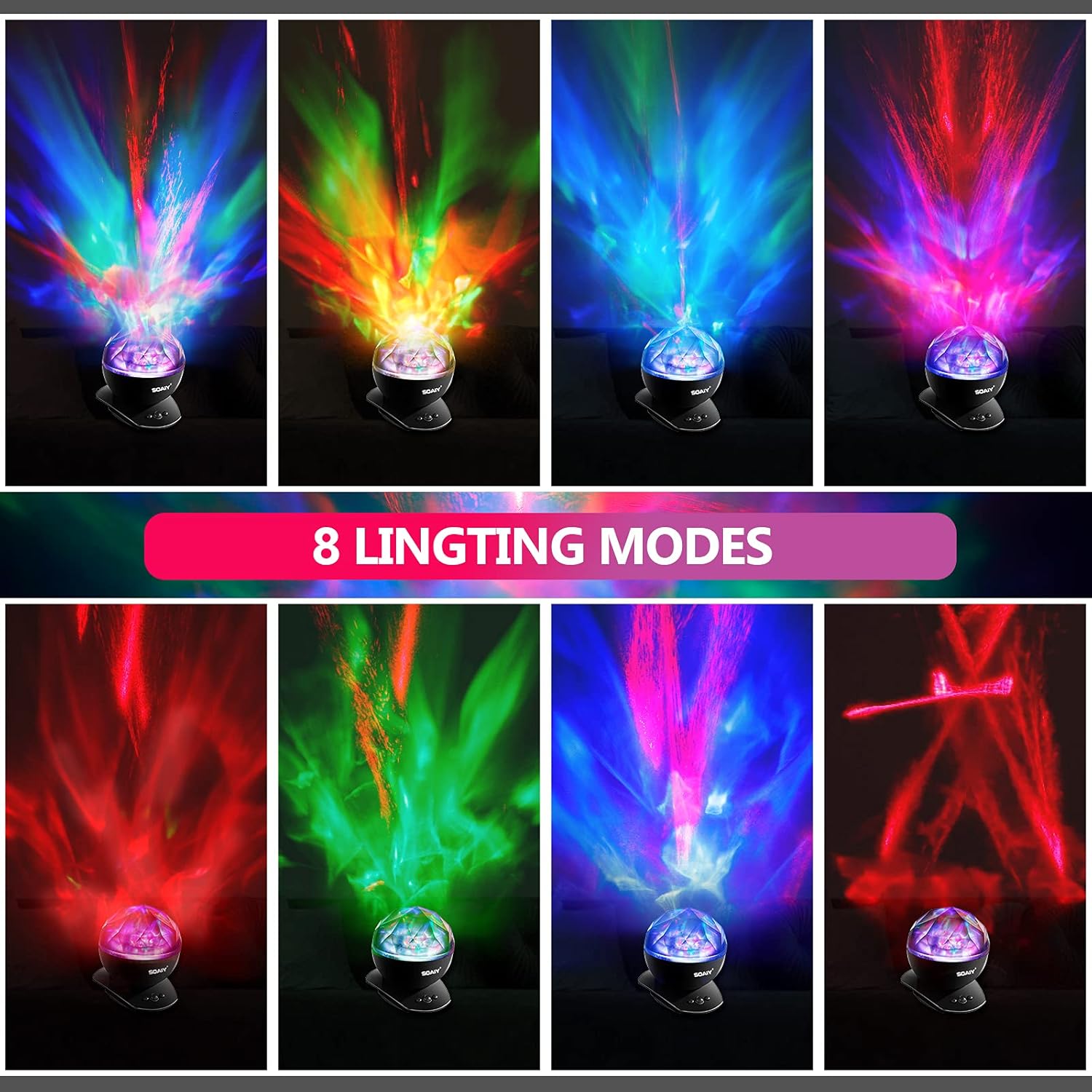
The projector features a remote control for convenient operation, a built-in speaker for audio playback, and a timer function for automatic shut-off.

3. Package Contents
Verify that all items are present in the package:
- SOAIY Aurora Borealis Light Projector
- Remote Control
- USB Power Cable
- AC Power Adapter
- 3.5mm Audio Cable
- Instruction Manual
4. Setup
4.1 Power Connection
- Connect the USB power cable to the projector's power input port.
- Plug the other end of the USB cable into the provided AC power adapter, then plug the adapter into a standard wall outlet. Alternatively, you can connect the USB cable to any compatible 5V USB power source (e.g., a power bank or computer USB port).
4.2 Remote Control Battery Installation
The remote control requires 1 Lithium Ion battery (not always included, check packaging). Open the battery compartment on the back of the remote and insert the battery, ensuring correct polarity.
4.3 Placement
Place the projector on a stable, flat surface. For optimal projection, position it in the center of the room or desired projection area. The projector head can be tilted up to 45 degrees to adjust the projection angle on walls or ceilings.

5. Operating Instructions
5.1 Power On/Off
Press the Power button on the remote control or the main unit to turn the projector on or off.
5.2 Light Projection Modes
The projector offers 8 distinct lighting modes, combining red, blue, green, and multicolor effects. Use the Mode button on the remote to cycle through the available projection patterns.

5.3 Brightness Adjustment
Adjust the projection brightness to one of three levels (30%, 60%, 100%) using the Brightness buttons on the remote control.

5.4 Rotation Control
Press the Rotation button on the remote to turn the light rotation feature on or off.
5.5 Built-in Speaker Function
The projector includes a built-in speaker. To play audio:
- Connect one end of the provided 3.5mm audio cable to the audio input port on the projector.
- Connect the other end of the audio cable to the headphone jack of your audio device (e.g., smartphone, MP3 player, tablet).
- Play music or audio from your connected device. Adjust the volume using the Volume Up/Down buttons on the remote control or directly on your audio device.

5.6 Timer Function
Set the projector to automatically shut off after a specified duration:
- Press the Timer button on the remote control to cycle through 1-hour, 2-hour, 4-hour, or Timer Off settings.
- The projector will automatically power down after the selected time.
5.7 Two-Way Use
The projector can be used in two ways:
- With the Dome On: Functions as a gentle night light, projecting subtle patterns.
- With the Dome Off: Functions as a full aurora projector, casting dynamic light shows across the ceiling or walls.

6. Maintenance
6.1 Cleaning
To clean the projector, gently wipe the exterior with a soft, dry cloth. Do not use abrasive cleaners, solvents, or harsh chemicals, as these may damage the surface or internal components.
6.2 Storage
When not in use, store the projector in a cool, dry place, away from direct sunlight and extreme temperatures.
7. Troubleshooting
| Problem | Possible Cause | Solution |
|---|---|---|
| Projector does not turn on. | No power connection or faulty power source. | Ensure the power cable is securely connected and the power adapter is plugged into a working outlet. Try a different USB power source. |
| Remote control is not working. | Remote battery is dead or incorrectly installed. No line of sight. | Replace the remote control battery, ensuring correct polarity. Point the remote directly at the projector's IR receiver. |
| No sound from the speaker. | Audio cable not connected properly. Volume too low. | Ensure the 3.5mm audio cable is fully inserted into both the projector and your audio device. Increase the volume on both the projector (via remote) and your audio device. |
| Buzzing sound from the unit. | Internal component issue. | If a persistent buzzing sound occurs, discontinue use and contact customer support for assistance. |
| Light projection is dim or unclear. | Brightness setting is low. Lens is dirty. | Increase the brightness setting using the remote. Gently clean the projector lens with a soft, dry cloth. |
8. Specifications
- Model Name: Lamp006
- Product Dimensions: 4.7"D x 5.7"W x 4.7"H
- Item Weight: 10.9 Ounces
- Material: Stainless Steel
- Light Source Type: LED
- Light Colors: Red, Blue, Green, Multicolor
- Number of Light Sources: 1
- Power Source: Plug-in Electric
- Voltage: 5 Volts
- Wattage: 1 Watt
- Control Method: Remote
- Indoor/Outdoor Usage: Indoor
- Included Components: Remote Control
- GTIN (UPC): 799637099074
9. Warranty and Support
9.1 Warranty Information
This SOAIY product comes with a 12-month exchange warranty from the date of purchase. This warranty covers manufacturing defects and malfunctions under normal use.
9.2 Customer Support
If you encounter any issues or have questions regarding your SOAIY Aurora Borealis Light Projector, please contact our customer support team. To do so, navigate to your order details on the platform where you made the purchase and select the 'Contact Seller' option. Please provide your order number and a detailed description of the issue for prompt assistance.
For more information about SOAIY products, you may visit the official SOAIY Store: SOAIY Store on Amazon


