
Zenith MPC-680P
Zenith MPC-680P Mobile Multi Case & Sticky Notes Set
User Manual
1. Introduction
Thank you for purchasing the Zenith MPC-680P Mobile Multi Case & Sticky Notes Set. This versatile product is designed to help you organize your mobile device and notes efficiently. It features a dedicated pocket for your smartphone, a pen holder, and multiple sticky note pads, all within a compact and portable case. Please read this manual carefully to ensure proper use and maintenance of your new multi-case.
2. Product Overview
The Zenith MPC-680P is a practical accessory for daily organization. It combines a protective case for your mobile phone with essential stationery items.
- Mobile Phone Pocket: A clear, touch-sensitive pocket designed to hold your smartphone, allowing interaction without removal.
- Sticky Note Pads: Includes various sizes and colors of sticky notes for quick reminders and messages.
- Pen Holder: A convenient loop to secure a pen or stylus.
- Compact Design: Foldable case with a secure closure for portability.

Figure 2.1: The Zenith MPC-680P Mobile Multi Case shown open, displaying its compartments for a smartphone and various sticky notes. A separate, closed case is visible in the background.
3. Setup
Follow these steps to set up your Zenith MPC-680P Mobile Multi Case:
- Unpack: Carefully remove the multi-case and sticky notes from their packaging.
- Insert Mobile Phone: Open the case and slide your smartphone into the clear, designated pocket. Ensure it lies flat for optimal touchscreen responsiveness.
- Arrange Sticky Notes: Place the included sticky note pads into their respective slots within the case.
- Add Pen: Insert your preferred pen or stylus into the elastic pen holder loop.
4. Operating Instructions
The multi-case is designed for ease of use in various situations.
4.1 Using Your Mobile Phone
The clear pocket allows you to operate your smartphone's touchscreen without removing it from the case. This is ideal for quick checks, notifications, or light usage.
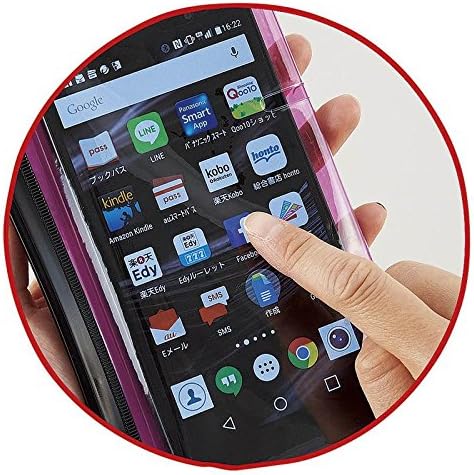
Figure 4.1: A hand is shown touching the screen of a smartphone through the clear protective layer of the multi-case, demonstrating touch functionality.
4.2 Using Sticky Notes
The integrated sticky notes are perfect for jotting down quick reminders, to-do lists, or messages.
- Peel off a sticky note from the pad.
- Write your note clearly.
- Adhere the note to any desired surface.

Figure 4.2: A hand is shown writing on one of the sticky notes included in the multi-case, illustrating its practical use for quick notes.
4.3 Utilizing the Pen Holder
The pen holder keeps your writing instrument secure and readily accessible.
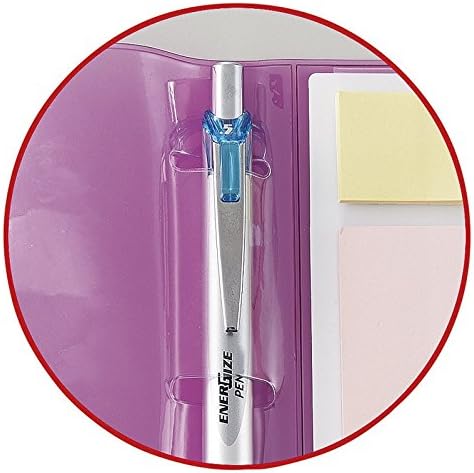
Figure 4.3: A close-up view of a pen securely held within the dedicated pen loop of the multi-case, highlighting its integrated design.
5. Maintenance
To ensure the longevity of your Zenith MPC-680P Mobile Multi Case, follow these simple maintenance guidelines:
- Cleaning: Wipe the exterior of the case with a soft, slightly damp cloth. Avoid harsh chemicals or abrasive cleaners.
- Sticky Notes: Replace sticky note pads when they run out. Ensure replacement pads fit the designated slots.
- Storage: Store the case in a cool, dry place away from direct sunlight when not in use.
6. Troubleshooting
If you encounter any issues with your multi-case, refer to the following common problems and solutions:
- Mobile Phone Not Fitting: Ensure your phone's dimensions are compatible with the case's pocket. The pocket is designed for standard smartphone sizes.
- Touchscreen Unresponsive Through Case: Ensure your phone is positioned flat against the clear panel without any air bubbles or debris between the screen and the case. Clean both surfaces if necessary.
- Sticky Notes Not Adhering: The adhesive on sticky notes can weaken over time or with repeated use. Replace the sticky note pad with a new one.
- Case Not Closing Properly: Check if any items inside the case are overfilling it or obstructing the zipper/closure mechanism. Remove excess items if needed.
7. Specifications
| Feature | Detail |
|---|---|
| Brand | Zenith |
| Model Number | MPC-680P |
| Item Weight | 2.32 ounces |
| Package Dimensions | 7.87 x 4.65 x 0.39 inches |
| Date First Available | March 18, 2016 |
8. Warranty and Support
This product is designed for durability and functionality. For specific warranty information, please refer to the documentation provided at the time of purchase or contact your retailer. For any product-related inquiries or support, please reach out to the customer service department of your point of purchase.
Ask a question about this manual
Ask about setup, troubleshooting, compatibility, parts, safety, or missing instructions. Manuals+ will review the question and use this page’s manual context to help answer it.