
Introduction
This manual provides comprehensive instructions for the safe and effective use of your Rextin WS2811 Digital Addressable LED Pixel String Lights. These lights are designed for versatile applications, offering full RGB color control for various decorative and functional lighting needs.
Safety Information
- Ensure the power supply voltage matches the product's specified voltage (DC5V). Incorrect voltage can damage the lights.
- Do not submerge connectors in water unless explicitly stated as waterproof. While the pixels are IP68 waterproof, connections may not be.
- Avoid excessive bending or twisting of the wires to prevent damage.
- Keep out of reach of children.
- Disconnect power before installation, maintenance, or troubleshooting.
Package Contents
- 50pcs Rextin WS2811 Digital Addressable LED Pixel String Lights (DC5V)
Product Overview
The Rextin WS2811 LED Pixel String Lights feature individually addressable RGB LEDs, allowing for dynamic color changes and custom lighting effects. Each pixel is 12mm in diameter and is connected by durable wiring.


Setup
1. Power Supply Connection
These lights require a DC 5V power supply. Ensure your power supply is compatible with the voltage and provides sufficient current for the number of pixels connected. Each pixel consumes approximately 0.3W.
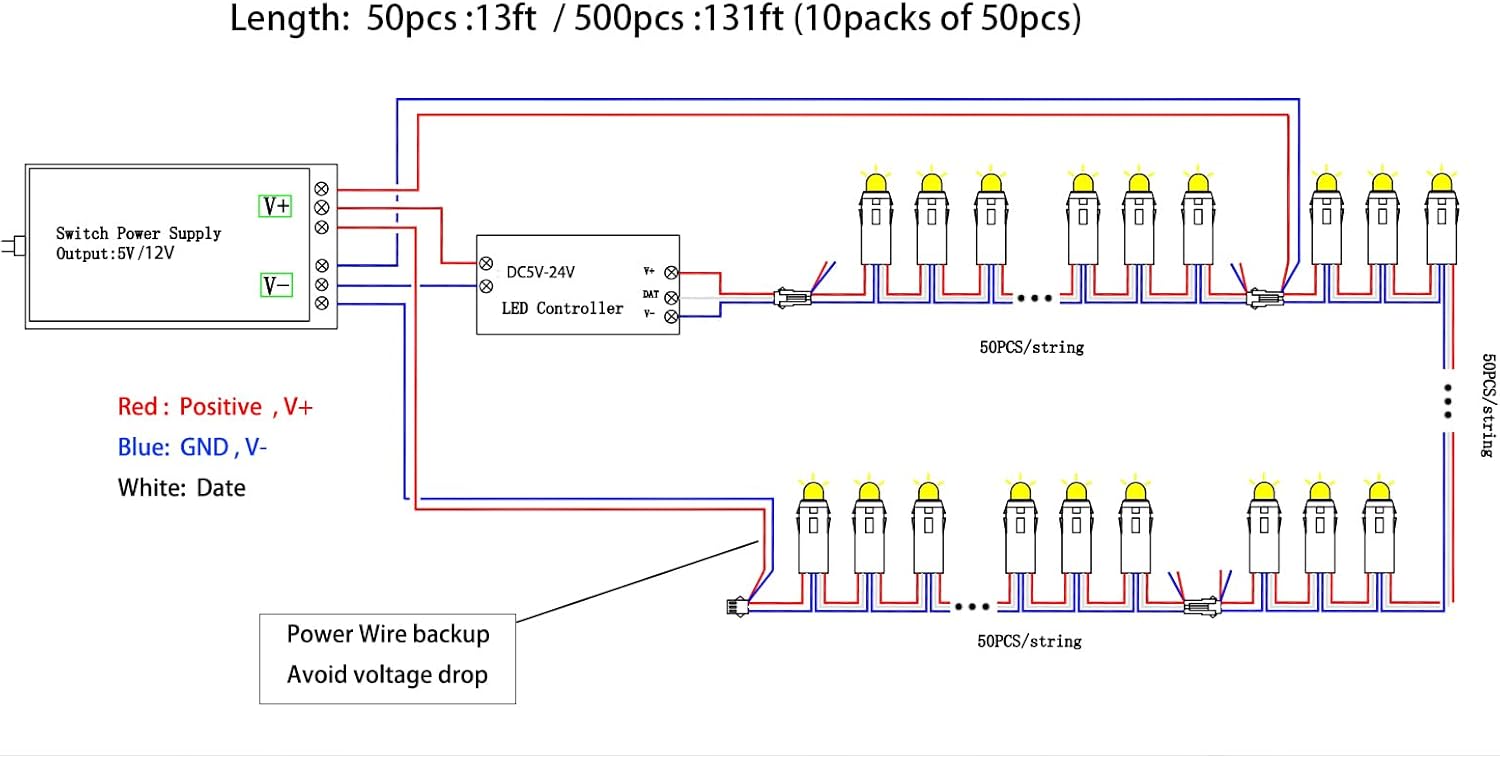
2. Controller Connection
To achieve dynamic lighting effects, these addressable LED pixels require a compatible WS2811 LED controller (not included).
- Connect the positive (red) wire from the LED string to the VCC output of your controller.
- Connect the ground (blue) wire from the LED string to the GND output of your controller.
- Connect the data (white) wire from the LED string to the DAT output of your controller.
3. Daisy-Chaining Multiple Strings
Multiple strings can be connected in series using the integrated 3-pin connectors. For longer runs or a high number of pixels, power injection may be necessary to prevent voltage drop and ensure consistent brightness.
- Connect the male connector of one string to the female connector of the next.
- If connecting many strings, consider adding additional power lines (power injection) at intervals to maintain consistent voltage across all pixels.
Operating Instructions
Using a Compatible Controller
Once connected to a compatible WS2811 controller, you can program and control the lights to display various patterns, colors, and animations. Refer to your specific controller's manual for detailed programming instructions.

Basic Functionality (Controller Dependent)
- Color Change: Most controllers allow selection of solid colors (red, green, blue, purple, etc.).
- Dynamic Modes: Pre-programmed modes offer various effects like fading, chasing, and flashing.
- Brightness Adjustment: Adjust the intensity of the lights.
- Speed Control: Modify the speed of dynamic effects.
Maintenance
The Rextin WS2811 LED Pixel String Lights are designed for durability.
- Cleaning: Gently wipe the pixels with a soft, damp cloth if they become dirty. Do not use harsh chemicals.
- Storage: When not in use, store the lights in a cool, dry place, away from direct sunlight and extreme temperatures.
- Inspection: Periodically inspect the wiring and connections for any signs of wear or damage. Replace any damaged components immediately.
Troubleshooting
- Lights not turning on:
- Check power supply connection and ensure it's providing the correct DC 5V.
- Verify all connections (power, ground, data) are secure.
- Ensure the controller is powered on and functioning correctly.
- Incorrect colors or flickering:
- Check the data connection to the controller.
- Verify the controller settings match the WS2811 protocol and the correct color order (e.g., GRB).
- If using multiple strings, check for voltage drop and consider power injection.
- Only some lights working:
- This often indicates a break in the data line or a faulty pixel. Inspect the connections between the working and non-working sections.
- Individual pixels can be replaced if faulty.
Specifications
| Feature | Detail |
|---|---|
| Brand | REXTiN |
| Model | 50PCSSTRIPRGB |
| LED Type | WS2811 Digital Addressable RGB Pixels |
| Pixel Diameter | 12 mm |
| Working Voltage | DC 5V |
| Power Consumption | 0.3W per LED |
| Waterproof Rating | IP68 |
| Indoor/Outdoor Use | Outdoor |
| Control Method | App (with compatible controller) |
| Number of Lights | 50 |
| Material | Plastic |
| Item Weight | 10 ounces (0.29 Kilograms) |
Warranty and Support
For warranty information and technical support, please contact REXTiN customer service through the retailer where the product was purchased. Keep your purchase receipt as proof of purchase.