
Introduction
Thank you for purchasing the URBAN REVOLT 20068 Portable Power Bank 2200. This device is designed to provide convenient and reliable power for your mobile devices on the go. Please read this manual carefully to ensure proper use and to maximize the lifespan of your power bank.
Safety Information
- Do not expose the power bank to extreme temperatures, direct sunlight, or fire.
- Do not immerse the power bank in water or other liquids.
- Avoid dropping or subjecting the power bank to strong impacts.
- Do not attempt to disassemble, repair, or modify the device. This will void the warranty.
- Keep out of reach of children.
- Use only certified charging cables and adapters.
- Dispose of the power bank responsibly according to local regulations.
Package Contents
Please check the package for the following items:
- URBAN REVOLT 20068 Portable Power Bank 2200
- Micro-USB Charging Cable
- User Manual (this document)
Product Overview
The URBAN REVOLT 20068 is a compact and portable power bank with a 2200 mAh capacity, designed to provide emergency power for your mobile devices. It features a solid ABS casing and an LED indicator for battery status.
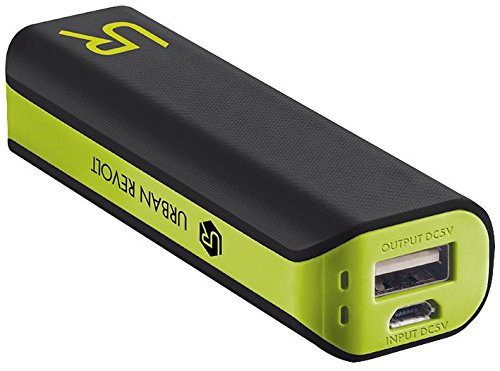
Image of the URBAN REVOLT 20068 Portable Power Bank 2200, showing its compact black design and USB ports.
Setup
Initial Charging of the Power Bank
- Connect the micro-USB end of the provided cable to the input port on the power bank.
- Connect the USB-A end of the cable to a USB wall charger (not included) or a computer's USB port.
- The LED indicator on the power bank will illuminate to show that it is charging. The indicator will change or turn off once fully charged.
- For optimal performance, fully charge the power bank before its first use.
Operating
Charging Your Mobile Device
- Ensure the power bank is sufficiently charged.
- Connect your device's charging cable (not included) to the USB output port on the power bank.
- Connect the other end of your device's charging cable to your mobile device.
- The power bank will automatically begin charging your device. The LED indicator may illuminate to show activity.
- Disconnect your device once it is fully charged or when you no longer need to charge it.
LED Indicator
The power bank features an LED indicator to show its charging status and remaining battery level. Refer to the specific behavior of the LED on your device for detailed information (e.g., solid light for charging, blinking for low battery).
Maintenance
Cleaning
- Wipe the power bank with a soft, dry cloth.
- Do not use harsh chemicals, cleaning solvents, or strong detergents.
Storage
- Store the power bank in a cool, dry place away from direct sunlight and extreme temperatures.
- If storing for an extended period, charge the power bank to approximately 50% every three months to maintain battery health.
Troubleshooting
- Power bank not charging: Ensure the charging cable is securely connected to both the power bank and the power source. Try a different cable or power adapter.
- Device not charging from power bank: Ensure the power bank is charged. Check that the charging cable between the power bank and your device is securely connected and not damaged. Try a different cable.
- Slow charging: Ensure you are using a suitable charging cable and that your device supports faster charging. The power bank provides a 1A output.
- LED indicator not working: If the power bank is otherwise functioning, this may indicate a minor issue. If the power bank is not charging or discharging, contact support.
Specifications
| Model Number | UK-20068 |
| Battery Capacity | 2200 mAh |
| Input Voltage | 5V |
| Output | 1A |
| Dimensions (H x W x D) | 90 x 31 x 21 mm |
| Casing Material | Solid ABS |
| Color | Black |
| Certifications | CE |
Warranty
This product is covered by a standard UK manufacturer's warranty. Please refer to the warranty card included in your package or contact your retailer for specific terms and conditions.
Support
If you encounter any issues or have questions regarding your URBAN REVOLT 20068 Portable Power Bank 2200 that are not addressed in this manual, please contact the retailer where you purchased the product or visit the official Pro-Series website for further assistance.

