1. Introduction
This user manual provides detailed instructions for the setup, operation, maintenance, and troubleshooting of your Telefunken MC1003N DAB+ Music System. Please read this manual thoroughly before using the device to ensure proper functionality and to maximize your listening experience. Keep this manual for future reference.
2. Important Safety Instructions
- Power Source: Connect the unit only to an AC power outlet of the specified voltage.
- Ventilation: Ensure adequate ventilation. Do not block ventilation openings.
- Water and Moisture: Do not expose the unit to rain, moisture, or dripping/splashing liquids. Do not place objects filled with liquids on the unit.
- Heat: Keep the unit away from heat sources such as radiators, heat registers, stoves, or other apparatus (including amplifiers) that produce heat.
- Cleaning: Unplug the unit from the wall outlet before cleaning. Use a soft, dry cloth. Do not use liquid cleaners or aerosol cleaners.
- Servicing: Do not attempt to service this product yourself. Refer all servicing to qualified service personnel.
3. Package Contents
Verify that all items listed below are included in your package:
- Telefunken MC1003N Compact Music System
- Remote Control
- Power Adapter
- User Manual (this document)
4. Product Overview
Familiarize yourself with the various parts and controls of your Telefunken MC1003N music system.
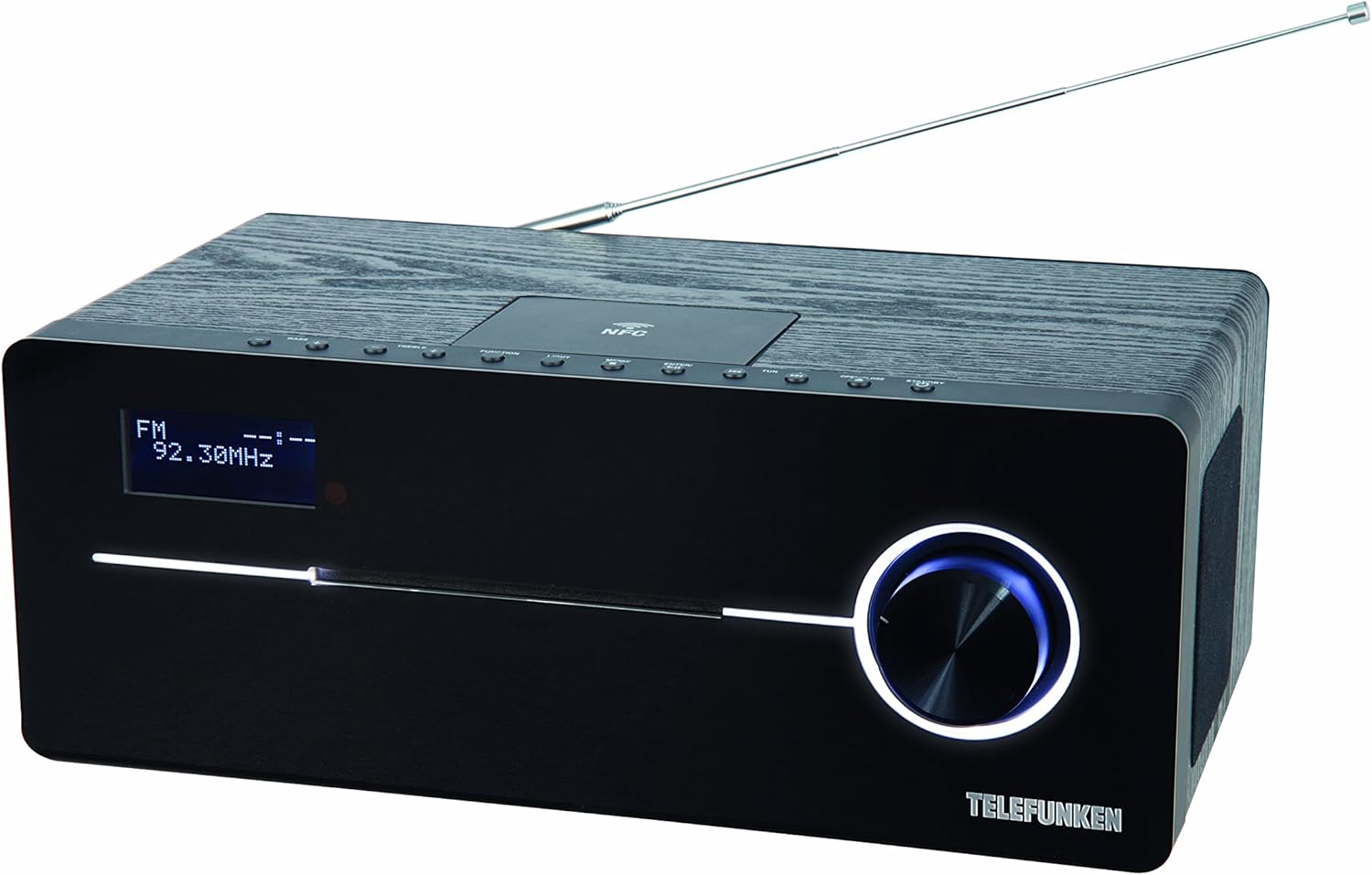
This image displays the Telefunken MC1003N compact music system. The front panel features a digital display showing 'FM 92.30MHz', a large illuminated control knob on the right, and a CD tray slot. The top panel includes several small control buttons and an NFC tag area. A telescopic antenna extends from the rear top of the unit.
4.1 Front Panel
- Digital Display: Shows current mode, frequency, track information, and menu options.
- CD Tray Slot: For inserting and ejecting audio CDs.
- Control Knob: Multi-functional knob for volume adjustment, menu navigation, and selection.
4.2 Top Panel
- Power/Standby Button: Turns the unit on or off.
- Function Button: Switches between input modes (DAB+, FM, CD, Bluetooth, USB, AUX-in).
- Light Button: Controls display backlight or illumination.
- Menu Button: Accesses system settings and options.
- Enter/Pair Button: Confirms selections or initiates Bluetooth pairing.
- TUN+/- Buttons: Tunes radio frequencies or navigates tracks/folders.
- Open/Close Button: Opens and closes the CD tray.
- NFC Tag Area: For quick pairing with NFC-enabled devices.
4.3 Rear Panel / Side Connections
- Telescopic Antenna: For DAB+ and FM radio reception.
- Power Input: Connects the power adapter.
- AUX-in (3.5mm): Connects external audio devices.
- USB Port: Connects USB storage devices for MP3 playback.
- Headphone Jack (3.5mm): For private listening.
5. Initial Setup
5.1 Placement
Place the music system on a stable, flat surface. Ensure there is sufficient space around the unit for proper ventilation. Avoid placing it near strong magnetic fields or direct sunlight.
5.2 Antenna Connection
Extend the telescopic antenna fully for optimal DAB+ and FM radio reception. Adjust its position to improve signal strength if needed.
5.3 Power Connection
Connect the supplied power adapter to the DC IN socket on the rear of the unit, then plug the adapter into a standard wall outlet.
6. Operating Instructions
6.1 Power On/Off
- Press the Power/Standby button on the top panel or remote control to turn the unit on or off.
6.2 Mode Selection
- Press the Function button repeatedly to cycle through available modes: DAB+, FM, CD, Bluetooth, USB, AUX-in.
6.3 DAB+ Radio Operation
6.3.1 Automatic Scan
- In DAB+ mode, press the Menu button, then use the control knob or TUN+/- buttons to select 'Full Scan'. Press Enter to start scanning for available DAB+ stations.
6.3.2 Manual Tuning
- Use the TUN+/- buttons to manually browse through available DAB+ ensembles.
6.3.3 Storing and Recalling Presets
- To store a station, press and hold the Preset button (if available, or refer to manual for specific preset steps).
- To recall a stored station, press the Preset button and use TUN+/- to select the desired preset number.
6.4 FM Radio Operation
6.4.1 Automatic Scan
- In FM mode, press and hold the TUN+/- button for a few seconds to automatically scan for the next available station.
6.4.2 Manual Tuning
- Press the TUN+/- button briefly to adjust the frequency step by step.
6.4.3 Storing and Recalling Presets
- Similar to DAB+ presets, use the Preset function to store and recall your favorite FM stations. The system supports 30 station memories.
6.5 CD Playback
6.5.1 Loading a CD
- Press the Open/Close button to open the CD tray.
- Place a CD (CD/CD-R) with the label side up into the tray.
- Press the Open/Close button again to close the tray. Playback will start automatically.
6.5.2 Playback Controls
- Use the control knob or remote for Play/Pause, Skip Track, and Fast Forward/Rewind functions.
6.6 Bluetooth Pairing
6.6.1 Activating Bluetooth
- Switch the unit to Bluetooth mode using the Function button. The display will show 'BT' or 'Bluetooth' and indicate pairing mode.
6.6.2 Pairing with a Device
- On your smartphone or tablet, enable Bluetooth and search for available devices.
- Select 'Telefunken MC1003N' from the list.
- Once paired, you can stream audio from your device to the music system.
6.7 NFC Pairing
6.7.1 Using NFC
- Ensure NFC is enabled on your compatible smartphone or tablet.
- Tap your device gently on the NFC tag area on the top panel of the music system.
- Confirm the pairing request on your device.
6.8 USB Playback
6.8.1 Connecting a USB Device
- Insert a USB storage device containing MP3 files into the USB port.
- Switch the unit to USB mode using the Function button.
6.8.2 File Navigation
- Use the control knob or remote to navigate through folders and select MP3 tracks.
6.9 AUX-in Connection
6.9.1 Connecting External Audio Devices
- Connect an external audio device (e.g., MP3 player) to the AUX-in port using a 3.5mm audio cable.
- Switch the unit to AUX-in mode using the Function button.
- Control playback from your external device.
6.10 Sound Settings
6.10.1 Equalizer Presets
- Press the EQ button (if available, or navigate via Menu) to cycle through sound modes: Flat, Classic, Pop, Rock, Jazz.
7. Maintenance
7.1 Care and Cleaning
- Always unplug the unit before cleaning.
- Use a soft, dry, lint-free cloth to wipe the exterior surfaces.
- Do not use abrasive cleaners, waxes, or solvents as they may damage the finish.
- For the CD lens, use a specialized CD lens cleaner disc.
8. Troubleshooting
If you encounter any issues with your Telefunken MC1003N, refer to the table below for common problems and solutions.
| Problem | Solution |
|---|---|
| No power | Check if the power adapter is securely connected to the unit and the wall outlet. Try a different outlet. |
| No sound | Adjust the volume. Check if headphones are connected. Ensure the correct input mode is selected. |
| Poor radio reception | Extend and adjust the telescopic antenna. Move the unit to a location with better signal. Perform a full scan for DAB+ stations. |
| Bluetooth pairing fails | Ensure the unit is in Bluetooth pairing mode. Make sure Bluetooth is enabled on your device and it's within range. Forget previous pairings on your device and try again. |
| CD not playing | Ensure the CD is clean and inserted correctly (label side up). Check if the CD is scratched or damaged. Try a different CD. |
| USB not recognized | Ensure the USB device is formatted correctly (FAT32) and contains supported MP3 files. Try a different USB device. |
9. Technical Specifications
- Model: MC1003N
- Brand: Telefunken
- Output Power: 100 Watts (50 Watts per speaker)
- Connectivity: Bluetooth 3.0, NFC, USB, AUX-in (3.5mm), Headphone Jack (3.5mm)
- Tuner: Digital PLL-tuner (DAB+, FM)
- Preset Stations: 30 (for FM/DAB+)
- CD Compatibility: CD, CD-R
- Supported Audio Formats: MP3, CD-DA, DAB
- Sound Control: Equalizer presets (Flat, Classic, Pop, Rock, Jazz)
- Power Source: Electric with cord
- Dimensions (L x W x H): 35.1 x 13.6 x 21.4 cm
- Weight: 3.65 kg
10. Warranty and Support
Your Telefunken MC1003N DAB+ Music System is covered by a manufacturer's warranty. Please refer to the warranty card included in your package for specific terms and conditions. For technical support, service, or warranty claims, please contact your retailer or the authorized Telefunken service center in your region.


