
1. Introduction
The Sekonic L-478DR-U LiteMaster Pro is an advanced, touch-screen operated light meter designed for both still photography and motion picture applications. It offers precise exposure measurement for ambient and flash lighting, along with specialized modes for cine and HD video production. This manual provides detailed instructions for setting up, operating, and maintaining your L-478DR-U light meter.

Figure 1: Front view of the Sekonic L-478DR-U LiteMaster Pro light meter, displaying its touch screen interface with exposure settings.
Key Features:
- Touch-Screen Operation: Intuitive control via a large 2.7-inch color LCD.
- Ambient and Flash Measurement: Measures and displays ambient and flash exposures, including flash percentage.
- Cine/HD Cine Modes: Dedicated modes for video production with adjustable frame rates and shutter angles.
- PocketWizard Triggering: Integrated PocketWizard radio for wireless flash control (L-478DR-U model only).
- DTS Exposure Profiling: Allows matching the meter's performance to your camera's characteristics for precise results.
- Light Source Filtration Compensation: Provides precise control for CTO/CTB/ND filter types.
- Illumination Measurement: Displays brightness in Lux or Foot-Candles (FC) and Cd/m² or Foot-Lamberts (FL).
2. Setup
2.1. Battery Installation
The Sekonic L-478DR-U requires two (2) AAA 1.5V batteries. Compatible battery types include Alkaline, Manganese, Lithium, NiCad, and NiMH.
- Locate the battery compartment cover on the back of the meter.
- Slide or unlatch the cover to open the compartment.
- Insert two AAA batteries, ensuring correct polarity (+/-) as indicated inside the compartment.
- Close the battery compartment cover securely.
Note: Always use fresh batteries for optimal performance. Remove batteries if the meter will not be used for an extended period to prevent leakage.
2.2. Initial Power On and Settings
Upon first power-on or after battery replacement, the meter may prompt you to set basic parameters such as date, time, and language. Follow the on-screen instructions using the touch interface.
3. Operating Instructions
The L-478DR-U features a touch-screen interface for easy navigation and setting adjustments. Tap icons or slide your finger across the screen to change values and access different modes.
3.1. Basic Measurement Modes
- Ambient Light Measurement:
To measure continuous light, ensure the meter is in ambient mode. Point the lumisphere (white dome) towards the light source or subject, then press the measurement button. The display will show recommended shutter speed, aperture, and ISO settings.
- Flash Measurement:
For flash photography, switch to flash mode. Trigger your flash unit while pressing the measurement button on the meter. The meter will display the correct exposure for the flash, often showing the percentage of flash contribution to the total exposure.

Figure 2: Angled view of the Sekonic L-478DR-U, highlighting its compact design and lumisphere for light measurement.
3.2. Cine/HD Cine Modes
The L-478DR-U offers specialized modes for video production:
- HD SLR Mode: Set shutter speeds appropriate for HD video recording with DSLR cameras.
- Cine Mode: Select desired frame rates and shutter angles for professional cinema cameras. The meter allows for infinite frame rate and shutter angle selection for precise control.
3.3. PocketWizard Triggering (L-478DR-U Only)
The L-478DR-U model includes built-in PocketWizard radio technology, enabling wireless triggering and power control of compatible flash units and receivers. This feature is particularly useful for studio and on-location flash photography.
- Access the PocketWizard settings through the meter's menu.
- Select the appropriate channel and zone to match your PocketWizard receivers.
- Use the meter to trigger flashes and adjust their power settings remotely.
3.4. DTS Exposure Profiling
DTS (Data Transfer Software) Exposure Profiling allows you to calibrate your L-478DR-U to the specific characteristics of your camera sensor. This ensures the most accurate exposure readings tailored to your equipment.
- This feature typically requires separate Sekonic or X-rite exposure targets.
- Refer to the Sekonic website or the full user manual for detailed instructions on DTS profiling.
4. Maintenance
4.1. Cleaning
- Gently wipe the meter's body with a soft, dry cloth.
- For the touch screen, use a microfiber cloth specifically designed for electronics. Avoid abrasive materials or harsh cleaning agents.
- Keep the lumisphere clean and free of dust or smudges, as this can affect measurement accuracy.
4.2. Storage
When not in use, store the L-478DR-U in a dry, cool place, away from direct sunlight and extreme temperatures. If storing for an extended period, remove the batteries.
5. Troubleshooting
Common Issues and Solutions:
- Meter does not power on:
Check battery installation and ensure batteries are fresh. Replace if necessary.
- Inaccurate readings:
Ensure the lumisphere is clean and unobstructed. Verify ISO settings match your camera. Consider performing DTS Exposure Profiling for optimal accuracy. If issues persist, the meter may require professional calibration.
- Touch screen unresponsive:
Ensure the screen is clean and dry. Try restarting the meter by removing and reinserting the batteries. If the problem continues, contact Sekonic customer support.
- PocketWizard not triggering flashes:
Verify that the meter and PocketWizard receivers are set to the same channel and zone. Check battery levels in both the meter and receivers. Ensure flashes are powered on and in range.
For further assistance, refer to the official Sekonic support resources or the comprehensive user manual.
6. Specifications
| Feature | Detail |
|---|---|
| Model Number | L-478DR-U (401-477) |
| Product Dimensions | 2 x 1 x 5 inches; 8 ounces |
| Battery Type | (2) AAA 1.5V (Alkaline, Manganese, Lithium, NiCad, NiMH) |
| Display Range Film Speed | ISO 3 to 409600 (in 1/3 steps) |
| Display Range Shutter Speeds Ambient | 30 min to 1/64,000 sec. (in 1, 1/2, 1/3 steps) plus 1/200, 1/400 |
| Display Range Shutter Speeds Flash | 30 min to 1/1,000 sec. (in 1, 1/2, 1/3 steps) plus 1/75, 1/80, 1/90, 1/100, 1/200, 1/400 |
| Display Range Aperture | f/0.5 to f/161.2 (in 1, 1/2, 1/3 steps) |
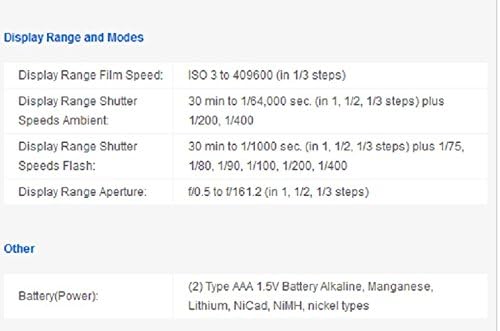
Figure 3: Detailed display range and other specifications for the Sekonic L-478DR-U.
7. Warranty and Support
7.1. Warranty Information
The Sekonic L-478DR-U LiteMaster Pro light meter typically comes with a standard manufacturer's warranty. The product title mentions an "Exclusive 3-Year Warranty" for USA radio frequency models. Please refer to your product registration or the official Sekonic website for specific warranty terms and conditions.
Extended protection plans may also be available for purchase, offering additional coverage beyond the standard warranty period.
7.2. Customer Support and Resources
For comprehensive information, detailed operational guides, and technical support, please refer to the official Sekonic resources:
- Official User Manual (PDF): Download PDF
- Official User Guide (PDF): Download PDF
- Manufacturer: MacGroup (Sekonic Distributor)
- Sekonic Website: Visit the official Sekonic website for the latest software updates, FAQs, and contact information for customer service.


