
1. Introduction
The Philips DPM-8000 Digital Pocket Memo is a professional voice recorder designed for efficient dictation. It features advanced 3D Mic technology for superior audio quality and integrates with SpeechExec Pro software for streamlined data management. This manual provides essential information for setting up, operating, maintaining, and troubleshooting your device.
2. Package Contents
Verify that all items listed below are present in your package:
- Philips DPM-8000 Digital Pocket Memo
- Docking Station
- Memory Card
- Rechargeable Battery (Lithium Ion)
- USB Cable
- SpeechExec Pro Dictation Software
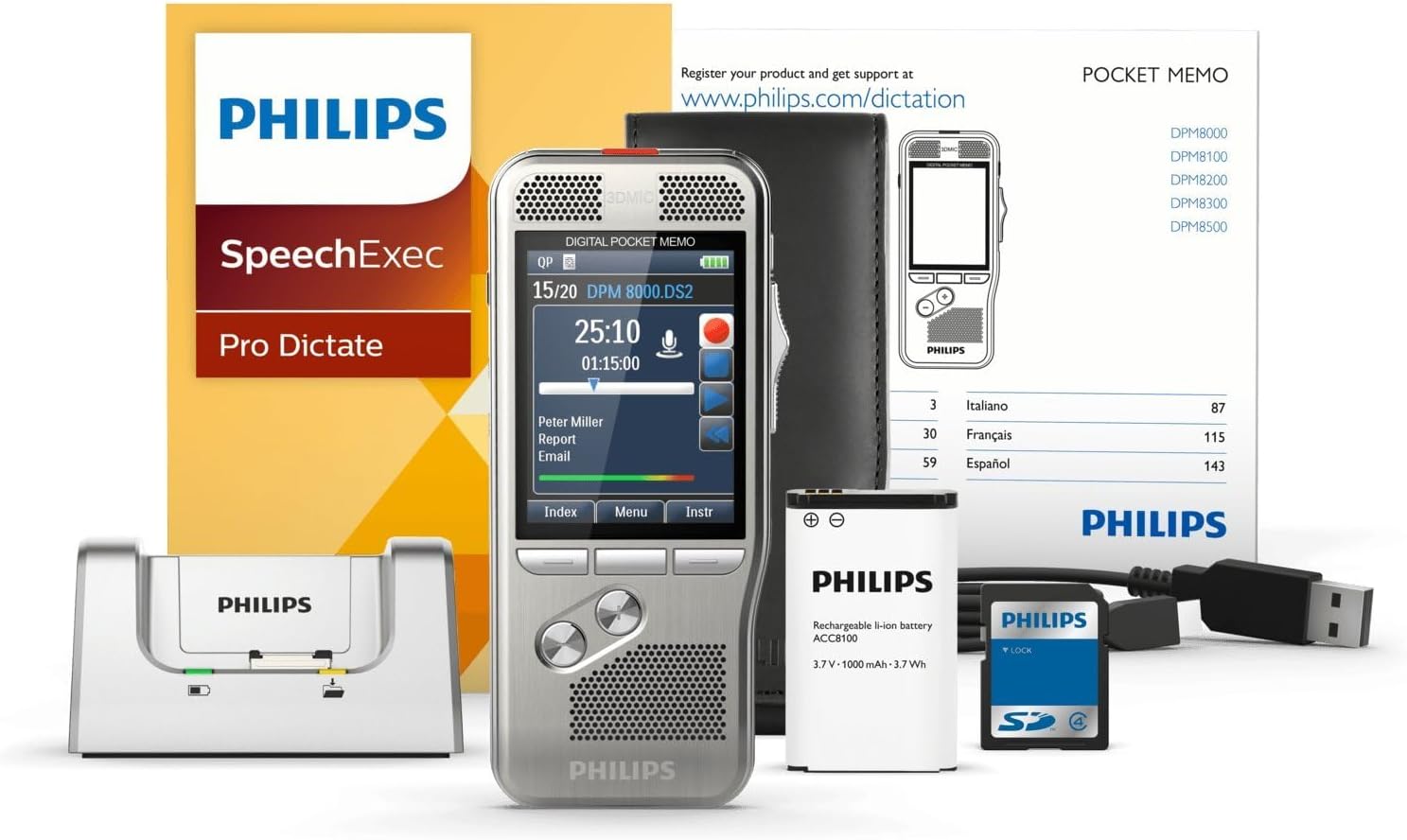
Image: The Philips DPM-8000 Digital Pocket Memo, docking station, battery, USB cable, and software packaging.
3. Setup
3.1 Battery Installation and Charging
- Open the battery compartment cover on the back of the device.
- Insert the supplied Lithium Ion rechargeable battery, ensuring correct polarity.
- Close the battery compartment cover.
- Connect the USB cable to the docking station and then to a power source or computer.
- Place the Digital Pocket Memo into the docking station to begin charging. The charging indicator will illuminate.

Image: The Philips DPM-8000 Digital Pocket Memo placed in its docking station for charging or data transfer.
3.2 Software Installation (SpeechExec Pro)
The SpeechExec Pro Dictation Software is essential for managing your dictations. Insert the software CD into your computer's optical drive or download the latest version from the official Philips website. Follow the on-screen instructions to complete the installation.
4. Operating Instructions
4.1 Basic Recording
- To power on the device, slide the power switch to the ON position.
- Press the Record button (red circle) to start recording. The 3D Mic system will automatically adjust for optimal audio capture.
- Speak clearly into the microphone. The built-in motion sensor helps in automatic microphone selection for best results.
- Press the Stop button to pause or end the recording.
- The device utilizes light and motion sensors to optimize battery life during operation.

Image: A detailed view of the Philips DPM-8000, highlighting its display and control buttons.
4.2 Playback
- Select the desired dictation file from the device's menu.
- Press the Play button to listen to the recording.
- Use the navigation buttons to fast forward, rewind, or adjust volume.
4.3 Transferring Dictations to Computer
To transfer your recorded dictations to your computer for transcription or archiving:
- Ensure the SpeechExec Pro software is running on your computer.
- Place the Digital Pocket Memo into the docking station, or connect it directly via the USB cable.
- The software will automatically detect the device and begin transferring new dictations. Follow any prompts within the SpeechExec Pro application.

Image: An individual dictating into the Philips DPM-8000 while another person transcribes on a computer, illustrating the workflow.
5. Maintenance
5.1 Cleaning the Device
- Wipe the device with a soft, dry cloth.
- Do not use abrasive cleaners or solvents, as these can damage the surface.
- Keep the microphone and speaker grilles free from dust and debris.
5.2 Battery Care
- Charge the battery regularly to maintain optimal performance.
- Avoid exposing the device to extreme temperatures, which can affect battery life.
- If the device will not be used for an extended period, store it with a partially charged battery.
5.3 Software Updates
Periodically check the Philips website for updates to the SpeechExec Pro software and device firmware to ensure optimal performance and access to new features.
6. Troubleshooting
6.1 Common Issues and Solutions
-
Device does not power on:
- Ensure the battery is correctly installed and charged.
- Connect the device to the docking station or USB cable to check for charging.
-
Poor recording quality:
- Ensure the microphone is not obstructed.
- Check recording settings (e.g., sensitivity, format) in the device menu.
- Record in a quiet environment.
-
Dictations not transferring to computer:
- Verify the USB cable connection between the docking station/device and the computer.
- Ensure SpeechExec Pro software is running and updated.
- Restart both the device and the computer.
-
Short battery life:
- Ensure the battery is fully charged before use.
- Reduce screen brightness or disable unnecessary features.
- Consider replacing the battery if it is old or frequently used.
7. Specifications
| Brand | Philips |
| Model Number | DPM8000 |
| Item Weight | 4.1 ounces (116 grams) |
| Product Dimensions | 4.8 x 2.1 x 0.6 inches (12.2 x 5.3 x 1.5 cm) |
| Batteries | 1 Lithium Ion battery (required) |
| Memory Storage Capacity | 32 GB |
| Screen Size | 2.4 Inches |
| Digital Recording Time | Up to 1168 hours |
| Hardware Interface | USB |
| Microphone Form Factor | Built-In |
| Headphones Jack | 3.5 millimeters |
8. Warranty and Support
For detailed warranty information, please refer to the warranty card included with your product or visit the official Philips website. For technical support, software downloads, and frequently asked questions, please visit www.philips.com/dictation.


