
Introduction
This manual provides essential information for the safe operation, maintenance, and care of your Hyper Tough 2.4A Orbit Sander, Model 2112. Please read and understand all instructions before using the product to ensure proper function and to prevent injury.
The Hyper Tough 2.4A Orbit Sander is designed for dry sanding on painted surfaces, wood, plastic, and metal. It is suitable for smoothing rough surfaces, removing old finishes, and preparing surfaces for new paint or other finishes.
General Safety Information
WARNING: Read all safety warnings, instructions, illustrations, and specifications provided with this power tool. Failure to follow all instructions listed below may result in electric shock, fire, and/or serious injury.
Work Area Safety
- Keep the work area clean and well-lit. Cluttered or dark areas invite accidents.
- Do not operate power tools in explosive atmospheres, such as in the presence of flammable liquids, gases, or dust. Power tools create sparks which may ignite the dust or fumes.
- Keep children and bystanders away while operating a power tool. Distractions can cause you to lose control.
Electrical Safety
- Power tool plugs must match the outlet. Never modify the plug in any way.
- Avoid body contact with earthed or grounded surfaces, such as pipes, radiators, ranges, and refrigerators. There is an increased risk of electric shock if your body is earthed or grounded.
- Do not expose power tools to rain or wet conditions. Water entering a power tool will increase the risk of electric shock.
- Do not abuse the cord. Never use the cord for carrying, pulling, or unplugging the power tool. Keep cord away from heat, oil, sharp edges, or moving parts. Damaged or entangled cords increase the risk of electric shock.
Personal Safety
- Always wear eye protection. Use safety glasses or goggles.
- Wear appropriate personal protective equipment such as a dust mask, non-skid safety shoes, hard hat, or hearing protection for appropriate conditions.
- Do not overreach. Keep proper footing and balance at all times. This enables better control of the power tool in unexpected situations.
- Dress properly. Do not wear loose clothing or jewelry. Keep your hair and clothing away from moving parts. Loose clothes, jewelry, or long hair can be caught in moving parts.
Product Overview
Familiarize yourself with the components of your Hyper Tough 2.4A Orbit Sander before operation.
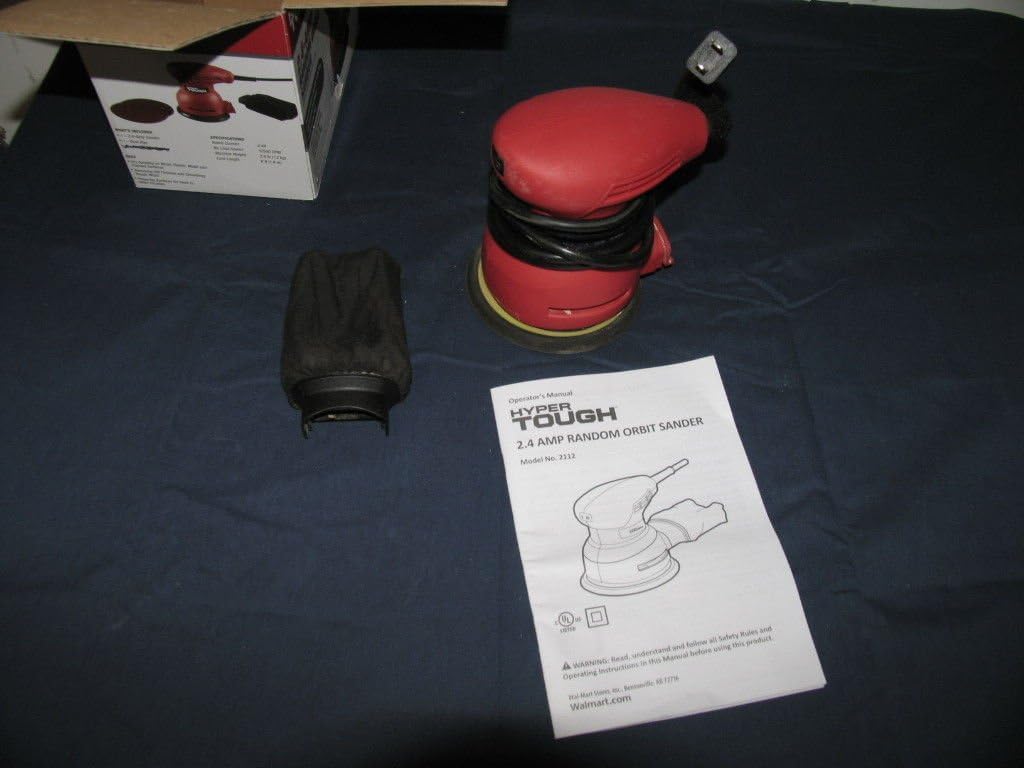
Figure 1: Hyper Tough 2.4A Orbit Sander with accessories and manual.

Figure 2: Underside of the sander with dust bag attached.
Key Components:
- Sanding Pad: Hook-and-loop system for quick sandpaper changes.
- Dust Collection Bag: Attaches to the sander for dust extraction.
- On/Off Switch: Sealed to prevent dust ingress.
- Power Cord: 6-foot length for extended reach.
Setup
Attaching Sandpaper
- Ensure the sander is unplugged from the power source.
- Select the appropriate grit sandpaper for your task. The sander uses hook-and-loop sandpaper.
- Align the holes on the sandpaper with the holes on the sanding pad to ensure proper dust extraction.
- Press the sandpaper firmly onto the sanding pad, ensuring it is securely attached across the entire surface.
Attaching the Dust Collection Bag
- Ensure the sander is unplugged.
- Locate the dust extraction port on the sander.
- Slide the dust collection bag onto the port until it is firmly seated. Ensure a tight fit to maximize dust collection efficiency.
Operating Instructions
Before Operation
- Always wear safety glasses and a dust mask.
- Ensure the workpiece is securely clamped or held to prevent movement during sanding.
- Check that the sandpaper is correctly attached and the dust bag is securely in place.
- Plug the sander into a suitable power outlet.
Sanding Procedure
- Hold the sander firmly with both hands.
- Place the sanding pad flat on the workpiece before turning the tool on.
- Press the On/Off switch to start the sander.
- Move the sander slowly and evenly over the surface in overlapping circular or linear patterns. Avoid applying excessive pressure; the weight of the tool is usually sufficient.
- Keep the sander moving to prevent gouging or creating swirl marks. The mechanical pad brake helps reduce free-spin to minimize gouging.
- When finished, lift the sander from the workpiece before turning it off.
- Press the On/Off switch to turn the sander off.
- Unplug the sander from the power source after use.
Note: For best results, start with a coarser grit sandpaper to remove material quickly, then switch to finer grits for a smoother finish.
Maintenance
Cleaning
- Always unplug the sander before cleaning.
- Wipe the exterior of the tool with a clean, damp cloth. Do not use harsh chemicals or abrasive cleaners.
- Periodically clean the ventilation openings to prevent overheating. Use compressed air if available.
Dust Collection Bag
- Empty the dust collection bag frequently, especially when sanding fine dust. A full bag reduces dust extraction efficiency.
- To empty, remove the bag from the sander and shake out the dust.
- Clean the inside of the bag periodically to ensure optimal airflow.
Sanding Pad
- Inspect the sanding pad regularly for wear or damage. Replace if necessary to maintain sanding performance.
- Ensure the hook-and-loop surface is clean and free of debris for proper sandpaper adhesion.
Troubleshooting
| Problem | Possible Cause | Solution |
|---|---|---|
| Sander does not start. | No power supply. Faulty switch. | Check power cord and outlet. Contact customer support for switch replacement. |
| Poor dust collection. | Dust bag full or improperly attached. Sandpaper holes not aligned. | Empty and reattach dust bag securely. Ensure sandpaper holes align with pad holes. |
| Excessive vibration or noise. | Damaged sanding pad. Loose sandpaper. | Inspect and replace sanding pad if damaged. Reattach sandpaper firmly. |
| Sander leaves swirl marks. | Applying too much pressure. Not moving the sander evenly. Worn sandpaper. | Reduce pressure. Move sander smoothly and evenly. Replace sandpaper. |
Specifications
- Model Number: 2112
- Brand: Hyper Tough
- Power Source: Electric
- AC Adapter Current: 2.4 Amps
- Grit Type: Medium (typically ships with 80 grit)
- Item Weight: 5 Pounds (approx. 2.27 kg)
- Product Dimensions: 7 x 5 x 4.8 inches (approx. 17.8 x 12.7 x 12.2 cm)
- Cord Length: 6 feet (approx. 1.83 meters)
- Sanding Pad: Hook-and-loop system
Warranty and Support
This product is tested and certified to look and work like new. For specific warranty information or technical support, please refer to the documentation included with your purchase or contact the manufacturer directly. Keep your purchase receipt as proof of purchase.
For further assistance, please visit the Hyper Tough website or contact their customer service department.