
1. Introduction
This manual provides essential instructions for the safe installation, operation, and maintenance of your Hatco AWD-12 Hot Water Dispenser. Please read this manual thoroughly before operating the unit and retain it for future reference. Proper use and care will ensure optimal performance and longevity of your dispenser.
2. Important Safety Instructions
To reduce the risk of injury or damage, always observe basic safety precautions when using electrical appliances. This includes, but is not limited to, the following:
- Electrical Safety: Ensure the unit is connected to a properly grounded electrical outlet with the correct voltage (208 Volts) as specified on the product label. Do not operate with a damaged cord or plug.
- Hot Water Hazard: The dispenser produces extremely hot water. Exercise extreme caution to prevent burns. Keep hands and face clear of the dispensing area.
- Installation: Installation must be performed by qualified personnel in accordance with all local electrical and plumbing codes.
- Cleaning: Disconnect power before cleaning. Allow the unit to cool completely before performing any maintenance or cleaning procedures.
- Supervision: This appliance is not intended for use by persons with reduced physical, sensory, or mental capabilities, or lack of experience and knowledge, unless they have been given supervision or instruction concerning use of the appliance by a person responsible for their safety.
3. Product Overview
The Hatco AWD-12 is a commercial-grade hot water dispenser designed for efficient and reliable hot water delivery. Key components include the main housing, control panel, dispensing spout, and drip tray.
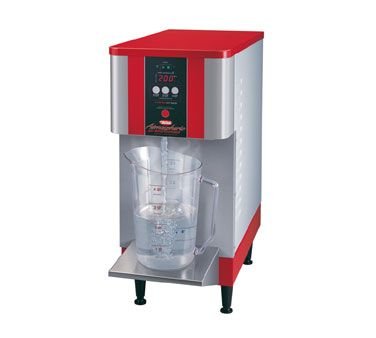
Figure 1: Front view of the Hatco AWD-12 Hot Water Dispenser. The unit features a red and silver exterior, a digital display, and a dispensing area with a drip tray, shown here with a measuring cup.
4. Setup and Installation
4.1 Unpacking
- Carefully remove the dispenser from its packaging.
- Inspect the unit for any shipping damage. Report any damage immediately to the carrier and your supplier.
- Retain packaging materials for future transport or storage.
4.2 Placement
- Place the dispenser on a sturdy, level, non-combustible surface capable of supporting its weight when full.
- Ensure adequate clearance around the unit for ventilation and maintenance. Avoid placing near heat sources or in direct sunlight.
- Locate the unit near a suitable electrical outlet and a potable water supply with appropriate drainage.
4.3 Electrical Connection
The Hatco AWD-12 requires a 208 Volt electrical supply. Ensure the circuit is dedicated and properly fused. Connection must comply with all national and local electrical codes. Do not use extension cords.
4.4 Water Connection
Connect the dispenser to a potable cold water supply using appropriate plumbing fittings. An inline water filter is recommended to prevent mineral buildup and improve water quality. Ensure all connections are secure and leak-free.
4.5 Initial Fill and Heating
- Once electrical and water connections are complete, open the water supply valve.
- Turn on the dispenser's power switch. The unit will begin to fill with water.
- Allow the unit to fill completely and heat to the set temperature. This process may take several minutes. The display will indicate when the water is ready.
5. Operating Instructions
5.1 Powering On/Off
- To power on, locate the main power switch (typically on the back or side) and flip it to the "ON" position.
- To power off, flip the main power switch to the "OFF" position. For extended periods of non-use, it is recommended to also disconnect the unit from the electrical supply and turn off the water supply.
5.2 Setting Temperature
The Hatco AWD-12 features a digital control panel for temperature adjustment. Refer to the specific controls on your unit, typically involving "Up" and "Down" arrows or a rotary dial, to set the desired hot water temperature. The display will show the current and/or set temperature.
5.3 Dispensing Hot Water
- Ensure the unit is powered on and the "Ready" indicator (if present) is illuminated, signifying the water has reached the set temperature.
- Place a heat-resistant container under the dispensing spout.
- Activate the dispensing lever or button. Hot water will flow from the spout.
- Release the lever/button to stop the flow. Exercise caution as the water is very hot.
6. Maintenance
Regular maintenance ensures the efficient and safe operation of your Hatco AWD-12. Always disconnect power and allow the unit to cool before performing any maintenance.
6.1 Daily Cleaning
- Exterior: Wipe clean the exterior surfaces with a damp cloth and mild detergent. Avoid abrasive cleaners or scouring pads.
- Drip Tray: Remove and empty the drip tray. Wash it with warm, soapy water, rinse thoroughly, and dry before replacing.
- Dispensing Spout: Wipe the dispensing spout to remove any residue.
6.2 Descaling (Periodic)
Mineral deposits (scale) can build up inside the water tank, affecting performance and efficiency. The frequency of descaling depends on your water hardness. Consult a qualified service technician for descaling procedures or refer to specific descaling instructions provided by Hatco, if available. Do not attempt to descale the unit without proper knowledge or tools, as this may damage the appliance.
6.3 Product Care Instructions
As per manufacturer guidelines: Hand wash, Wipe clean. This applies to removable parts and exterior surfaces. Do not immerse the main unit in water.
7. Troubleshooting
This section addresses common issues you might encounter. For problems not listed here, or if solutions do not resolve the issue, contact a qualified service technician.
| Problem | Possible Cause | Solution |
|---|---|---|
| No hot water / Unit not heating |
|
|
| Water not dispensing |
|
|
| Leaking from unit |
|
|
8. Specifications
| Feature | Detail |
|---|---|
| Model | AWD-12 |
| Brand | Hatco |
| Voltage | 208 Volts |
| Product Type | Hot Water Dispenser |
| Care Instructions | Hand wash, Wipe clean |
| Date First Available | October 15, 2013 |
9. Warranty and Support
Hatco products are manufactured to high standards and typically come with a limited warranty. For specific warranty terms and conditions applicable to your AWD-12 model, please refer to the warranty card included with your purchase or visit the official Hatco website.
For technical assistance, parts, or service inquiries, please contact Hatco customer support or an authorized service agent. Ensure you have your model number (AWD-12) and serial number (if applicable) ready when contacting support.


