
1. Introduction
This manual provides comprehensive instructions for the safe and effective use of your UniqueFire 850nm IR Illuminator Fresnel Lens Infrared Flashlight, Model UF-1903. This device is designed to provide infrared illumination for night vision applications, featuring a zoomable Fresnel lens and multiple operating modes.
2. Product Features
- Upgraded 44MM Fresnel Lens: Utilizes microstructured Fresnel optics for more focused and stronger light penetration, allowing for longer illumination distances compared to ordinary lenses.
- Adjustable Focus: Features an adjustable focus mechanism from spot to flood. Achieved by screwing the head, providing stability when mounted.
- 5Watt IR 850NM Module: Equipped with an advanced IR BLACK LED, offering high efficiency and low thermal resistance. Emits 850nm infrared light with a focused beam range of approximately 100-300 meters (300 yards).
- 3 Modes with Memory Function: Offers Low, Medium, and High modes. The flashlight features a mode memory function, meaning it will turn on to the last setting it was operated on.
- Durable Construction: Body made of Aircraft Aluminum Alloy.
- Compact Size: Housing Diameter: 1 inch (25.4mm). Head diameter: approximately 45mm. Length: approximately 123mm. Tail diameter: approximately 29mm.
3. Package Contents
The standard package includes:
- UniqueFire UF-1903 IR Illuminator Flashlight
- Light kit (as included by manufacturer)
Note: Batteries and remote pressure switches are typically sold separately unless specified otherwise.
4. Setup Instructions
4.1 Battery Installation
To install the battery, unscrew the tail cap of the flashlight. Insert the battery with the positive (+) pole facing the head of the flashlight and the negative (-) pole facing the tail cap. Securely screw the tail cap back on.

Image: Steps for inserting the battery and changing the LED module. Ensure correct battery polarity.
Video: Demonstration of battery insertion and basic flashlight operation. Note the positive pole faces the head and the negative pole faces the tail.
4.2 Remote Pressure Switch Installation (Optional)
If you have purchased a remote pressure switch (sold separately), unscrew the original tail cap and replace it with the remote pressure switch. Ensure it is securely fastened. This allows for convenient activation and mode changes when the flashlight is mounted.

Image: A remote pressure switch, which can be used to replace the standard tail cap for remote operation.
Video: Demonstration of installing and using the remote pressure switch (shown from 1:20 mark). This accessory is sold separately.
5. Operating Instructions
5.1 Power On/Off and Mode Switching
To turn the flashlight on, press the tail switch fully once. To turn it off, press the switch for 2-3 seconds. While the light is on, gently press (half-way press) the tail switch to cycle through the three modes: Low, Medium, and High. The flashlight features a mode memory function, meaning it will turn on to the last setting it was operated on.

Image: Illustration of the tail switch operation for power control and cycling through High, Medium, and Low modes. Note: IR light is invisible to the naked eye; a small red dot on the lens indicates activation.
5.2 Adjusting Focus
The UF-1903 features an adjustable focus. To adjust the beam from a wide floodlight to a narrow spotlight, hold the head of the flashlight and rotate the tail section. Rotating in one direction will zoom in (spotlight), and rotating in the other will zoom out (floodlight). This screw-type adjustment provides a stable focus.
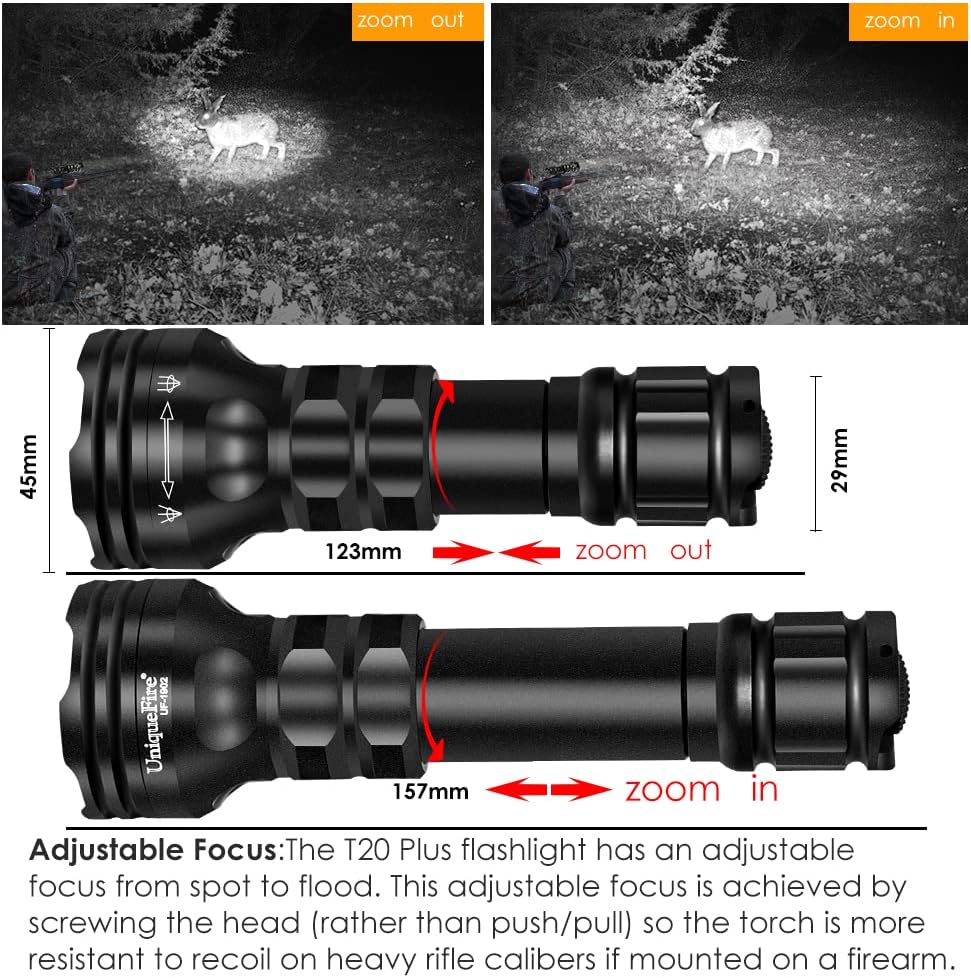
Image: Visual representation of the flashlight's adjustable focus mechanism, demonstrating how rotating the tail section changes the beam from zoom out to zoom in.

Image: Diagram illustrating the Fresnel lens focusing technology, which allows for a more concentrated and far-reaching infrared beam.
Video: Demonstration of adjusting the focus (zoom in/zoom out) by rotating the tail of the flashlight (shown from 0:40 mark).
6. Specifications
| Feature | Detail |
|---|---|
| Model Name | UF-1903 |
| Special Feature | Adjustable, LED Torch, Portable |
| Color | Black |
| Power Source | Battery Powered (Lithium recommended) |
| Light Source Type | LED (850nm IR) |
| Material | Aircraft Aluminum Alloy |
| Item Package Dimensions | 7.4 x 3.46 x 1.97 inches |
| Package Weight | 0.19 Kilograms |
| Water Resistance Level | Not Water Resistant |
Note: Some promotional images may indicate IPX65 water resistance; however, official specifications state "Not Water Resistant". Please exercise caution regarding water exposure.
7. Maintenance
- Keep the flashlight clean and dry. Wipe with a soft, damp cloth as needed.
- Regularly check and clean the battery contacts to ensure optimal performance.
- If the flashlight will not be used for an extended period, remove the battery to prevent leakage and damage.
- Store the flashlight in a cool, dry place away from direct sunlight and extreme temperatures.
- Avoid dropping the flashlight or subjecting it to strong impacts.
8. Troubleshooting
| Problem | Possible Cause / Solution |
|---|---|
| Flashlight does not turn on. |
|
| Beam is weak or inconsistent. |
|
| Focus adjustment is stiff. |
|
9. Warranty and Support
The manufacturer's specifications indicate "No" warranty information is provided for this product. For any product-related inquiries or support, please contact the seller, Homesafety Electronic Co.,Ltd., directly through the platform where the purchase was made.