
1. Introduction
The Atago ES-421 Palette-Style Digital Refractometer is designed for fast and accurate concentration readings, making it suitable for on-site use. This compact, portable device features a built-in thermistor for Automatic Temperature Compensation (ATC), eliminating the need for manual temperature correction tables. It provides clear error messages for out-of-range concentrations or temperatures, inadequate sample volume, standardization errors, or low battery conditions. Calibration is straightforward, requiring only distilled water and the zero-adjustment button. The water-resistant design enhances its utility in damp field environments. Additionally, the device allows operators to set custom user scales.
2. Safety Information
Please read and understand all safety instructions before operating the Atago ES-421 Refractometer. Failure to follow these instructions may result in injury or damage to the instrument.
- Do not immerse the entire unit in water, despite its water-resistant design. The water resistance applies to splashes and damp environments, not full submersion.
- Handle the sample well and prism with care to avoid scratches or damage, which can affect measurement accuracy.
- Use only the specified 9V battery. Incorrect battery types may cause malfunction or damage.
- Keep the device away from strong magnetic fields or excessive vibrations.
- Do not attempt to disassemble or repair the unit yourself. Refer to qualified service personnel for repairs.
- Ensure the sample well is clean and dry before and after each use to prevent contamination and ensure accurate readings.
3. Product Overview
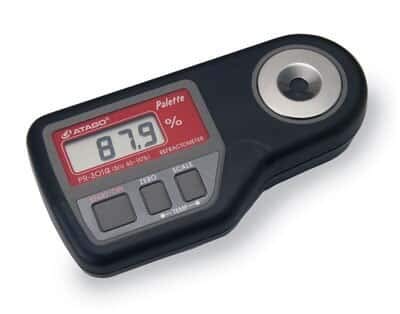
This image displays the Atago ES-421 Palette-Style Digital Refractometer. It features a black body with a red and grey control panel. The digital LCD screen shows '87.9 %'. Below the screen are three grey buttons: 'START/ON', 'ZERO', and 'SCALE'. On the right side, there is a circular sample well with a metallic rim.
3.1. Package Contents
- Atago ES-421 Palette-Style Digital Refractometer
- One 9V Battery
3.2. Key Components
- Sample Well: Area where the liquid sample is placed for measurement.
- Digital LCD Display: Shows measurement readings, battery status, and error messages.
- START/ON Button: Powers the device on and initiates a measurement.
- ZERO Button: Used for calibrating the device to a zero point (e.g., with distilled water).
- SCALE Button: Allows selection or setting of different measurement scales.
- Battery Compartment: Located on the back, houses the 9V battery.
4. Setup
4.1. Battery Installation
- Locate the battery compartment cover on the back of the refractometer.
- Slide or unclip the cover to open the compartment.
- Insert one 9V battery, ensuring correct polarity (+/-).
- Replace the battery compartment cover securely.
4.2. Initial Power On
Press the START/ON button to power on the device. The LCD display should illuminate.
5. Operation
5.1. Calibration (Zero Setting)
Calibration should be performed regularly, especially before critical measurements or if accuracy is in doubt.
- Ensure the sample well is clean and dry.
- Apply a few drops of distilled water to the sample well, ensuring the prism surface is fully covered.
- Press the ZERO button. The display will show '0.00%' or a similar indication of successful calibration.
- Wipe the distilled water from the sample well using a soft, lint-free cloth.
5.2. Taking a Measurement
- Ensure the sample well is clean and dry.
- Apply a few drops of the sample liquid to the sample well, ensuring the prism surface is fully covered without air bubbles.
- Press the START/ON button.
- The measurement reading will be displayed on the LCD screen.
- Record the reading if necessary.
- Wipe the sample from the well immediately after measurement to prevent residue buildup.
5.3. Automatic Temperature Compensation (ATC)
The Atago ES-421 features a built-in thermistor that automatically compensates for temperature variations within its specified range (up to 40°C). This ensures accurate readings without manual temperature correction tables.
5.4. Setting User Scales
The device provides the ability to set user-defined scales. Refer to the detailed instructions in the full product manual (if available) or contact Atago support for specific procedures on utilizing the SCALE button to configure custom measurement units or ranges.
6. Maintenance
6.1. Cleaning the Sample Well
After each use, clean the sample well and prism surface thoroughly with a soft, lint-free cloth or tissue. For stubborn residues, a small amount of distilled water or a mild cleaning solution compatible with the prism material can be used, followed by drying.
6.2. Storage
Store the refractometer in a clean, dry place away from direct sunlight, extreme temperatures, and corrosive chemicals. If storing for an extended period, remove the 9V battery to prevent leakage.
6.3. Battery Replacement
When the low-battery indicator appears on the display, replace the 9V battery following the instructions in Section 4.1.
7. Troubleshooting
The Atago ES-421 provides error messages to assist in troubleshooting common issues:
- Concentrations or Temperatures Out of Range: If the sample's concentration or temperature exceeds the device's operational limits, an error message will appear. Ensure your sample falls within the 0.0 to 10.0% salinity range and the temperature is within the ATC compensation range (up to 40°C).
- Inadequate Sample Volume: If not enough sample is applied to fully cover the prism, an error will occur. Ensure the prism is completely covered with the liquid.
- Standardization Errors: This may occur during calibration if the distilled water is contaminated or the ZERO button is pressed incorrectly. Re-clean the sample well and re-attempt calibration with fresh distilled water.
- Low Battery: The display will indicate a low battery. Replace the 9V battery as soon as possible to ensure accurate operation.
If problems persist after following these steps, contact Atago customer support.
8. Specifications
| Feature | Specification |
|---|---|
| Model Number | 4211 ES-421 |
| Measurement Range | 0.0 to 10.0% Salinity |
| Accuracy | 0.05% of reading (0.00 to 1.00%); 0.5% of reading (1.01 to 10.0%) |
| Resolution | 0.01% (0.00 to 2.99%); 0.1% (3.0 to 10.0%) |
| Display Type | 3-digit LCD |
| Battery Type | 9V battery (1) |
| Max Temperature Compensation | 40°C |
| Package Dimensions | 9.37 x 6.1 x 2.6 inches |
| Item Weight | 1.42 Pounds |
| Manufacturer | Cole-Parmer (as per Amazon listing) |
| Date First Available | January 14, 2016 |
9. Warranty and Support
For warranty information, technical support, or service inquiries, please contact Atago customer service or refer to the official Atago website. Keep your purchase receipt as proof of purchase for warranty claims.
For further assistance, you may visit the manufacturer's website or contact their support channels directly.
