
Introduction
This manual provides essential information for the safe and effective use of your MERCO Power Cord Model 050027. Please read these instructions carefully before installation and operation. Retain this manual for future reference.
Product Overview
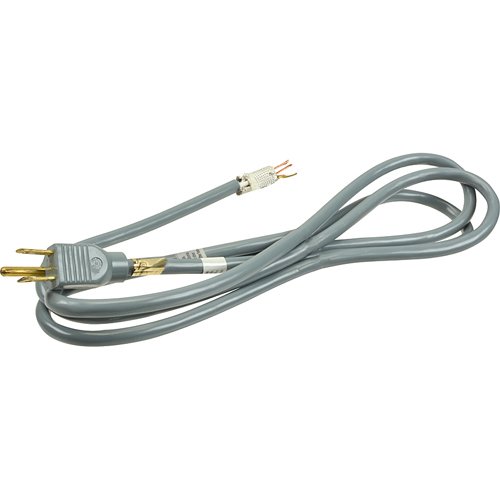
Image: The MERCO Power Cord Model 050027, a 6-foot long cordset designed for 120V 15A applications. It features a standard three-prong plug on one end and a corresponding receptacle on the other, suitable for connecting electrical devices to a power source.
The MERCO Power Cord Model 050027 is a durable 6-foot cordset designed to provide reliable electrical connection for various applications. It is rated for 120V and 15A, making it suitable for a wide range of household and industrial equipment requiring a standard power connection.
Setup Instructions
Follow these steps to properly set up your MERCO Power Cord:
- Inspect the Cord: Before each use, visually inspect the entire length of the power cord for any signs of damage, including cuts, fraying, exposed wires, or bent prongs. Do not use a damaged cord.
- Verify Compatibility: Ensure that the power requirements of the device you intend to power do not exceed the cord's rating of 120V and 15A.
- Connect to Device: Firmly insert the female end of the power cord into the power inlet of your electrical device. Ensure a snug fit.
- Connect to Power Source: Plug the male end of the power cord into a standard 120V wall outlet or an appropriate power strip. Ensure the outlet is properly grounded.
- Secure Placement: Route the cord in a manner that prevents tripping hazards and avoids placing it under heavy objects or in areas where it could be pinched or cut.
Operating Instructions
The MERCO Power Cord is designed for straightforward operation. Observe the following guidelines for safe use:
- Do Not Overload: Avoid connecting devices that collectively draw more than 15 amps through this cord. Overloading can lead to overheating and fire hazards.
- Indoor Use Recommended: While durable, this cord is primarily designed for indoor use. If used outdoors, ensure it is protected from moisture and extreme weather conditions.
- Proper Disconnection: To disconnect, always grasp the plug firmly and pull it straight out from the outlet. Never pull the cord itself, as this can damage the wiring.
- Keep Away from Heat and Water: Do not use the cord near water sources or in excessively damp environments. Keep it away from hot surfaces, heaters, and open flames.
- Children and Pets: Keep the power cord out of reach of children and pets to prevent accidental damage or injury.
Maintenance
Proper maintenance ensures the longevity and safe operation of your power cord:
- Regular Inspection: Periodically inspect the cord for any signs of wear, damage, or discoloration. Pay close attention to the plug and receptacle ends.
- Cleaning: Disconnect the cord from all power sources before cleaning. Wipe the cord with a dry, soft cloth to remove dust and dirt. Do not use liquid cleaners or immerse the cord in water.
- Storage: When not in use, coil the cord loosely and store it in a dry, cool place, away from direct sunlight and extreme temperatures. Avoid tight coiling or kinking, which can damage internal wires.
- Do Not Repair: If the cord is damaged, do not attempt to repair it. Damaged power cords should be replaced immediately to prevent electrical hazards.
Troubleshooting
If you experience issues with your MERCO Power Cord, consider the following:
- No Power to Device:
- Ensure both ends of the power cord are fully and securely plugged into the device and the power outlet.
- Check if the power outlet is functional by plugging in another known working device.
- Verify that the circuit breaker for the outlet has not tripped.
- Cord Feels Warm:
- A slightly warm cord can be normal, but if it feels excessively hot, immediately disconnect it.
- Ensure the connected device's power draw does not exceed the cord's 15A rating.
- Check for any kinks or tight coiling that might impede heat dissipation.
- Visible Damage: If the cord shows any signs of physical damage (cuts, fraying, exposed wires), discontinue use immediately and replace the cord. Do not attempt to repair it.
Specifications
| Feature | Specification |
|---|---|
| Model Number | 050027 |
| Brand | MERCO |
| Voltage Rating | 120V |
| Current Rating | 15A |
| Length | 6 feet |
| Product Dimensions | 18.5 x 3 x 1.5 inches |
| Item Weight | 1 pound |
| Manufacturer | MERCO |
| ASIN | B01AFFGVZM |
| Date First Available | January 10, 2016 |
Warranty and Support
Specific warranty information for the MERCO Power Cord Model 050027 is not provided in the product details. For warranty inquiries or technical support, please contact the manufacturer, MERCO, directly or refer to the retailer's return policy where the product was purchased.