
1. Safety Information
This product is designed for children aged 3 years and up. Please ensure adult supervision during play, especially during initial setup and charging. No specific safety warnings are applicable beyond general toy safety guidelines.
2. Product Overview
The BRIO World 33599 Rechargeable Engine is a battery-powered toy train designed to enhance your BRIO World railway system. It features forward and backward motion, a functional headlamp, and is easily rechargeable via a mini USB cable. This engine is compatible with all BRIO World railway components, offering versatile play opportunities.

Image 1: The BRIO World 33599 Rechargeable Engine shown with its packaging, highlighting the product and its USB charging cable.
3. Package Contents
Upon opening the package, you should find the following items:
- 1x BRIO World 33599 Rechargeable Engine
- 1x Mini USB Cable

Image 2: The package contents, including the rechargeable engine and the mini USB charging cable.
4. Setup
The BRIO World 33599 Rechargeable Engine comes ready for use after an initial charge. No assembly is required.
- Remove the engine and mini USB cable from the packaging.
- Proceed to the "Charging the Engine" section to prepare your engine for its first use.
5. Charging the Engine
The engine is equipped with a rechargeable battery. Follow these steps to charge it:
- Locate the mini USB charging port on the side of the engine.
- Connect the mini USB cable to the engine's charging port.
- Plug the other end of the USB cable into any standard USB power source (e.g., computer USB port, USB wall adapter).
- A red light on the engine will blink to indicate that it is charging.
- The red light will stop blinking when the engine is fully charged.
- Disconnect the USB cable once charging is complete.
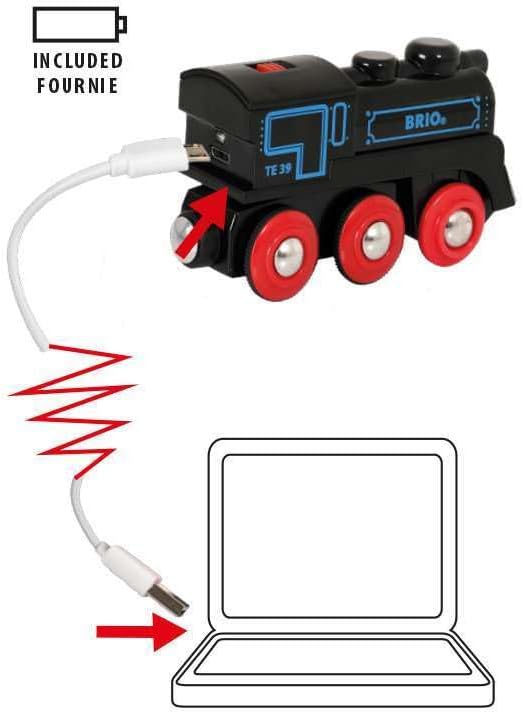
Image 3: Illustration of the engine being charged by connecting the mini USB cable to a laptop.
6. Operation
To operate your BRIO World 33599 Rechargeable Engine:
- Place the engine on a BRIO World railway track.
- Locate the red switch on the top of the engine.
- Slide the switch forward to make the engine move forward. The headlamp will illuminate.
- Slide the switch backward to make the engine move in reverse.
- Set the switch to the middle position to stop the engine.

Image 4: A hand demonstrating the use of the red switch on top of the engine to control its direction.
7. Maintenance
Proper care will ensure the longevity of your BRIO World 33599 Rechargeable Engine:
- Cleaning: Wipe the engine with a damp cloth to remove dust and dirt. Do not submerge in water.
- Storage: Store the engine in a dry place away from direct sunlight and extreme temperatures.
- Battery Care: For optimal battery life, avoid completely draining the battery frequently. Charge the engine regularly, even if not in use for extended periods.
8. Troubleshooting
Refer to the table below for common issues and their solutions:
| Problem | Possible Cause | Solution |
|---|---|---|
| Engine does not move. | Battery is depleted. | Charge the engine using the mini USB cable. |
| Engine moves slowly or inconsistently. | Low battery charge. | Recharge the engine. |
| Engine stops unexpectedly. | Battery depleted or switch moved to 'off' position. | Check battery charge and switch position. |
| Red charging light does not illuminate. | Cable not properly connected or USB power source issue. | Ensure cable is securely connected to both engine and power source. Try a different USB port or adapter. |
9. Specifications
- Model Number: 33599
- Product Dimensions: 3.94 x 1.57 x 1.97 inches (10.2 x 5 x 5 cm)
- Item Weight: 7.7 ounces
- Recommended Age: 3 years and up
- Power Source: Rechargeable battery (1 LR44 battery included, non-replaceable by user)
- Charging: Mini USB cable (included)
- Material: Plastic, FSC sourced European beech wood
10. Warranty and Support
BRIO products are manufactured to high-quality standards. For information regarding warranty coverage or customer support, please refer to the official BRIO website or contact your local retailer. Keep your proof of purchase for any warranty claims.
For further assistance, visit the BRIO Store on Amazon.

