
RIGEXPERT AA-230
RIGEXPERT AA-230 ZOOM Antenna Analyzer
User Manual
Model: AA-230 | Brand: RIGEXPERT
Introduction
The RIGEXPERT AA-230 ZOOM is a powerful antenna analyzer designed for testing, checking, tuning, and repairing antennas and antenna feedlines. It operates within a frequency range of 0.1 to 230 MHz, making it suitable for a wide array of amateur radio and professional applications. This manual provides essential information for the proper setup, operation, and maintenance of your device.
Please read this manual thoroughly before using the AA-230 ZOOM to ensure safe and efficient operation.
Package Contents and Setup
Before beginning, ensure all components are present and undamaged. Carefully unpack the device and its accessories.

Figure 1: The AA-230 ZOOM antenna analyzer as it appears in its retail packaging, ready for unboxing.

Figure 2: The AA-230 ZOOM device alongside its essential accessories, including the USB cable, N-UHF adapter, and four AAA alkaline batteries.
Included Components:
- RIGEXPERT AA-230 ZOOM Antenna Analyzer Unit
- 4 x 1.5V AAA Alkaline Batteries
- USB Cable
- N-UHF Adapter
- Strap Cover
- User Manual (this document)
Battery Installation:
- Locate the battery compartment on the rear of the AA-230 ZOOM unit.
- Open the battery compartment cover.
- Insert four (4) 1.5V AAA alkaline batteries, ensuring correct polarity (+/-) as indicated inside the compartment.
- Close the battery compartment cover securely.
Note: The device can operate for up to 4 hours of continuous measurement or up to 2 days in standby mode on a full charge of alkaline batteries. Always use fresh alkaline batteries for optimal performance.
Connecting to a Computer:
The AA-230 ZOOM features a USB port for connection to a computer, enabling data transfer and potential firmware updates. Use the provided USB cable for this connection.

Figure 3: The bottom of the AA-230 ZOOM, highlighting the USB port for computer connectivity and power input.
Operating Instructions
This section details the basic operation of your RIGEXPERT AA-230 ZOOM antenna analyzer.
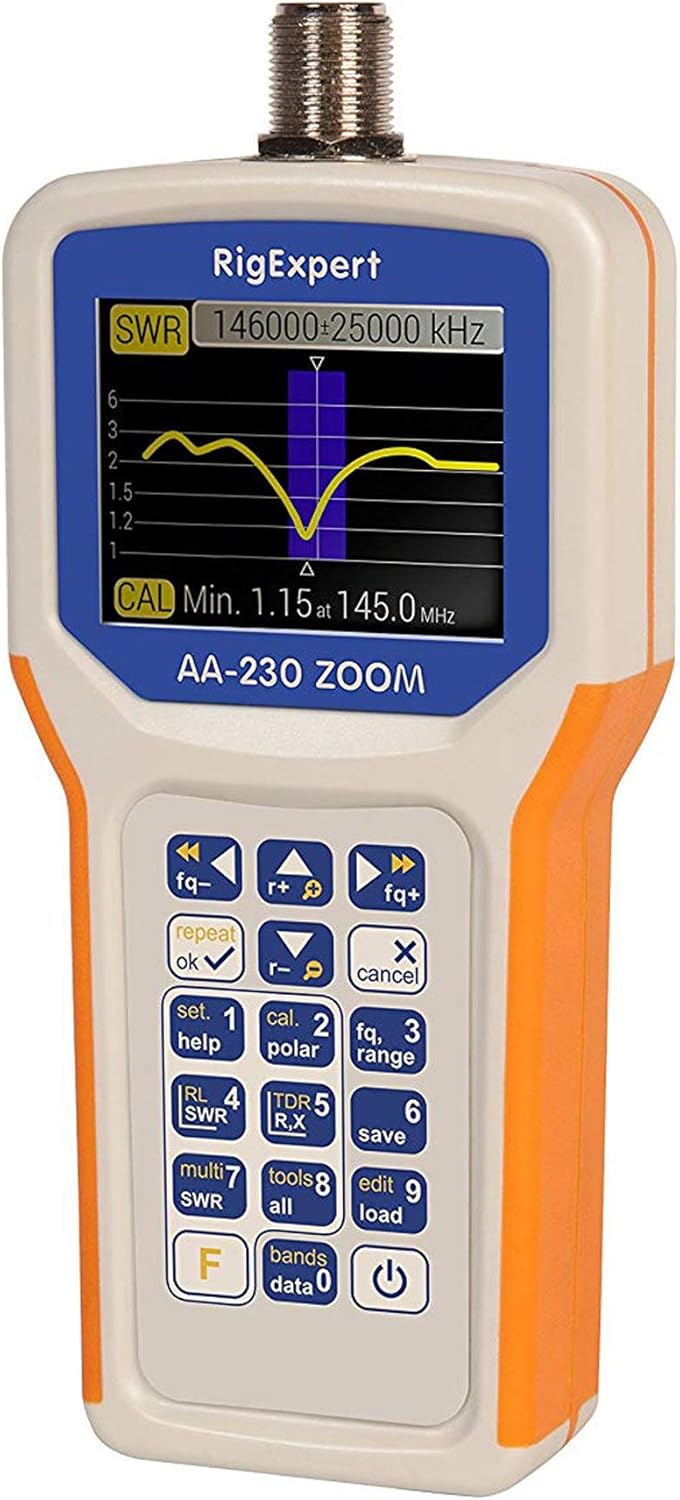
Figure 4: The main display of the AA-230 ZOOM showing an SWR sweep, along with the keypad for navigation and function selection.

Figure 5: A detailed view of the AA-230 ZOOM's screen, displaying a numerical SWR reading of 2.3 and corresponding return loss in dB.
Powering On/Off:
- To power on the device, press and hold the Power button (usually located at the bottom right of the keypad) until the screen illuminates.
- To power off, press and hold the Power button again until the screen turns off.
Keypad Functions:
The AA-230 ZOOM features a tactile keypad for navigating menus and selecting functions. Key functions include:
- Frequency Control: Use the fq- and fq+ buttons to adjust the operating frequency.
- OK/Repeat: Confirms selections or repeats the last measurement.
- Cancel/X: Cancels an operation or exits a menu.
- Set/Help (1): Accesses settings or displays help information.
- Cal/Polar (2): Initiates calibration or changes polarization.
- Fq/Range (3): Adjusts frequency range for sweeps.
- RL/SWR (4): Displays Return Loss or SWR.
- TDR/R,X (5): Activates Time Domain Reflectometer mode or displays Resistance and Reactance.
- Save (6): Saves current measurement data.
- Multi SWR (7): For multi-frequency SWR measurements.
- Tools/All (8): Accesses additional tools or displays all parameters.
- Edit/Load (9): Edits saved data or loads configurations.
- Bands/Data (0): Selects frequency bands or accesses stored data.
- F (Function): Accesses secondary functions of keys.
Performing SWR Measurements:
- Connect the antenna or load to be tested to the N-type connector on the top of the AA-230 ZOOM. Use the N-UHF adapter if necessary.
- Power on the device.
- Navigate to the SWR measurement mode using the keypad (e.g., press RL/SWR (4)).
- Adjust the frequency using fq- and fq+ buttons to the desired test frequency.
- The display will show the SWR value numerically and/or graphically.
- For a frequency sweep, use the Fq/Range (3) button to set the start and end frequencies.
Maintenance
Proper maintenance ensures the longevity and accuracy of your AA-230 ZOOM.
Cleaning:
- Wipe the device with a soft, dry cloth.
- For stubborn dirt, use a slightly damp cloth with mild soap, then wipe dry immediately.
- Do not use abrasive cleaners, solvents, or harsh chemicals, as these can damage the casing or screen.
Battery Care:
- Remove batteries if the device will not be used for an extended period to prevent leakage.
- Dispose of used batteries according to local regulations.
Storage:
- Store the device in a cool, dry place, away from direct sunlight and extreme temperatures.
- Use the provided strap cover for protection during storage and transport.

Figure 6: The AA-230 ZOOM with its protective strap cover, which helps shield the device from dust and minor impacts during storage or transport.
Troubleshooting
If you encounter issues with your AA-230 ZOOM, refer to the following common problems and solutions:
| Problem | Possible Cause | Solution |
|---|---|---|
| Device does not power on. | Dead or incorrectly installed batteries. | Check battery polarity. Replace with fresh AAA alkaline batteries. |
| Inaccurate SWR readings. | Improper calibration; faulty cable/connector; external interference. | Perform a calibration. Check all cable connections. Ensure no strong RF sources are nearby. |
| Screen is blank or frozen. | Software glitch; low battery. | Remove and reinsert batteries to perform a hard reset. Ensure batteries are charged. |
| Cannot connect to PC via USB. | Faulty USB cable; driver issue; incorrect port. | Try a different USB port or cable. Install necessary drivers from the RIGEXPERT website if prompted by your PC. |
Specifications
Detailed technical specifications for the RIGEXPERT AA-230 ZOOM Antenna Analyzer.
| Frequency Range | 0.1 to 230 MHz |
| Frequency Step Resolution | 1 kHz |
| Impedance Compatibility | 25, 50, 75, and 100 Ohm systems |
| SWR Measurement Range | 1-100 (numerical mode) / 1-10 (graphical mode) |
| R and X Range | 0-10000, -10000-10000 (numerical) / 0-1000, -1000-1000 (graphical) |
| RF Output Connector | N-type |
| Signal Output Form | Square wave |
| Output Power | -10 dBm (at 50 Ohm load) |
| Power Supply | 4 x 1.5V AAA Alkaline Batteries |
| Battery Life | Up to 4 hours continuous measurement / Up to 2 days standby |
| Display | Color TFT, 290 x 220 pixels |
| Keyboard | Waterproof |
| PC Interface | USB Port |
| Dimensions (H x W x D) | 182 x 82 x 32 mm (7.17 x 3.23 x 1.26 inches) |
| Weight | 236 g (0.52 lbs) |
| Operating Temperature | 0°C to +40°C (32°F to +104°F) |
| Model Number | AA-230 |
| UPC | 644730932592 |
Warranty and Support
For detailed warranty information, please refer to the warranty card included with your product or visit the official RIGEXPERT website. Warranty terms may vary by region and retailer.
For technical support, software updates, or additional resources, please visit the official RIGEXPERT support page or contact their customer service directly. Always provide your product model (AA-230) and serial number (if applicable) when seeking support.
Official RIGEXPERT Website: www.rigexpert.com
Related documentsAA-230


Ask a question about this manual
Ask about setup, troubleshooting, compatibility, parts, safety, or missing instructions. Manuals+ will review the question and use this page’s manual context to help answer it.