
1. Introduction
This manual provides comprehensive instructions for the safe and efficient use of your Cowon Plenue D High Resolution Music Player. Please read this manual thoroughly before operating the device to ensure proper functionality and to prevent damage.
2. Safety Information
- Do not expose the device to extreme temperatures, direct sunlight, or high humidity.
- Avoid dropping or subjecting the device to strong impacts.
- Do not disassemble, repair, or modify the device yourself. Refer all servicing to qualified personnel.
- Use only the specified charging cable and power adapter.
- Prolonged listening at high volume levels can cause hearing damage. Adjust volume to a safe level.
- Keep the device away from water and other liquids.
3. Package Contents
Verify that all items are present in the package:
- Cowon Plenue D Main Unit
- USB Cable
4. Product Overview
Familiarize yourself with the components and controls of your Plenue D music player.

Figure 4.1: Front View. This image displays the front of the Cowon Plenue D, highlighting its wide-angle touch display with a music playback screen showing track information and playback controls. The device features a gold and black color scheme.

Figure 4.2: Rear and Side View. This image shows the back and side of the Cowon Plenue D, revealing its textured black rear panel and the placement of physical control buttons on the side, including volume and playback controls. Branding and regulatory information are visible on the back.

Figure 4.3: Top View. This image provides a top-down view of the Cowon Plenue D, clearly showing the prominent high-definition sound volume knob and the 3.5mm headphone jack. The gold accent on the top edge is also visible.
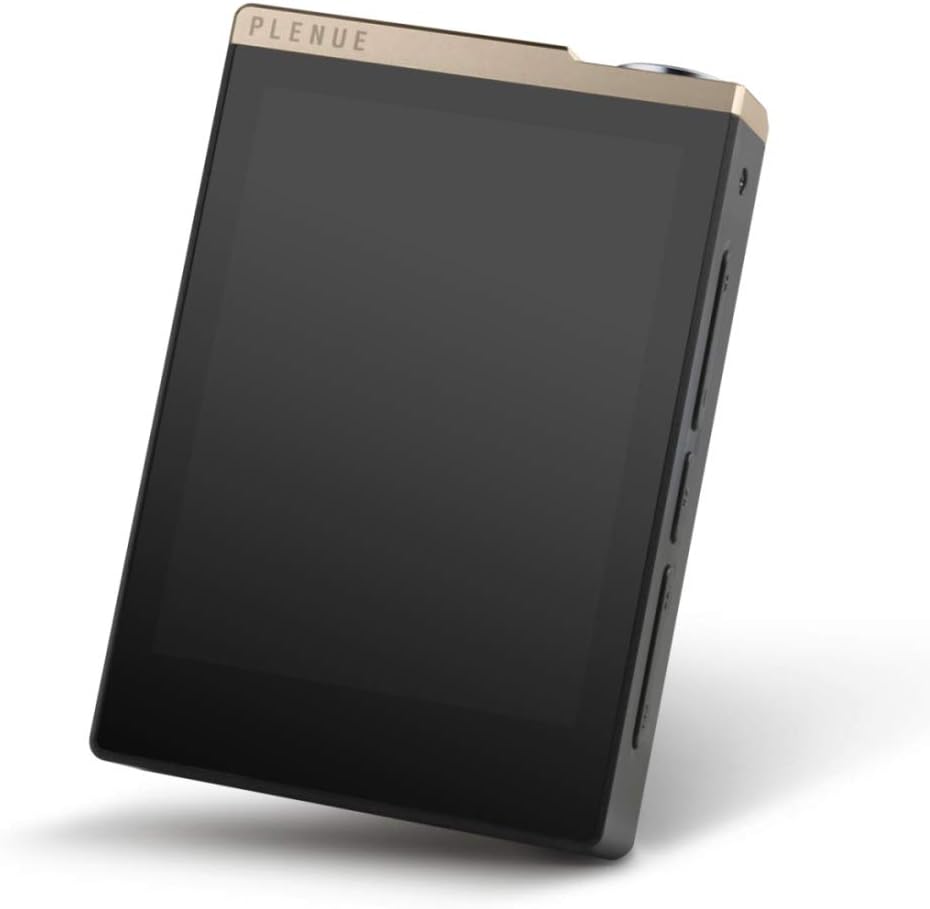
Figure 4.4: Angled View. This image presents an angled view of the Cowon Plenue D, showcasing its sleek profile, the touch screen, and the physical buttons located on the side for easy access to controls.
Key Features:
- 24bit/192kHz High Definition Sound
- High Quality 24bit Stereo DAC
- SNR 123dB, THD+N 0.004%, Crosstalk -105dB
- Jet Effect 5 & BBE+ Sound Enhancements
- Supports FLAC, WAV, AIFF, ALAC, APE, MP3, WMA, OGG audio formats
- Wide Angle Touch Display
- 32GB Internal Memory with microSD Card Slot for expansion
- Up to 100 hours Music Playback
5. Setup
5.1 Initial Charging
- Connect the supplied USB cable to the Plenue D's USB port.
- Connect the other end of the USB cable to a USB power adapter (not included) or a computer's USB port.
- The device will begin charging. A full charge is recommended before first use.
5.2 Inserting a microSD Card
- Locate the microSD card slot on the side of the device.
- Insert a compatible microSD card (up to 128GB, sold separately) into the slot until it clicks into place.
- To remove, gently push the card in until it springs out.
5.3 Connecting to a Computer
- Connect the Plenue D to your computer using the supplied USB cable.
- The device will be recognized as a removable storage device.
- You can now transfer music files to the internal memory or the inserted microSD card.
6. Operating Instructions
6.1 Power On/Off
- To power on: Press and hold the Power button until the screen illuminates.
- To power off: Press and hold the Power button, then select "Power Off" on the screen.
6.2 Basic Navigation
- The Plenue D features a touch display for navigation. Tap icons and menus to select options.
- Swipe left or right to navigate between screens or lists.
- Use the physical buttons on the side for volume control and track skipping.
6.3 Music Playback
- From the main screen, tap the "Music" or "Browser" icon to access your music library.
- Browse by Artist, Album, Song, Genre, or Folder.
- Tap a song to begin playback.
- Use the on-screen controls or physical buttons to play, pause, skip tracks, and adjust volume.
6.4 Jet Effect 5 & BBE+
The Plenue D includes Jet Effect 5 and BBE+ sound enhancements to customize your audio experience. Access these settings through the playback screen or system settings to adjust equalizer presets, BBE+ effects, and other audio parameters.
7. Maintenance
7.1 Cleaning
- Wipe the device with a soft, dry, lint-free cloth.
- Do not use abrasive cleaners, alcohol, or chemical solvents.
7.2 Battery Care
- To prolong battery life, avoid fully discharging the battery frequently.
- Store the device in a cool, dry place if not used for extended periods.
7.3 Software Updates
Periodically check the official Cowon website for firmware updates to ensure optimal performance and access to new features.
8. Troubleshooting
| Problem | Possible Cause | Solution |
|---|---|---|
| Device does not power on. | Battery is discharged. | Charge the device for at least 30 minutes. |
| No sound from headphones. | Volume is too low or headphones are not properly connected. | Increase volume. Ensure headphones are fully plugged into the jack. Test with another pair of headphones. |
| Cannot transfer files to device. | USB cable issue or device not recognized by computer. | Try a different USB port or cable. Restart both the device and computer. Ensure the device is in data transfer mode if prompted. |
| Device freezes or becomes unresponsive. | Software glitch. | Perform a soft reset by pressing and holding the Power button for approximately 10 seconds until the device restarts. |
9. Specifications
| Model Number | PD-32GB |
| Product Dimensions | 7.2 x 1 x 3.8 inches |
| Item Weight | 8.8 ounces |
| Memory Storage Capacity | 32 GB (Internal) |
| Expandable Memory | microSD Card Slot |
| Color | Gold Black |
| Screen Size | 2.8 Inches |
| Display Technology | LCD |
| Connectivity Technology | Aux (for headphones) |
| Audio Formats Supported | FLAC, WAV, AIFF, ALAC, APE, MP3, WMA, OGG |
| SNR (Signal-to-Noise Ratio) | 123dB |
| THD+N (Total Harmonic Distortion + Noise) | 0.004% |
| Crosstalk | -105dB |
| Music Playback Time | Up to 100 hours |
10. Warranty and Support
The Cowon Plenue D High Resolution Music Player comes with a limited manufacturer's warranty. Please refer to the warranty card included with your product for specific terms and conditions.
For technical support, service, or warranty claims, please contact Cowon customer service through their official website or authorized service centers. Keep your proof of purchase for warranty validation.
Manufacturer: Cowon
