
1. Introduction
Thank you for choosing the LTC MEGA50USB Rechargeable Megaphone. This manual provides essential information for the safe and efficient operation, maintenance, and troubleshooting of your device. Please read this manual thoroughly before using the megaphone and keep it for future reference.
2. Product Overview
2.1 Key Features
- Powerful 50W output with an approximate range of 600 meters.
- Integrated USB, SD, and AUX inputs for versatile audio playback.
- MP3 controls for media management.
- Rechargeable battery for extended use.
- 16-second message recording and playback function.
- Built-in siren for emergency or attention-grabbing situations.
- Detachable microphone with a coiled cord for convenient handling.
- Ergonomic handle and adjustable shoulder strap for portability.
- Durable ABS body construction.
2.2 Components
Familiarize yourself with the main components of your MEGA50USB megaphone:
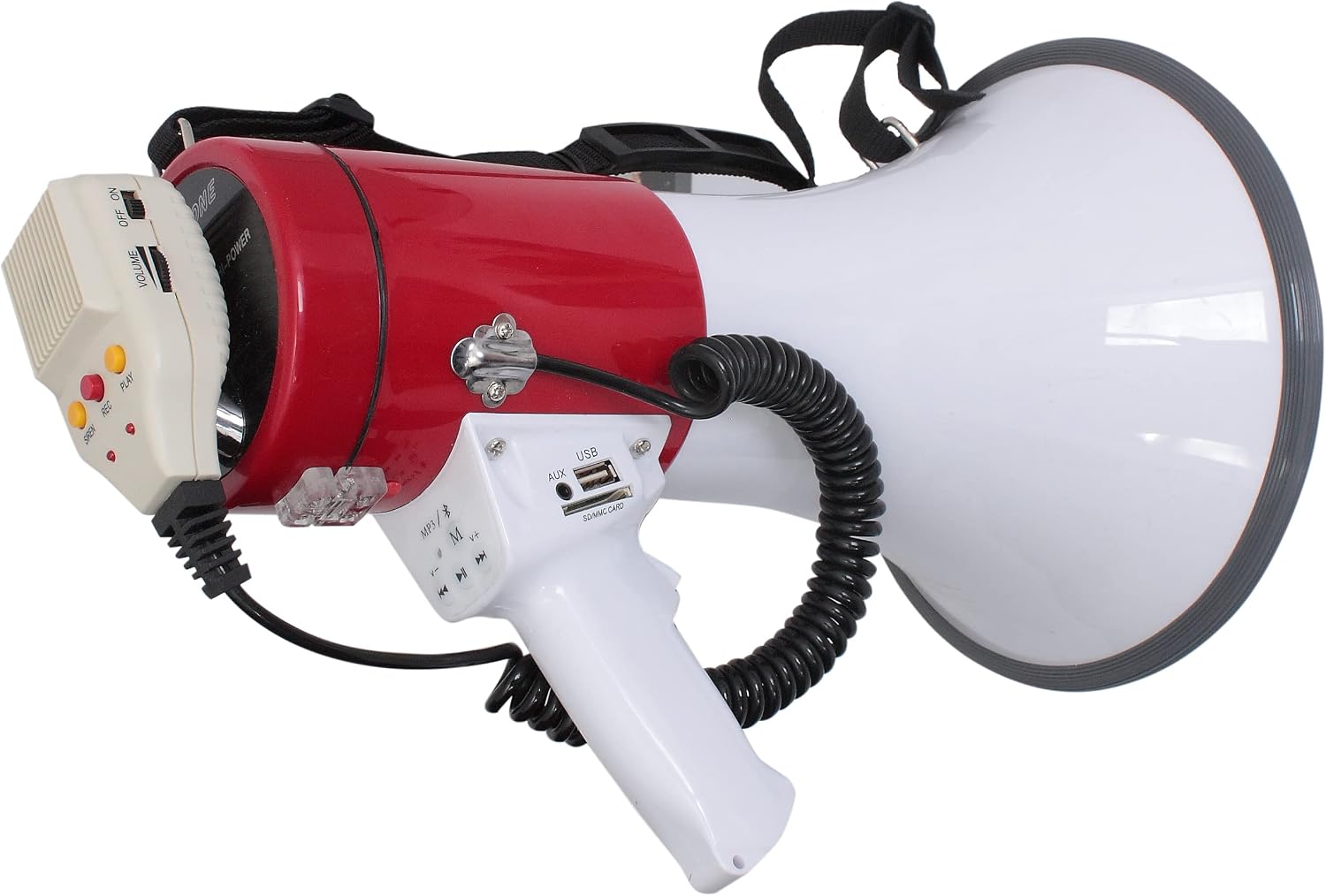
Figure 1: The LTC MEGA50USB megaphone, showcasing its red and white body, the detachable microphone with volume and power controls, the main handle with USB, AUX, and SD card slots, and MP3 playback buttons. A coiled cord connects the microphone to the main unit, and a shoulder strap is visible at the top.
- Megaphone Horn: The large white cone for sound projection.
- Main Body: The red cylindrical section housing the electronics and battery.
- Handle: White ergonomic grip for holding the megaphone.
- Control Panel (on handle):
- USB Port: For connecting USB flash drives.
- SD/MMC Card Slot: For inserting SD or MMC memory cards.
- AUX Input: For connecting external audio devices via a 3.5mm cable.
- MP3 Controls: Play/Pause, Next/Previous Track, Mode selection.
- Detachable Microphone:
- ON/OFF Switch: Powers the microphone.
- Volume Slider: Adjusts microphone volume.
- SIREN Button: Activates the siren sound.
- REC Button: Initiates message recording.
- PLAY Button: Plays back recorded messages.
- Shoulder Strap: For hands-free carrying.
3. Setup
3.1 Charging the Battery
- Ensure the megaphone is switched OFF.
- Locate the charging port, typically on the side or rear of the main body.
- Connect the provided power adapter to the charging port and then to a suitable power outlet.
- An indicator light (if present) will show the charging status. Charge until fully charged (refer to the indicator light behavior in the adapter's manual if available).
- Disconnect the adapter once charging is complete.
Note: The megaphone uses a Lithium-ion battery. For optimal battery life, avoid fully discharging the battery frequently.
3.2 Attaching the Shoulder Strap
Attach the ends of the shoulder strap to the designated attachment points on the megaphone body. Adjust the strap length for comfortable carrying.
3.3 Connecting the Microphone
The microphone is typically pre-connected via a coiled cord. Ensure the connector is securely plugged into its port on the megaphone body.
4. Operating Instructions
4.1 Powering On/Off
Slide the ON/OFF switch on the detachable microphone to the "ON" position to power on the megaphone. Slide it to "OFF" to power off.
4.2 Adjusting Volume
Use the VOLUME slider on the detachable microphone to increase or decrease the sound output level.
4.3 Voice Amplification
- Ensure the megaphone is powered ON.
- Hold the microphone close to your mouth.
- Speak clearly into the microphone.
- Adjust the volume slider to your desired level.
4.4 Using the Siren
Press the SIREN button on the detachable microphone to activate the siren sound. Press it again to stop the siren.
4.5 Recording and Playback
- To Record: Press and hold the REC button on the microphone. Speak your message clearly. The megaphone can record up to 16 seconds. Release the button to stop recording.
- To Playback: Press the PLAY button on the microphone to listen to your last recorded message.
4.6 Using USB/SD/AUX Inputs
- USB/SD Playback: Insert a USB flash drive into the USB Port or an SD/MMC card into the SD/MMC CARD Slot on the handle. The megaphone should automatically detect and begin playing MP3 files. Use the MP3 controls (Play/Pause, Next/Previous Track, Mode) to manage playback.
- AUX Input: Connect an external audio device (e.g., smartphone, MP3 player) to the AUX Input using a 3.5mm audio cable. Select the AUX mode using the MP3 controls (if applicable) or ensure the device is playing audio.
5. Maintenance
5.1 Cleaning
Wipe the megaphone's exterior with a soft, damp cloth. Do not use abrasive cleaners or solvents. Ensure no liquid enters the ports or openings.
5.2 Battery Care
- Recharge the battery regularly, even if not in use, to maintain its health.
- Avoid storing the megaphone in extreme temperatures.
- If the megaphone will not be used for an extended period, charge the battery to about 50% before storage.
5.3 Storage
Store the megaphone in a cool, dry place, away from direct sunlight and moisture. Keep it in its original packaging or a protective case if available.
6. Troubleshooting
| Problem | Possible Cause | Solution |
|---|---|---|
| No sound from megaphone. | Megaphone is OFF. Battery is low/dead. Volume is too low. Microphone not connected properly. | Ensure ON/OFF switch is ON. Charge the battery. Increase volume. Check microphone connection. |
| Distorted sound. | Volume too high. Microphone too close to mouth. | Decrease volume. Hold microphone slightly further away. |
| USB/SD playback not working. | No compatible files (e.g., MP3). USB/SD card not inserted correctly. Corrupted files. | Ensure files are MP3 format. Reinsert USB/SD card. Try a different USB/SD card or files. |
| Siren not activating. | Megaphone is OFF. Siren button not pressed firmly. | Ensure megaphone is ON. Press the SIREN button firmly. |
7. Specifications
| Feature | Detail |
|---|---|
| Model Number | 95-2005 |
| Power Output | 50 Watts |
| Approximate Range | 600 meters |
| Dimensions (L x W x H) | 34.5 x 24 x 24 cm |
| Weight | 1.47 Kilograms |
| Battery Type | 1 Lithium-ion (included) |
| Material | ABS |
| Connectivity | USB, SD/MMC Card, AUX (3.5mm) |
| Message Recording | 16 seconds |
| Color | White and Red |
8. Warranty and Support
This product comes with a spare parts availability period of 2 Years from the date of purchase. Please retain your proof of purchase for any warranty claims.
For technical support, service, or warranty inquiries, please contact your retailer or the manufacturer's customer service department. Refer to the product packaging or the retailer's website for contact information.

