
Introduction
Thank you for purchasing the Air Innovations Cool Mist Digital Humidifier MH-701C. This manual provides detailed instructions for the safe and efficient operation, maintenance, and troubleshooting of your new humidifier. Please read this manual thoroughly before use and retain it for future reference.
Important Safety Instructions
When using electrical appliances, basic precautions should always be followed to reduce the risk of fire, electric shock, and injury to persons, including the following:
- Read all instructions before using the humidifier.
- Place the humidifier on a firm, flat, level surface away from direct sunlight and heat sources.
- Do not place the humidifier on soft surfaces such as carpets or towels, as this could block the air intake.
- Do not use the humidifier in areas where humidity levels are already high, such as bathrooms.
- Always unplug the humidifier before filling, cleaning, or moving it.
- Do not immerse the humidifier base in water or other liquids.
- Keep the humidifier out of reach of children and pets.
- Use only clean, cool tap water. Distilled or demineralized water is recommended to prevent mineral buildup.
- Do not add essential oils or medication directly into the water tank or base.
- Regularly clean the humidifier to prevent mold and bacteria growth.
Package Contents
Please check the box for the following items:
- Air Innovations Cool Mist Digital Humidifier Unit (Base and Water Tank)
- Adjustable Mist Nozzle
- Remote Control
- Ceramic Filter / Demineralization Filter (pre-installed or separate)
- User Manual (this document)
Parts Identification

Figure 1: Front view of the Air Innovations Cool Mist Digital Humidifier MH-701C in Teal, showing the main unit with the tall mist nozzle and digital display.
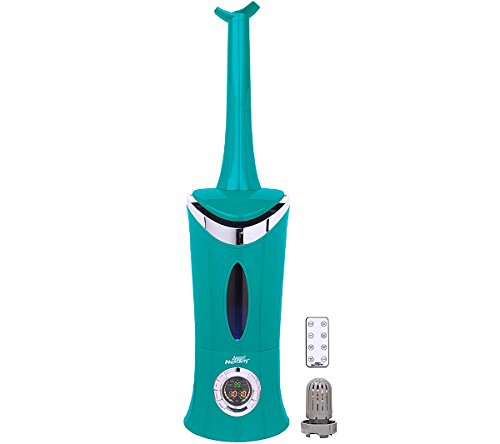
Figure 2: The humidifier unit alongside its remote control and the demineralization filter, which helps reduce mineral dust.
- Mist Nozzle (Adjustable)
- Water Tank
- Water Tank Handle
- Base Unit
- Digital Control Panel / Display
- Remote Control Sensor
- Demineralization Filter (inside water tank or base)
- Power Cord
Setup
Initial Setup and Placement
- Unpack the humidifier carefully and remove all packaging materials.
- Place the humidifier on a firm, flat, waterproof surface at least 6 inches away from walls and furniture. Ensure the mist output is directed away from walls or sensitive items.
- Ensure the power cord is not obstructed and is easily accessible.
Filling the Water Tank

Figure 3: Illustrates the process of filling the humidifier's water tank directly from a faucet. Ensure the tank cap is securely fastened after filling.
- Remove the water tank from the base unit.
- Unscrew the water tank cap (usually located at the bottom of the tank).
- Fill the water tank with clean, cool tap water. Distilled or demineralized water is highly recommended to prevent white dust from mineral deposits.
- Securely screw the water tank cap back on.
- Place the filled water tank back onto the humidifier base, ensuring it is seated correctly.
Operating Instructions

Figure 4: A detailed view of the digital control panel, showing buttons for On/Off, Mist, Humidistat, Timer, and Clock settings.
Control Panel Functions
| Button/Display | Function |
|---|---|
| ON/OFF | Powers the unit on or off. |
| MIST | Adjusts mist output level (e.g., Low, Medium, High, Turbo). |
| HUMIDISTAT | Sets desired humidity level. The unit will automatically turn on/off to maintain this level. |
| TIMER | Sets an auto-off timer for a specified duration (e.g., 1-24 hours). |
| CLOCK | Sets the current time on the display. |
| Digital Display | Shows current humidity, set humidity, mist level, timer settings, and current time. |
Basic Operation
- Plug the power cord into a standard electrical outlet.
- Press the ON/OFF button to turn on the humidifier. The display will illuminate.
- Press the MIST button repeatedly to cycle through desired mist output levels.
- Press the HUMIDISTAT button to set your desired humidity level. The unit will operate until this level is reached, then cycle on and off to maintain it.
- To set a timer, press the TIMER button and adjust the hours. The unit will automatically shut off after the set time.
- To turn off the humidifier, press the ON/OFF button again.

Figure 5: The humidifier in operation, visibly emitting a cool mist into the room, demonstrating its primary function.

Figure 6: Example placement of a humidifier (shown in white, product is teal) in a bedroom setting, indicating its use for personal comfort and air quality.
Maintenance
Regular cleaning and maintenance are essential for optimal performance and hygiene of your humidifier.
Daily Maintenance
- Empty and rinse the water tank and water basin daily.
- Refill with fresh, cool water.
Weekly Cleaning
- Unplug the humidifier and remove the water tank.
- Empty any remaining water from the tank and base.
- Cleaning the Water Tank: Fill the tank halfway with water and add 2 tablespoons of white vinegar. Shake vigorously and let it sit for 20 minutes. Rinse thoroughly with clean water until the vinegar smell is gone.
- Cleaning the Water Basin: Gently wipe the water basin and ultrasonic nebulizer (the small disc) with a soft cloth or brush dipped in white vinegar. Do not scrub aggressively. Rinse the basin with clean water.
- Demineralization Filter: Check the demineralization filter. If it appears discolored or if you notice increased white dust, it may need cleaning or replacement. Refer to the filter's specific instructions for maintenance.
- Dry all parts thoroughly before reassembling.
Storage
When storing the humidifier for an extended period, ensure all parts are clean and completely dry. Store in a cool, dry place.
Troubleshooting
| Problem | Possible Cause | Solution |
|---|---|---|
| No mist output | No water in tank/basin; Unit not plugged in; Ultrasonic nebulizer dirty. | Refill water tank; Check power connection; Clean ultrasonic nebulizer. |
| White dust around unit | Hard water minerals; Demineralization filter needs replacement. | Use distilled or demineralized water; Replace demineralization filter. |
| Unusual odor | Stagnant water; Mineral buildup; New unit smell. | Clean tank and basin thoroughly; Use fresh water daily; Odor should dissipate with use. |
| Unit not turning on | No power; Tank not seated correctly. | Check power outlet and cord; Re-seat water tank firmly on base. |
Specifications
| Feature | Detail |
|---|---|
| Model Number | MH-701C TEAL |
| Brand | Air Innovations |
| Color | Teal |
| Item Weight | 2.72 kg (2 kg 720 g) |
| Item Dimensions (LxWxH) | 21 x 21 x 83.8 Centimeters |
| UPC | 180104003944 |
| Type | Cool Mist Digital Humidifier |
Warranty and Support
For information regarding warranty coverage, technical support, or replacement parts, please refer to the warranty card included with your product or visit the official Air Innovations website. Keep your purchase receipt as proof of purchase for warranty claims.
For further assistance, you may contact Air Innovations customer service directly.


