
Gigaset S30852-H2501-D202
Gigaset AS405 Cordless Phone
User Manual
Introduction
This manual provides detailed instructions for the setup, operation, and maintenance of your Gigaset AS405 cordless phone. Please read this manual carefully to ensure proper use and to take full advantage of all features. The Gigaset AS405 is designed for ease of use in daily calls, featuring a large, clear display and excellent sound quality.
Important Note: This product is primarily compatible for use in Spain. While language settings can be changed, certain functionalities or regional services may be optimized for the Spanish market.
1. Setup
1.1 Package Contents
Before you begin, ensure all components are present:
- Gigaset AS405 Handset
- Base Station
- Power Adapter for Base Station
- Telephone Line Cord
- Rechargeable Lithium-ion Battery (1 included)
- Battery Cover
1.2 Battery Installation
- Remove the battery cover on the back of the handset.
- Insert the supplied Lithium-ion battery, ensuring the polarity is correct.
- Replace the battery cover until it clicks into place.
- Place the handset on the base station to charge. The display will indicate charging status. Allow at least 8 hours for the initial charge.

Image 1.1: Gigaset AS405 Handset on Base Station
1.3 Connecting the Base Station
- Connect the telephone line cord to the 'LINE' port on the base station and to your telephone wall socket.
- Connect the power adapter to the 'POWER' port on the base station and plug it into an electrical outlet.
- Ensure the base station is placed in a central location, away from other electronic devices that may cause interference.
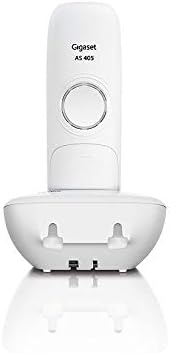
Image 1.2: Rear of Base Station with Connection Ports
1.4 Handset Registration (for additional handsets or re-registration)
If you are adding an additional handset or need to re-register your existing handset to the base:
- On the base station, press and hold the registration/paging button for approximately 3 seconds. The base will enter registration mode.
- On the handset, navigate to the 'Settings' or 'Registration' menu.
- Select 'Register Handset' and follow the on-screen prompts. You may be asked to enter a PIN (default is 0000).
- Once registered, the handset display will show its internal number (e.g., INT 1).
1.5 Language Setting
The phone may initially be set to Spanish. To change the language:
- Press the 'Menu' key.
- Navigate to 'Settings' (often represented by a gear icon).
- Select 'Language' or 'Idioma'.
- Scroll through the list and select 'English' or your preferred language.
2. Operating Instructions
2.1 Basic Call Functions
- Making a Call: Enter the phone number using the keypad, then press the green call key (📞).
- Answering a Call: When the phone rings, press the green call key (📞).
- Ending a Call: Press the red end call key (☎️).
- Hands-free Calling: During a call, press the illuminated hands-free key (often with a speaker icon) to activate speakerphone mode.
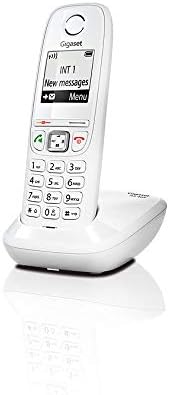
Image 2.1: Handset Keypad and Display
2.2 Phonebook
The Gigaset AS405 can store up to 100 names and numbers in its phonebook.
- Adding a Contact: Navigate to the 'Phonebook' menu, select 'New Entry', enter the name and number, then save.
- Calling from Phonebook: Open the 'Phonebook', scroll to the desired contact, and press the green call key (📞).
2.3 Display and Navigation
The 1.8-inch black and white backlit display offers excellent contrast for easy readability. Navigation is intuitive using the central 4-way navigation key and the soft keys below the display.
- Use the up/down arrows to scroll through lists and menus.
- Use the left/right arrows to move the cursor or access sub-menus.
- The soft keys change function depending on the context, indicated by labels on the display directly above them (e.g., 'Menu', 'Back', 'OK').
2.4 Call Features
- Missed Calls List: The phone stores a list of up to 25 missed calls, including caller ID and time, if supported by your network provider. Access this list via the 'Menu' or a dedicated key.
- Silent Mode (Day/Night): You can program the phone to silence calls during specific times. Refer to the 'Settings' menu for 'Silent Mode' or 'Do Not Disturb' options.
- Anonymous Call Silencing: This feature allows you to silence calls from unknown or withheld numbers. Check the 'Settings' menu for 'Anonymous Call' options.
- Alarm Clock: The phone includes an alarm function with selectable ringtones and a snooze option. Set this up in the 'Settings' or 'Alarm' menu.
3. Maintenance
3.1 Cleaning
To clean your phone, use a soft, damp cloth. Do not use abrasive cleaners or solvents. Ensure no liquid enters the phone's openings.
3.2 Battery Care
- Always use the original Gigaset battery and power adapter.
- Avoid exposing the battery to extreme temperatures.
- If the phone will not be used for an extended period, remove the battery.
4. Troubleshooting
| Problem | Possible Cause | Solution |
|---|---|---|
| No dial tone | Base station not connected or powered. | Check power adapter and telephone line cord connections. |
| Handset not registering | Handset out of range or base not in registration mode. | Move handset closer to base. Put base in registration mode (Section 1.4). |
| Display is blank | Battery is low or not installed correctly. | Place handset on base to charge. Check battery installation. |
| Cannot change language | Incorrect menu navigation. | Follow instructions in Section 1.5 carefully. |
| Poor sound quality | Interference from other devices or out of range. | Move phone away from other electronics. Move closer to base station. |
5. Specifications
- Model Number: S30852-H2501-D202
- Color: White
- Screen Size: 1.8 inches (Black and White Backlit Display)
- Phonebook Capacity: Up to 100 contacts
- Battery Type: 1 Lithium-ion (included)
- Special Features: Low radiation, Hands-free function, Alarm clock, Anonymous call silencing
- Material: Plastic
- Dimensions (L x W x H): 34 x 34 x 34 millimeters (approximate for handset)
- Power Source: Battery Powered
- Answering System Type: Digital (if applicable, not explicitly stated for AS405 but common for Gigaset)
6. Warranty and Support
6.1 Warranty Information
Gigaset provides a warranty for this product. Spare parts availability is guaranteed for 2 years from the date of purchase. Please retain your proof of purchase for warranty claims.
6.2 Customer Support
For further assistance, technical support, or warranty inquiries, please visit the official Gigaset website or contact their customer service department. You can find more information and support resources by visiting the Gigaset Brand Store on Amazon.
Related documentsS30852-H2501-D202


Ask a question about this manual
Ask about setup, troubleshooting, compatibility, parts, safety, or missing instructions. Manuals+ will review the question and use this page’s manual context to help answer it.