
Protmex PPM-AM001
Protmex MS6252A Portable Digital Anemometer
User Instruction Manual
Introduction
Thank you for choosing the Protmex MS6252A Portable Digital Anemometer. This device is designed for accurate measurement of wind speed, air volume, and air velocity. It is a versatile tool suitable for various applications, including HVAC system testing, outdoor sports, environmental monitoring, and industrial use. This manual provides detailed instructions for the safe and effective operation, maintenance, and troubleshooting of your anemometer.

Figure 1: Front view of the Protmex MS6252A Portable Digital Anemometer.
Safety Information
Please read and understand all safety warnings and operating instructions before using this instrument. Failure to do so may result in injury or damage to the device.
- Do not attempt to repair or modify the device. Refer all servicing to qualified personnel.
- Keep the device away from water and high humidity environments.
- Avoid exposing the device to extreme temperatures or direct sunlight for prolonged periods.
- Handle the fan blades with care to prevent damage.
- Remove batteries if the device is not used for an extended period to prevent leakage.
Product Overview
Familiarize yourself with the components and controls of your anemometer.

Figure 2: Labeled components of the Protmex MS6252A.
- Fan: Rotates to measure wind speed.
- LCD Display: Shows measurement readings, units, and indicators.
- Power Switch Button (①): Turns the device on or off.
- Function Switching Button (FUNC): Toggles between different measurement modes (e.g., wind speed, air volume).
- Hold Display / Temperature Mode Switch Button (HOLD): Freezes the current reading on the display or switches temperature units.
- Max / Min Button (MAX/MIN): Displays maximum or minimum recorded values.
- Unit Switching Button (UNIT): Changes the measurement units (e.g., m/s, km/h, ft/m).
- Backlight Button (☀): Activates or deactivates the display backlight.
Specifications
Key technical specifications of the Protmex MS6252A Anemometer:
| Feature | Specification |
|---|---|
| Brand | Protmex |
| Model Number | PPM-AM001 (MS6252A) |
| Material | Plastic |
| Dimensions (L x W x H) | 16.5 x 8.5 x 3.8 Centimeters |
| Item Weight | 240 Grams |
| Power Source | 1 x 9V Battery (included) |
| Display | LCD with Backlight |
The device supports multiple measurement units for wind speed and air volume:
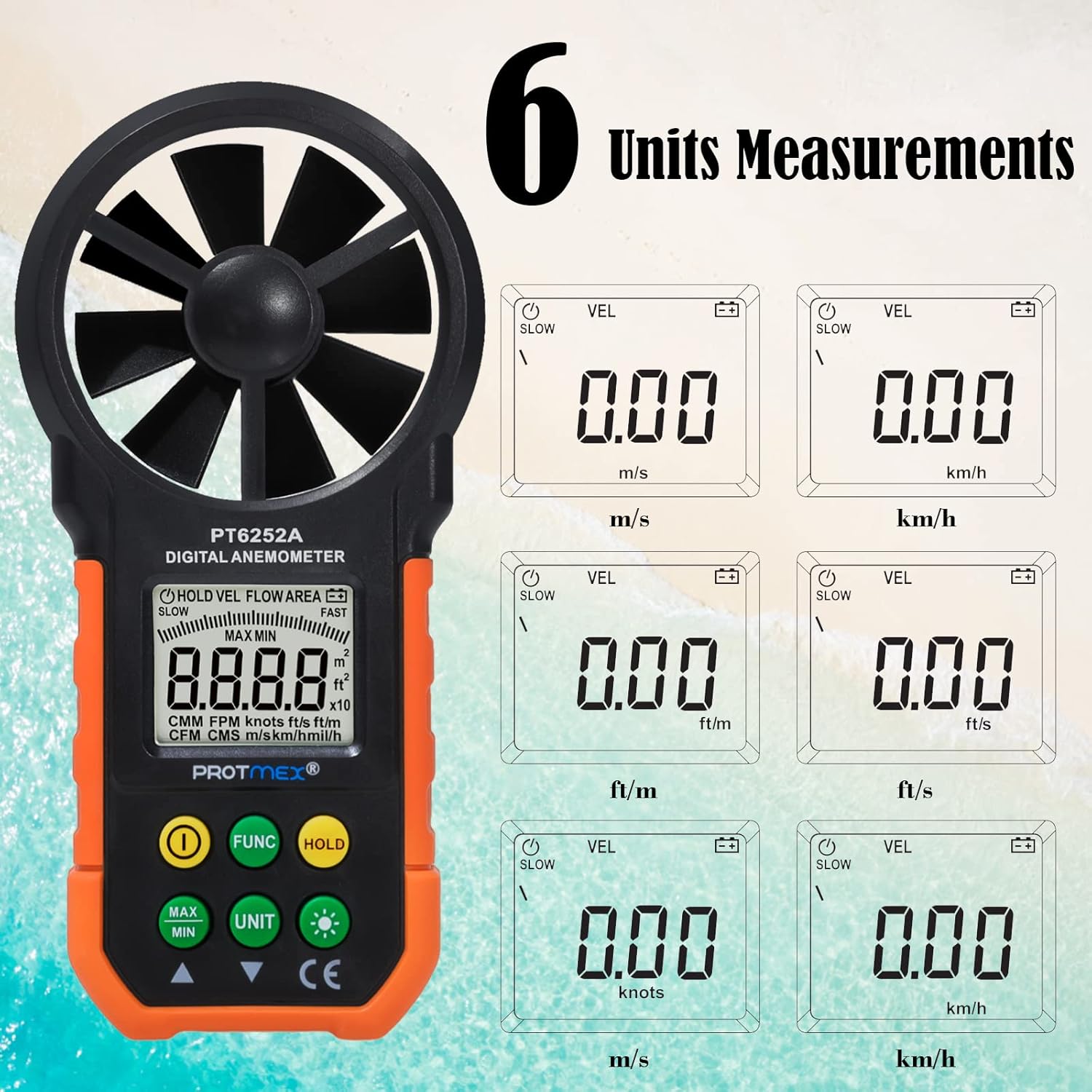
Figure 3: Available measurement units for wind speed and air volume.
- Wind Speed Units: m/s, km/h, ft/m, ft/s, knots, mph
- Air Volume Units: CMM, CFM
Setup
Battery Installation
The Protmex MS6252A requires one 9V battery for operation.
- Locate the battery compartment cover on the back of the device.
- Slide or unclip the cover to open the compartment.
- Insert a new 9V battery, ensuring correct polarity (+ and -).
- Close the battery compartment cover securely.
Operation
Power On/Off
- To turn on the device, press the ① (Power Switch) button.
- To turn off the device, press and hold the ① (Power Switch) button for a few seconds until the display turns off.
Measurement Modes (FUNC Button)
Press the FUNC button to cycle through different measurement modes, such as wind speed (VEL) and air volume (FLOW AREA).
Unit Selection (UNIT Button)
While in a measurement mode, press the UNIT button to change the measurement units. For example, in wind speed mode, you can switch between m/s, km/h, ft/m, ft/s, knots, and mph.
Data Hold (HOLD Button)
- Press the HOLD button once to freeze the current reading on the display. The "HOLD" indicator will appear.
- Press the HOLD button again to release the data hold and resume live measurements.
MAX/MIN Measurement (MAX/MIN Button)
- Press the MAX/MIN button once to display the maximum recorded value. "MAX" will appear on the display.
- Press the MAX/MIN button again to display the minimum recorded value. "MIN" will appear on the display.
- Press the MAX/MIN button a third time to exit MAX/MIN mode and return to live measurement.
Backlight Function (☀ Button)
The device features a bright LCD display with a backlight for visibility in low-light conditions.

Figure 4: The bright LCD display with backlight function.
- Press the ☀ (Backlight) button once to turn on the backlight.
- Press the ☀ (Backlight) button again to turn off the backlight.
Maintenance
Cleaning
- Wipe the device with a soft, dry cloth.
- Do not use abrasive cleaners or solvents.
- Ensure the fan blades are free from dust and debris for accurate readings. Use a soft brush if necessary.
Storage
- Store the device in a cool, dry place when not in use.
- Remove the battery if storing for an extended period to prevent battery leakage and damage to the device.
Battery Replacement
When the battery indicator appears on the LCD, replace the 9V battery following the steps in the "Battery Installation" section.
Troubleshooting
| Problem | Possible Cause | Solution |
|---|---|---|
| Device does not power on. | Low or dead battery; incorrect battery installation. | Replace battery; ensure correct polarity. |
| Inaccurate readings. | Fan blades obstructed or damaged; device not held correctly in airflow. | Clean fan blades; ensure clear path for airflow; hold device perpendicular to airflow. |
| Display is dim or flickering. | Low battery. | Replace battery. |
| Buttons are unresponsive. | Device frozen; low battery. | Remove and reinsert battery; replace battery. |
Warranty and Support
Protmex products are manufactured to high quality standards. For warranty information or technical support, please refer to the warranty card included with your purchase or contact Protmex customer service through their official website or authorized distributors.
Please retain your purchase receipt as proof of purchase for warranty claims.
Related documentsPPM-AM001


Ask a question about this manual
Ask about setup, troubleshooting, compatibility, parts, safety, or missing instructions. Manuals+ will review the question and use this page’s manual context to help answer it.