
1. Introduction and Overview
The JOYO JF-18R Power Tune is a compact and convenient device designed for guitarists and bassists, integrating two essential pedalboard functions: a high-precision chromatic tuner and a robust isolated power supply. This unit is engineered to save space on your pedalboard while ensuring optimal performance for your effects pedals.
The power section provides filtered, low-noise outputs with built-in short circuit and overcurrent protection, ensuring stable and clean power delivery. The tuner section features a large, bright LED screen and a rapid chromatic tuning algorithm for fast and accurate note detection. The True Bypass circuit minimizes signal loss when the tuner is disengaged.
2. Key Features
- Integrated Tuner and Power Supply: Combines a chromatic tuner and an 8-channel isolated power supply in a single pedal.
- High-Precision Chromatic Tuning: Detection range of 12Hz-4186Hz with an accuracy of ±1 cent, ensuring precise tuning for guitar and bass.
- Clear LED Display: Large, bright LED screen provides excellent visibility for tuning in various lighting conditions.
- Isolated Power Outputs: Features eight independent 9V DC power outputs, including six 100mA outputs for standard analog pedals and two 500mA outputs for demanding digital effects.
- Filtered Low-Noise Power: Ensures clean power delivery to prevent unwanted noise in your signal chain.
- Protection Circuitry: Built-in short circuit and overcurrent protection for all power outputs safeguards your pedals.
- True Bypass: Minimizes signal loss and preserves your instrument's tone when the tuner is not active.
- Durable Construction: Housed in a polished aluminum alloy case for road-ready durability.
3. Setup
- Power Connection: Connect the included 9V DC power adapter to the DC 9V IN jack on the pedal. Plug the adapter into a suitable power outlet.
- Instrument Connection: Connect your guitar or bass to the IN jack of the JF-18R using a standard 1/4-inch instrument cable.
- Output Connection: Connect the OUT jack of the JF-18R to the input of your first effects pedal or directly to your amplifier using a 1/4-inch instrument cable.
- Powering Effects Pedals: Use the provided DC power cables to connect your effects pedals to the 9V DC OUT jacks. Note that six outputs provide 100mA, suitable for most analog pedals, while two outputs provide 500mA, ideal for digital pedals with higher current demands. Ensure your pedals' power requirements match the output specifications.

Figure 3.1: Side view of the JF-18R Power Tune pedal, illustrating the input, output, and eight DC power output jacks for connecting effects pedals.
4. Operating Instructions
4.1. Tuner Function
- Activating the Tuner: Press the footswitch to engage the tuner. The large LED display will illuminate, and your instrument's signal will be muted (True Bypass).
- Tuning Your Instrument: Play a single note on your guitar or bass. The display will show the detected note and indicate whether it is sharp, flat, or in tune. Adjust your instrument's tuning pegs until the display indicates the note is in tune (typically a stable blue light or central indicator).
- Disengaging the Tuner: Press the footswitch again to disengage the tuner. The display will turn off, and your instrument's signal will pass through the pedal without alteration.

Figure 4.1: Angled top view of the JF-18R Power Tune pedal, showing the LED display actively indicating a note during the tuning process.
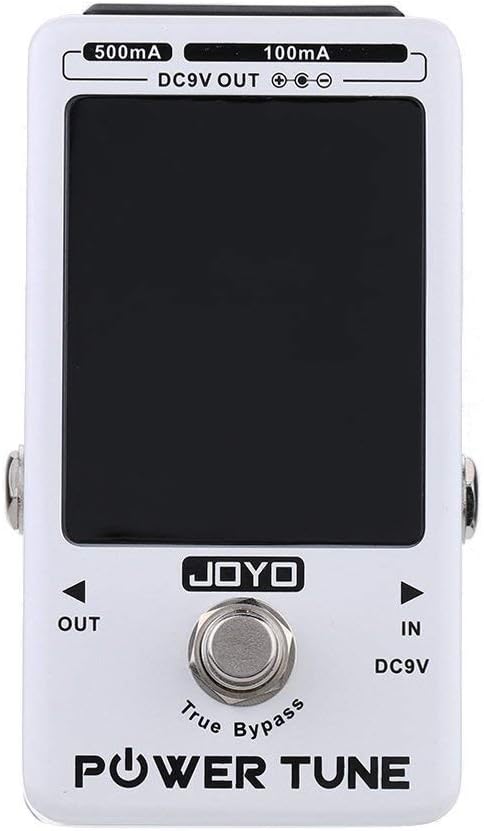
Figure 4.2: Top-down view of the JF-18R Power Tune pedal, with the LED display off, signifying that the pedal is in True Bypass mode and the signal is passing through unaffected.
4.2. Power Supply Function
The power supply section operates continuously as long as the JF-18R is connected to its power adapter. It provides stable 9V DC power to up to eight effects pedals simultaneously. The outputs are isolated to prevent ground loops and noise interference between pedals.
- 100mA Outputs (x6): Use these for standard analog effects pedals such as overdrives, distortions, compressors, and modulation effects that typically require less current.
- 500mA Outputs (x2): These higher-current outputs are designed for digital effects pedals like delays, reverbs, multi-effects units, or other pedals that draw more power.
Always verify the power requirements (voltage and current draw) of your effects pedals before connecting them to ensure compatibility and prevent damage.
Video 4.1: An official JOYO video demonstrating the JF-18R Power Tune Tuner Pedal, highlighting its power supply capabilities and tuning accuracy.
5. Specifications
| Feature | Specification |
|---|---|
| Model Number | JF-18R Power Tune |
| Item Weight | 1.55 pounds (approx. 0.7 kg) |
| Package Dimensions | 8 x 5.1 x 2.5 inches (approx. 20.3 x 13 x 6.4 cm) |
| Hardware Interface | 1/4-inch Audio |
| Signal Format | Analog |
| Power Source | Corded Electric (DC 9V) |
| Voltage | 9 Volts |
| Tuning Range | 12Hz-4186Hz |
| Tuning Accuracy | ±1 cent |
| Power Outputs | 6 x 9V DC 100mA, 2 x 9V DC 500mA |
| Bypass Type | True Bypass |
6. Troubleshooting
- No Power: Ensure the 9V DC power adapter is correctly connected to the pedal and a working power outlet. Check the power adapter for damage.
- No Sound (Tuner Off): Verify all instrument cables are securely connected to the IN and OUT jacks. Ensure the tuner is disengaged (LED display off).
- Inaccurate Tuning: Check that your instrument's pickups are active and the volume is sufficient. Ensure no other effects are engaged that might interfere with the signal.
- Noise from Powered Pedals: Confirm that all connected pedals are receiving the correct voltage and current. Ensure power cables are securely connected. If noise persists, try isolating the problematic pedal by connecting it to a different output or using a separate power source to identify the cause.
- Pedal Not Powering On (from JF-18R): Check the current draw of the pedal. Ensure it is connected to an output that provides sufficient current (100mA or 500mA as required).
7. Maintenance
- Cleaning: Use a soft, dry cloth to clean the pedal's exterior. Avoid using abrasive cleaners or solvents, which may damage the finish or electronic components.
- Storage: Store the pedal in a dry environment, away from extreme temperatures, humidity, and direct sunlight.
- Handling: Handle the pedal with care to prevent physical damage. Avoid dropping or subjecting it to strong impacts.
8. Warranty and Support
For warranty information, technical support, or service inquiries, please refer to the official JOYO website or contact your authorized JOYO dealer. Keep your purchase receipt as proof of purchase for any warranty claims.
JOYO is committed to providing high-quality products and customer satisfaction. If you encounter any issues not covered in this manual, please reach out to their customer service for assistance.
