
1. Introduction
Thank you for choosing the LE 12V 2A 24W AC to DC Power Adapter. This manual provides essential information for the safe and efficient use of your power supply. Please read it thoroughly before installation and operation, and retain it for future reference.
This power adapter is designed to convert AC household current (100-240V) to a stable 12V DC output, suitable for various low-voltage devices such as LED strip lights, table lamps, and other compatible 12V electronics requiring up to 2 Amps of current.
Package Contents:
- 1 x LE 12V 2A AC Power Adapter
- 1 x 1.2m Power Cord (US Plug)
- 1 x 2.1mm x 5.5mm Female Adapter (Screw Terminal)

Image 1.1: The LE 12V 2A Power Adapter, showing the main adapter unit, the attached DC barrel connector, and the separate screw terminal adapter.
2. Safety Instructions
To ensure safe operation and prevent damage, please observe the following safety guidelines:
- Indoor Use Only: This power adapter is designed for indoor use in dry locations. Do not expose it to water, moisture, or high humidity.
- Ventilation: Ensure adequate ventilation around the adapter. Do not cover it or place it in an enclosed space where heat cannot dissipate.
- Correct Voltage: Connect the adapter only to a power outlet providing 100-240V AC, 50/60Hz.
- Load Capacity: The total wattage of the connected devices must not exceed the adapter's maximum output of 24W (12V, 2A). Overloading can cause overheating and damage.
- Cable Integrity: Do not use the adapter if the power cord or plug is damaged. Avoid bending, twisting, or pulling the cord excessively.
- Disconnection: Always unplug the adapter from the power outlet before cleaning or when not in use for extended periods.
- Children and Pets: Keep the adapter out of reach of children and pets.
- No Disassembly: Do not attempt to open or repair the adapter. Refer all servicing to qualified personnel.
Built-in Protections:
This power adapter incorporates multiple safety features for reliable operation:
- Over-voltage Protection
- Over-heating Protection
- Over-current Protection
- Short-circuiting Protection

Image 2.1: The rear view of the power adapter, displaying its input/output specifications and icons representing over-voltage, over-heating, over-current, and short-circuiting protections.
3. Setup
Follow these steps to set up your LE Power Adapter:
- Verify Device Compatibility: Ensure your device requires 12V DC input and its current draw does not exceed 2 Amps (24W).
- Connect to Device:
- If your device has a standard 2.1mm x 5.5mm DC barrel jack, simply plug the adapter's DC output connector directly into your device.
- If your device uses bare wires (e.g., some LED strip lights), use the included 2.1mm x 5.5mm Female Adapter. Connect the positive (+) wire of your device to the (+) terminal and the negative (-) wire to the (-) terminal on the screw terminal adapter. Then, plug the screw terminal adapter into the power adapter's DC output connector.
- Plug into Power Outlet: Once the adapter is securely connected to your device, plug the US plug of the power adapter into a standard 100-240V AC wall outlet.
- Power On: Your device should now receive power.
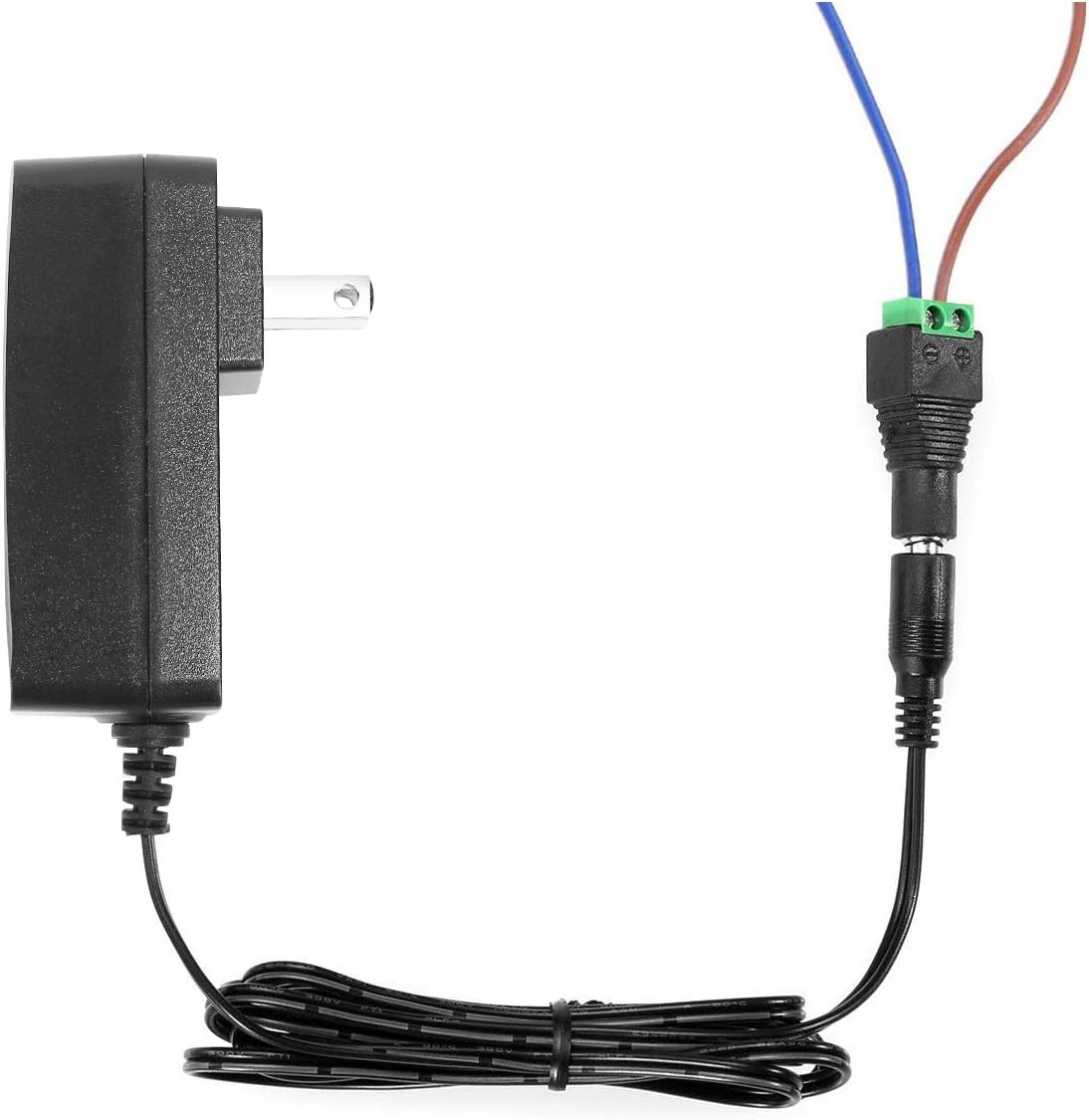
Image 3.1: Illustration of how to connect bare wires from a device to the included screw terminal adapter, which then connects to the power adapter.
4. Operating Instructions
The LE Power Adapter operates automatically once connected to a power source and a compatible device. There are no user-adjustable settings.
- Ensure all connections are firm and correct before plugging into the wall outlet.
- The adapter will supply a stable 12V DC output to your connected device.
- To disconnect power, unplug the adapter from the wall outlet first.
Typical Applications:
This adapter is suitable for a wide range of 12V DC devices, including but not limited to:
- LED Strip Lights (3528/5050 SMD)
- Table Lamps
- Wireless Routers
- Small Speakers
- CCTV Cameras
- Other 12V devices requiring 0-2 Amps

Image 4.1: A visual representation of common devices that can be powered by this 12V adapter, such as LED strip lights, wireless routers, speakers, and CCTV cameras.
5. Maintenance
Proper maintenance ensures the longevity and safe operation of your power adapter:
- Cleaning: Disconnect the adapter from the power outlet before cleaning. Use a soft, dry cloth to wipe the exterior. Do not use liquid cleaners or solvents.
- Storage: When not in use, store the adapter in a cool, dry place, away from direct sunlight and extreme temperatures.
- Inspection: Periodically inspect the power cord and adapter housing for any signs of damage, such as cuts, fraying, or cracks. If damage is found, discontinue use and replace the adapter.
- Avoid Overloading: Always ensure the connected load does not exceed 24W to prevent stress on the adapter components.
6. Troubleshooting
If you encounter issues with your power adapter, refer to the following troubleshooting steps:
| Problem | Possible Cause | Solution |
|---|---|---|
| No power to device |
|
|
| Device flickering or unstable power |
|
|
| Adapter feels hot |
|
|
If the problem persists after following these steps, please contact customer support.
7. Specifications
| Model Number | 5000067-US |
| Input Voltage | AC 100-240V, 50/60Hz |
| Output Voltage | DC 12V |
| Output Current | 2 Amps (Max) |
| Max Wattage | 24W |
| Power Cord Length | 3.9 ft (1.2 m) |
| DC Connector Diameter | Interior: 2.1mm; Exterior: 5.5mm |
| Dimensions (Adapter Unit) | 3.86 in x 1.77 in x 2.36 in (98mm x 45mm x 60mm) |
| Item Weight | 4.6 ounces |
| Safety Features | Over-voltage, Over-heating, Over-current, Short-circuiting Protection |
| Compatible Devices | 12V LED strip lights with 3528/5050 SMD components, and other 12V devices |
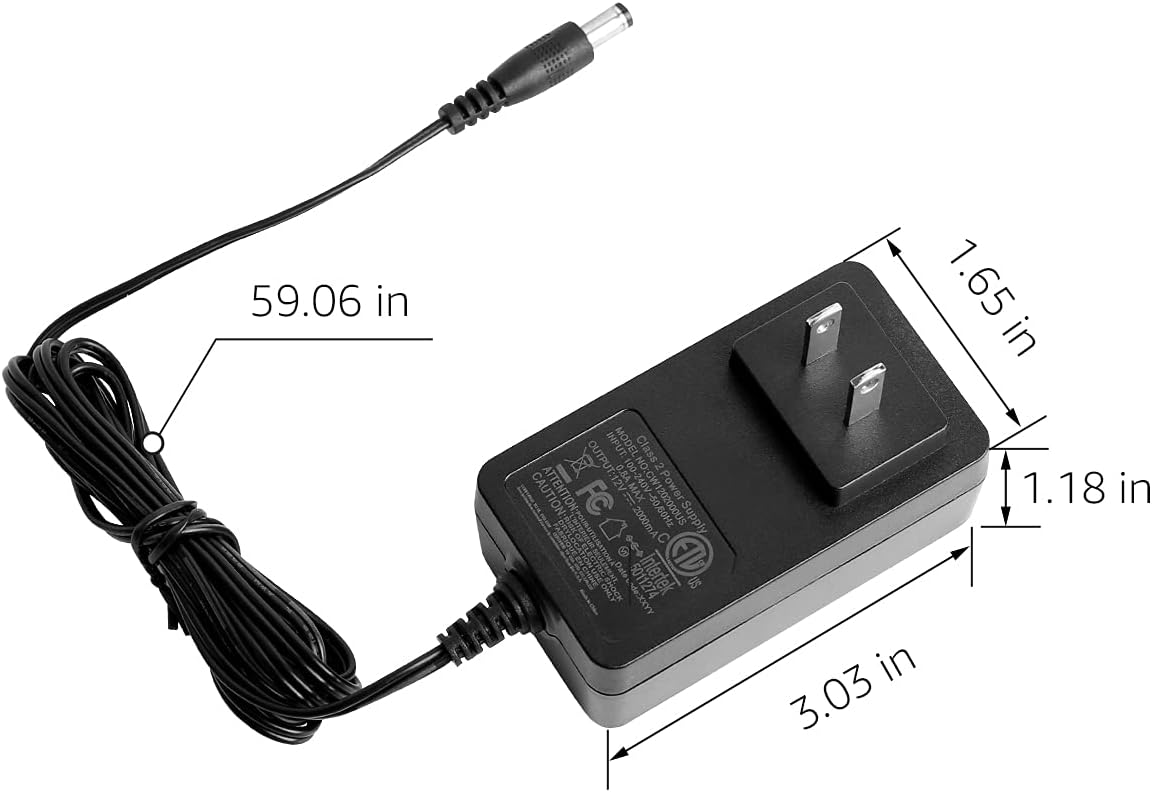
Image 7.1: The power adapter with key dimensions labeled, including length, width, and height.
8. Warranty and Support
For warranty information and customer support, please refer to the official Lighting EVER website or contact their customer service directly. Details regarding product warranty periods and terms are typically available through these channels.
You can visit the Lighting EVER Store on Amazon for more products and support resources.


