
Banshee 6V/12V 3.0A Smart Charger
Banshee 6V/12V 3.0A Smart Battery Charger User Manual
Model: 6V/12V 3.0A Smart Charger
Introduction
This manual provides essential information for the safe and efficient operation of your Banshee 6V/12V 3.0A Smart Battery Charger. This charger is designed for 6V and 12V lead-acid batteries, featuring a 3-stage charging process and automatic shutoff for optimal battery health and safety. Please read this manual thoroughly before use and retain it for future reference.
Safety Information
Always observe the following safety precautions to prevent injury or damage to the charger or battery:
- Read all instructions: Before using the charger, read all instructions and cautionary markings on the charger, the battery, and the product using the battery.
- Ventilation: Ensure adequate ventilation when charging. Batteries can produce explosive gases.
- Eye Protection: Always wear eye protection when working with batteries.
- Avoid Sparks: Do not smoke or allow a spark or flame in the vicinity of the battery or engine.
- Disconnect Power: Always disconnect the AC power supply before connecting or disconnecting the battery clamps.
- Polarity: Connect the positive (+) red clamp to the positive (+) battery terminal and the negative (-) black clamp to the negative (-) battery terminal. Incorrect polarity can cause damage.
- Indoor Use: This charger is designed for indoor use only. Do not expose to rain or moisture.
- Children: Keep out of reach of children.
- Damaged Charger: Do not operate the charger if it has received a sharp blow, been dropped, or otherwise damaged.
Product Overview
The Banshee 6V/12V 3.0A Smart Battery Charger is a compact and efficient device for maintaining and charging lead-acid batteries. It features intelligent charging modes and safety protections.

Figure 1: Overview of the Banshee 6V/12V 3.0A Smart Battery Charger, showing the main unit, AC power cord, and battery connection clamps (red for positive, black for negative).
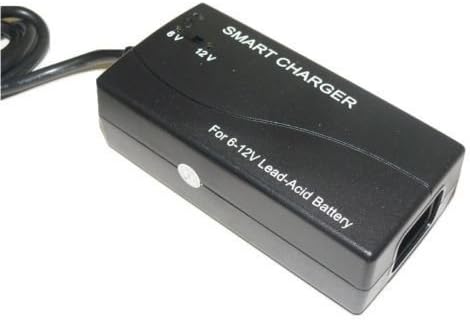
Figure 2: Detailed view of the charger unit, highlighting the "SMART CHARGER" label, "For 6-12V Lead-Acid Battery" text, and the 6V and 12V LED indicators on the top surface.

Figure 3: Close-up of the robust battery clamps. The red clamp is for the positive terminal, and the black clamp is for the negative terminal, ensuring secure connection to the battery.
Components:
- Charger Unit: The main body containing the charging circuitry and indicator LEDs.
- AC Power Cord: Connects the charger to a standard wall outlet (100-240V AC).
- Battery Clamps: Red (+) and Black (-) clamps for connecting to the battery terminals.
- LED Indicators:
- Red LED: Indicates the battery is currently charging.
- Green LED: Indicates the battery is fully charged.
Setup
Follow these steps for initial setup:
- Placement: Place the charger on a stable, flat surface in a well-ventilated area, away from direct sunlight, heat sources, and moisture.
- Battery Preparation: Ensure the battery terminals are clean and free of corrosion. If necessary, clean them with a wire brush or battery terminal cleaner.
- Voltage Selection: The charger automatically detects 6V or 12V batteries. No manual selection is required.
Operating Instructions
To charge a battery, follow these steps carefully:
- Connect to Battery:
- Connect the RED (+) positive clamp to the positive (+) terminal of the battery.
- Connect the BLACK (-) negative clamp to the negative (-) terminal of the battery.
- Ensure connections are secure.
- Connect to Power: Plug the AC power cord of the charger into a standard 100-240V AC wall outlet.
- Charging Indication: The Red LED on the charger will illuminate, indicating that charging is in progress.
- Charging Process: The charger will automatically proceed through its 3-stage charging cycle:
- Constant Current: Charges at 3.0A ±0.3A until voltage reaches a certain level.
- Constant Voltage: Charges at 14.3V to 14.7V for 12V batteries, or 7.2V to 7.4V DC for 6V batteries.
- Floating Voltage: Maintains the battery at 13.5V to 13.8V for 12V batteries, or 6.7V to 6.9V DC for 6V batteries, preventing overcharge.
- Full Charge Indication: When the battery is fully charged, the Green LED will illuminate, and the Red LED will turn off. The charger will automatically switch to float mode.
- Disconnecting:
- First, unplug the AC power cord from the wall outlet.
- Then, disconnect the BLACK (-) negative clamp from the battery.
- Finally, disconnect the RED (+) positive clamp from the battery.
Maintenance
Proper maintenance ensures the longevity of your charger:
- Cleaning: Clean the charger casing with a soft, dry cloth. Do not use abrasive cleaners or solvents.
- Storage: Store the charger in a cool, dry place when not in use. Keep cables neatly coiled.
- Cable Inspection: Periodically inspect the AC power cord and battery cables for any signs of damage, fraying, or exposed wires. Do not use if damaged.
Troubleshooting
| Problem | Possible Cause | Solution |
|---|---|---|
| Charger not turning on / No LEDs lit | No AC power; Faulty outlet; Damaged charger. | Check AC power connection and outlet. Try a different outlet. If still no power, the charger may be damaged. |
| Red LED not illuminating when connected to battery | Incorrect battery connection (polarity); Battery is already fully charged; Battery is severely discharged or faulty. | Verify correct polarity (+ to +, - to -). Check if Green LED is already lit. Test battery condition. |
| Green LED not illuminating after extended charging | Battery is very large or deeply discharged; Battery is faulty and cannot hold a charge. | Allow more time for charging. If the battery does not reach full charge after a prolonged period, it may need replacement. |
| Charger gets warm during operation | Normal operation; Insufficient ventilation. | It is normal for the charger to get warm. Ensure it is in a well-ventilated area and not covered. |
Specifications
| Feature | Detail |
|---|---|
| Product Model | Banshee 6V/12V 3.0A Smart Charger |
| Input Voltage | 100-240V AC, 50/60Hz, 1.0A |
| Output Voltage | 6V DC or 12V DC (Automatic Detection) |
| Charging Current | 3,000mA (3.0A) |
| Charging Modes | 3-Stage (Constant Current, Constant Voltage, Floating Voltage) |
| Constant Current | 3.0 ±0.3A |
| Constant Voltage (12V) | 14.3 to 14.7V |
| Constant Voltage (6V) | 7.2 to 7.4V DC |
| Floating Voltage (12V) | 13.5 to 13.8V |
| Floating Voltage (6V) | 6.7 to 6.9V DC |
| Dimensions (L x W x H) | 120.0 x 60.0 x 38.0mm |
| Weight | Approximately 1.5 pounds |
| Safety Protections | Short-circuit protection, Battery polarity error protection, Over-voltage protection |
| Compliance | CE standards |
Warranty and Support
The Banshee 6V/12V 3.0A Smart Battery Charger comes with a 2-Year Warranty from the date of purchase. This warranty covers defects in materials and workmanship under normal use.
Warranty Exclusions:
- Damage caused by misuse, abuse, neglect, or accident.
- Unauthorized repair or modification.
- Damage due to improper installation or connection.
- Normal wear and tear.
Customer Support:
For technical support, warranty claims, or general inquiries, please contact Banshee customer service. Refer to your purchase documentation or the official Banshee website for the most current contact information.
Online Resources: For additional information and FAQs, please visit the official Banshee website: Banshee Premium Motorsports Batteries Store
Ask a question about this manual
Ask about setup, troubleshooting, compatibility, parts, safety, or missing instructions. Manuals+ will review the question and use this page’s manual context to help answer it.