Introduction
This manual provides comprehensive instructions for the setup, operation, and maintenance of your Easy Karaoke EKG15 Pink Karaoke Machine. Please read this manual thoroughly before using the product to ensure proper function and longevity. Keep this manual for future reference.
Product Overview
The Easy Karaoke EKG15 is a versatile karaoke machine designed for home entertainment. It features a top-loading CDG/CD player, a built-in color VGA video camera, a color TFT screen, and recording capabilities to USB or SD card. It includes two microphone inputs with echo and volume control, an integrated amplifier and speaker, and A/V outputs for connecting to external displays and audio systems. An Aux-in port allows connection of external MP3 players.
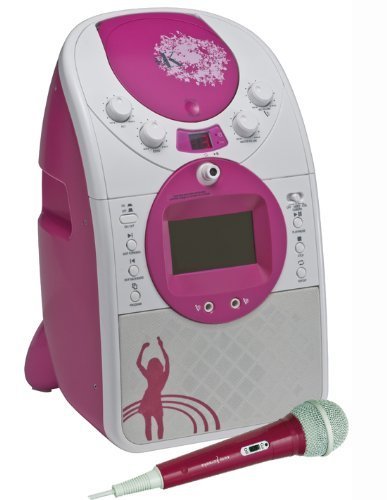
Figure 1: Front view of the Easy Karaoke EKG15 Pink Karaoke Machine, showing the main unit with its pink and white casing, central screen, control knobs, and a red microphone resting in front.
Package Contents
Please check the box for the following items:
- Easy Karaoke EKG15 Pink Karaoke Machine Unit
- Dynamic Microphone
- CDG Demo Disc
- A/V Lead (RCA cables)
- Power Adapter (not explicitly listed but implied for operation)
- User Manual (this document)
Setup
- Power Connection: Connect the power adapter to the DC IN port on the back of the unit and plug it into a standard electrical outlet.
- Microphone Connection: Insert the microphone plug into one of the MIC IN jacks on the front of the unit. The EKG15 supports two microphones.
- Audio/Video Output (Optional): To connect to a larger screen (TV) or home hi-fi system, use the supplied A/V lead. Connect the yellow plug to the video input of your TV, and the red/white plugs to the audio inputs of your TV or hi-fi system.
- Auxiliary Input (Optional): To play music from an external MP3 player or smartphone, connect an audio cable (not supplied) from your device's headphone jack to the AUX IN port on the karaoke machine.
- USB/SD Card Insertion (Optional): For recording performances, insert a USB flash drive or SD card into the respective slots on the unit. Ensure the storage device is formatted correctly (FAT32 recommended).
Operating Instructions
CDG/CD Playback
- Open the CD compartment lid on top of the unit.
- Place a CDG or CD disc onto the spindle, label side up.
- Close the CD compartment lid.
- Press the PLAY/PAUSE button to start playback. For CDG discs, lyrics will appear on the built-in TFT screen or connected external display.
- Use the NEXT and PREVIOUS buttons to skip tracks.
- Press the STOP button to end playback.
Microphone Usage
- Adjust the MIC VOLUME knob to control the microphone's output level.
- Adjust the ECHO knob to add an echo effect to your vocals.
Camera and Screen Functions
- The built-in color VGA video camera allows you to see yourself on the screen while performing.
- The built-in color TFT screen displays CDG lyrics and your camera feed.
Recording and Playback (USB/SD)
- Ensure a USB flash drive or SD card is inserted into the appropriate slot.
- During performance, press the RECORD button (often found on the remote control or unit) to begin recording your audio.
- Press STOP to end the recording. The recording will be saved to the inserted USB/SD card.
- To play back recordings, switch the unit to USB/SD mode (if applicable, refer to unit controls) and select the desired file.
Auxiliary Input Operation
- Connect your external audio device to the AUX IN port.
- Select the AUX input mode on the karaoke machine (if applicable).
- Control playback from your external device. The audio will play through the karaoke machine's speaker.
Remote Control
- The full-function remote control allows for convenient operation from a distance.
- It typically includes buttons for Play/Pause, Stop, Skip, Volume, and One-Touch Record.
Maintenance
- Cleaning: Disconnect the power before cleaning. Use a soft, dry cloth to wipe the exterior of the unit. For stubborn marks, a slightly damp cloth can be used, followed by a dry cloth. Do not use abrasive cleaners or solvents.
- CD Lens Care: Avoid touching the CD lens. If the lens is dirty, use a commercially available CD lens cleaner.
- Storage: When not in use for extended periods, store the unit in a cool, dry place away from direct sunlight and extreme temperatures.
- Handling: Handle discs and the unit with care to prevent scratches or damage.
Troubleshooting
| Problem | Possible Cause | Solution |
|---|---|---|
| No power | Power cord not connected; outlet not active. | Ensure power cord is securely plugged into the unit and a working electrical outlet. |
| No sound from speaker | Volume too low; incorrect input selected; A/V cables loose. | Increase master volume. Ensure correct input mode (CD/Aux) is selected. Check A/V cable connections if using external speakers. |
| Microphone not working | Microphone not plugged in; MIC VOLUME too low; microphone switch off. | Ensure microphone is fully plugged into MIC IN jack. Increase MIC VOLUME. Check if the microphone's ON/OFF switch is in the ON position. |
| No lyrics on screen (CDG) | Disc is a standard audio CD, not a CDG; A/V cable not connected or loose. | Ensure you are using a CDG disc. Check the yellow video A/V cable connection to your TV. |
| Cannot record to USB/SD | USB/SD card full or not formatted correctly; card not inserted properly. | Ensure USB/SD card has sufficient free space. Format the card to FAT32 if necessary. Re-insert the card firmly. |
Specifications
| Feature | Detail |
|---|---|
| Model Number | EKG15(539) |
| Brand | EASY KARAOKE |
| Colour | Pink |
| Disc Compatibility | CDG, CD |
| Display | Built-in Colour TFT screen |
| Camera | Built-in Colour VGA Video Camera |
| Recording | Record & Playback on USB/SD card |
| Microphone Inputs | Two (with Echo and Volume control) |
| Audio Output | Built-in Amplifier and Speaker, A/V Out |
| Auxiliary Input | Yes (for MP3 players) |
| Included Components | Dynamic microphone, CDG Demo disc, A/V lead |
| Recommended Use | Home |
Warranty Information
Specific warranty details for the Easy Karaoke EKG15 are typically provided at the point of purchase or within separate warranty documentation included with your product. Please retain your proof of purchase for any warranty claims. For detailed warranty terms and conditions, refer to the information provided by the retailer or manufacturer at the time of purchase.
Customer Support
Should you encounter any issues or have questions not covered in this manual, please contact the retailer where you purchased the product or visit the official Easy Karaoke website for support. Keep your model number (EKG15(539)) and purchase details ready when contacting support.
You can also visit the Easy Karaoke Store on Amazon for more information: Easy Karaoke Store


