
Introduction
This manual provides detailed instructions for the setup, operation, and maintenance of your Eagle Creek Luggage Scale/Alarm Clock. Please read this manual thoroughly before using the device to ensure proper function and longevity.
Product Overview
The Eagle Creek Luggage Scale/Alarm Clock is a dual-function device designed to help you manage luggage weight and keep track of time while traveling. It features an easy-to-read digital display and a durable strap for weighing items up to 88 lbs (40 kg).
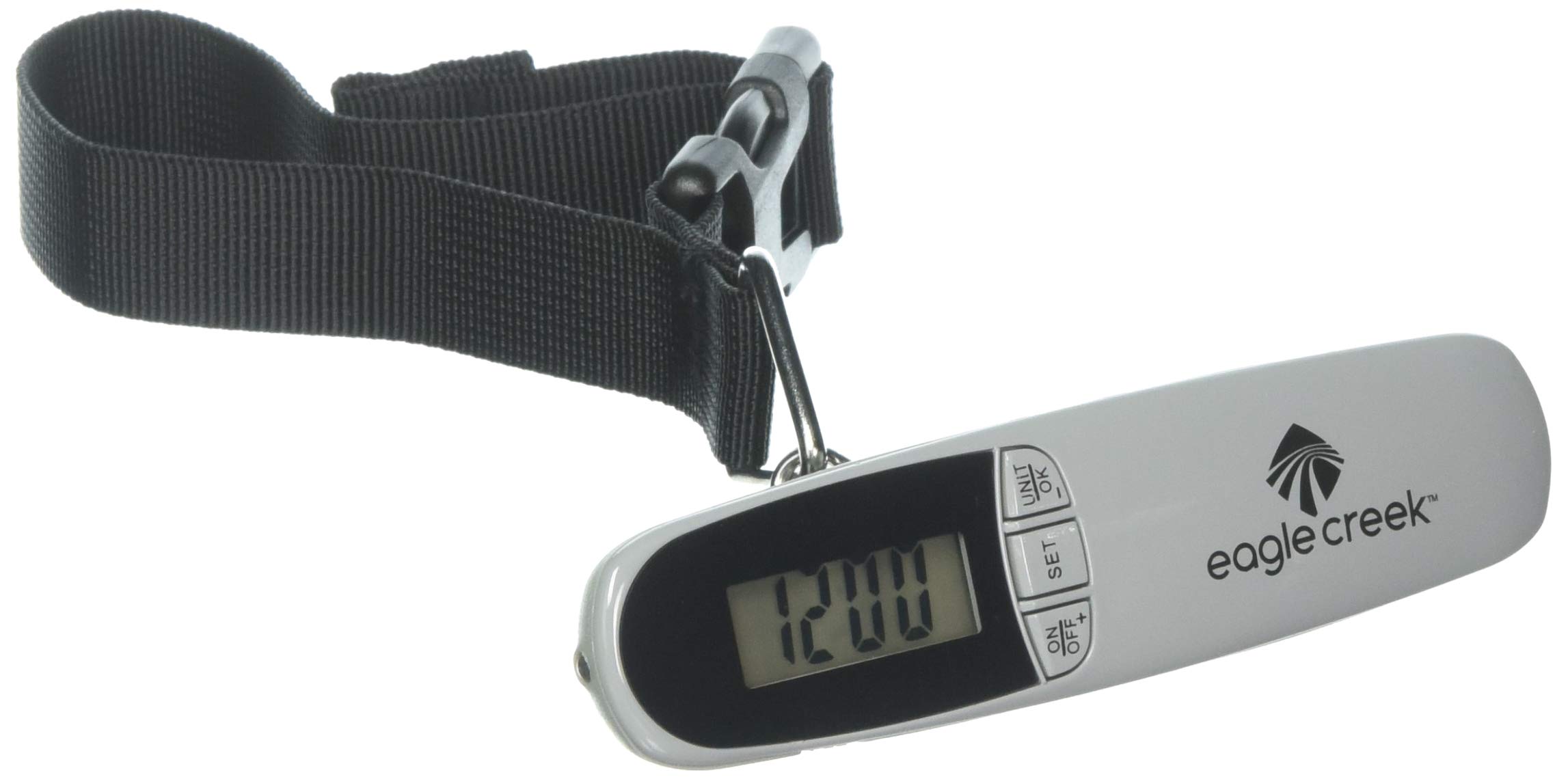
Figure 1: Eagle Creek Luggage Scale/Alarm Clock. This image shows the compact, charcoal-colored device with its digital display and integrated strap.
Setup
1. Battery Installation
- Locate the battery compartment on the back of the device.
- Open the battery compartment cover.
- Insert the required battery (typically a CR2032 coin cell battery, not included) with the positive (+) side facing up.
- Close the battery compartment cover securely.
2. Initial Power On
After installing the battery, the device should power on automatically, displaying the time or a default reading. If not, press the power button (usually labeled "ON/OFF" or "MODE").
Operating Instructions
Using the Luggage Scale
- Power On: Press the "ON/OFF" or "MODE" button to turn on the scale. Wait for the display to show "0.0" or "0.00".
- Select Unit: Press the "UNIT" button (if available) to switch between kilograms (kg) and pounds (lb).
- Attach Luggage: Securely attach the luggage strap around the handle of your bag.
- Lift and Weigh: Hold the scale by its handle and lift the luggage off the ground. Keep the scale steady until the weight reading stabilizes and locks on the display.
- Read Weight: The stable reading on the digital screen is the weight of your luggage. The maximum capacity is 88 lbs (40 kg).
- Power Off: The scale may automatically power off after a period of inactivity, or you can press and hold the "ON/OFF" button to turn it off manually.
Using the Alarm Clock
- Switch to Clock Mode: If the device is in scale mode, press the "MODE" button repeatedly until the time is displayed.
- Set Time:
- Press and hold the "SET" button until the hour digit flashes.
- Use the "ADJUST" or "UP/DOWN" buttons to set the correct hour.
- Press "SET" again to move to the minute digit, then use "ADJUST" to set the minutes.
- Press "SET" to confirm and exit time setting mode.
- Set Alarm:
- In clock mode, press the "ALARM" button (or "MODE" until alarm icon appears).
- Press and hold "SET" until the alarm hour digit flashes.
- Use "ADJUST" to set the desired alarm hour and minutes.
- Press "SET" to confirm.
- Activate/Deactivate Alarm: Press the "ALARM" button (or a dedicated alarm toggle) to turn the alarm on or off. An alarm icon will typically appear on the display when activated.
- Snooze/Stop Alarm: When the alarm sounds, press any button (except ON/OFF) for snooze, or press ON/OFF to stop the alarm.
Maintenance
Cleaning
Wipe the device with a soft, damp cloth. Do not use abrasive cleaners or immerse the device in water. Ensure the device is completely dry before storage or next use.
Battery Replacement
When the display becomes dim or the device stops functioning, replace the battery following the installation steps in the Setup section. Dispose of old batteries responsibly according to local regulations.
Storage
Store the device in a cool, dry place away from direct sunlight and extreme temperatures. If storing for an extended period, it is recommended to remove the battery to prevent leakage.
Troubleshooting
- Device does not turn on or display is blank:
Check battery installation. Ensure the battery is inserted correctly with the correct polarity. Replace the battery if it is old or depleted.
- Display shows "12:00" and cannot be changed or used for weighing:
This indicates the device may be stuck in a specific mode or requires a reset. Try removing the battery for 30 seconds and then reinserting it. If the issue persists, refer to the manufacturer's support.
- Inaccurate weight readings:
Ensure the scale is held steady and the luggage is not touching the ground or any other surface during weighing. Verify the unit of measurement (kg/lb) is correct. Replace the battery if it is low, as low power can affect accuracy.
- Alarm clock not setting or sounding:
Ensure you are in clock mode and have followed the alarm setting instructions carefully. Check that the alarm function is activated (look for an alarm icon on the display). Replace the battery if necessary.
- Battery drains quickly:
Ensure the device is powered off when not in use. Some devices may have a slight power draw even when off. If the issue persists with new batteries, it may indicate a device malfunction.
Specifications
| Model: | LUGGAGE SCALE/ALARM CLOCK |
| Part Number: | EC041334012 |
| Brand: | Eagle Creek |
| Display Type: | Digital |
| Weight Capacity: | 88 lbs (40 kg) |
| Measurement Units: | Kilograms (kg), Pounds (lb) |
| Form Factor: | Handheld |
| Material: | Plastic |
| Item Weight: | 75 Grams |
| Dimensions (L x W x H): | 4.75 x 2 x 1.25 inches (12 x 5 x 3 cm) |
| Power Source: | Coin cell battery (e.g., CR2032, not included) |
Warranty Information
This product is covered by a manufacturer's warranty. For specific details regarding warranty terms, duration, and claims process, please refer to the warranty card included with your purchase or visit the official Eagle Creek website. Keep your proof of purchase for warranty service.
Customer Support
If you encounter any issues not covered in this manual or require further assistance, please contact Eagle Creek customer support. Contact information can typically be found on the product packaging or on the official Eagle Creek website.
For more information, you may visit the Eagle Creek Store on Amazon.
Product Videos
No official product videos from the seller are available for embedding at this time.