
1. Important Safety Information
Please read all instructions carefully before using your Prestige PIC 3.1 V3 Induction Cooktop. Retain this manual for future reference.
- Hot Surface Warning: The ceramic plate remains hot after cooking. Avoid touching the cooking surface until it has completely cooled down to prevent burns.
- Electrical Safety: This appliance is designed with inbuilt 4KV surge protection to guard against electrical fluctuations. Always ensure the power cord is in good condition and connected to a properly grounded 15A power outlet.
- Ventilation: Ensure adequate ventilation around the cooktop during operation. Do not block the cooling fan located at the bottom of the unit.
- Vessel Compatibility: Use only induction-compatible cookware with a flat bottom. Incompatible vessels will not heat or may cause error messages.
- Children and Pets: Keep children and pets away from the appliance during operation and while it is cooling.
- Cleaning: Always unplug the cooktop and allow it to cool completely before cleaning. Do not immerse the unit in water.
2. Product Overview
The Prestige PIC 3.1 V3 Induction Cooktop features a sleek design with a durable glass surface and intuitive touch controls. It is equipped with advanced technology for efficient and safe cooking.
2.1 Components
- Cooking Surface: Flat glass surface for induction cooking.
- Control Panel: Feather-touch buttons with a digital display.
- Cooling Fan: Located at the bottom for rapid cooling of the appliance.
- Power Cord: Thick PVC power cable with a 3-pin plug.
2.2 Control Panel Layout
The control panel provides easy access to all cooking functions and settings.

Image: Close-up of the Prestige PIC 3.1 V3 Induction Cooktop control panel, showing feather-touch buttons and digital display.
- Dosa/Chapati Preset: One-touch button for Dosa/Chapati cooking.
- Whistle Preset: Allows setting the number of pressure cooker whistles.
- Preset Button: Cycles through various Indian menu options (Pressure Cook, Deep Fry, Saute, Curry, Idli, Heat Milk).
- Timer Button: Sets the cooking duration.
- Digital Display: Shows temperature, time, and selected preset.
- Down (-) / Up (+) Buttons: Adjusts power, temperature, or timer settings.
- Menu Button: Selects different cooking modes.
- On/Off Button: Powers the cooktop on or off.
2.3 Key Features
- Patented Automatic Whistle Counter: Automatically counts pressure cooker whistles and switches off.
- 4KV Surge Protection: Protects against electrical voltage fluctuations.
- 2000 Watts Power: Ensures rapid heating and efficient cooking.
- 7 Preset Indian Menu Options: Optimized settings for Pressure Cook, Curry, Dosa/Chapati, Idli, Deep Fry, Heat Milk, and Keep Warm.
- Intelligent Power & Temperature Control: Smart microprocessor for energy-efficient and uniform cooking.
- Automatic Keep Warm Function: Keeps food ready to serve without overcooking.
- Anti-Magnetic Wall: Concentrates the magnetic field to the center, keeping the rest of the surface cool.
- Dual Heat Sensors: Prevents overheating and optimizes power usage.
Video: Overview of Prestige PIC 3.1 V3 Induction Cooktop features, including the automatic whistle counter and preset menu options.
Video: Short demonstration of the Prestige PIC 3.1 V3 Induction Cooktop in use, highlighting its ease of operation.
3. Setup
Proper setup ensures optimal performance and safety.
3.1 Placement
- Place the induction cooktop on a flat, stable, and heat-resistant surface.
- Ensure there is sufficient space (at least 10-15 cm) around the cooktop for proper ventilation.
- Keep the appliance away from water sources, open flames, and other heat-generating appliances.
3.2 Power Connection
- Connect the 15A power plug securely into a grounded 15A electrical outlet.
- Verify that the voltage supply matches the appliance's requirements (230 Volts).
3.3 Vessel Selection
For induction cooking, use cookware made of magnetic materials such as cast iron, enameled iron, or stainless steel with a magnetic bottom. The vessel should have a flat bottom and a diameter suitable for the cooking zone.
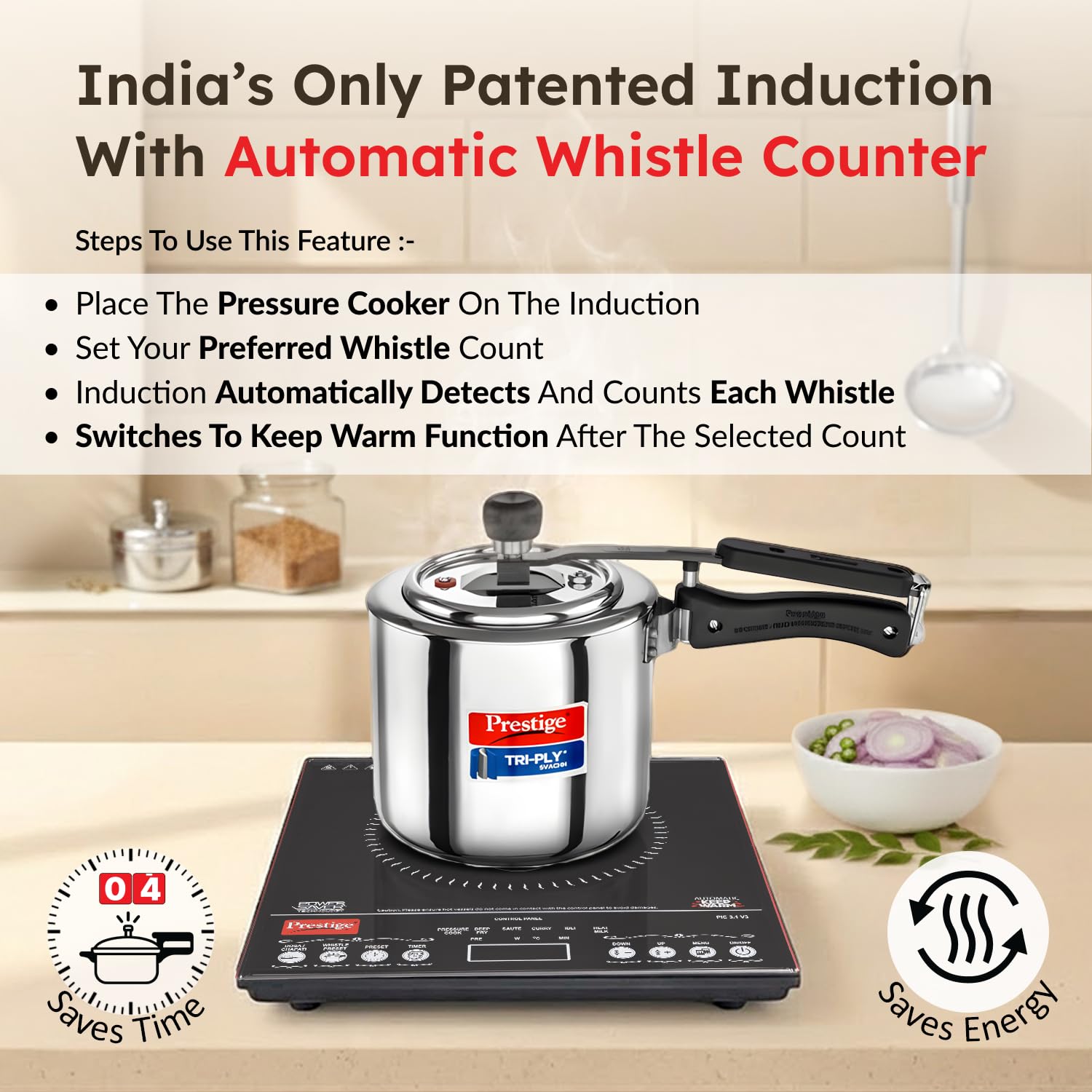
Image: Prestige PIC 3.1 V3 Induction Cooktop with a pressure cooker, demonstrating suitable cookware.
4. Operating Instructions
Follow these steps for effective and safe operation of your induction cooktop.
4.1 Basic Operation
- Plug in the cooktop. The digital display will show '00'.
- Place a suitable, induction-compatible vessel containing food or liquid on the center of the cooking surface.
- Press the On/Off button to power on the cooktop.
- Select your desired cooking mode using the Menu button or choose a specific preset.
- Adjust the power or temperature using the Up (+) or Down (-) buttons as needed.
- To turn off the cooktop, press the On/Off button again.
4.2 Preset Indian Menu Options
The cooktop comes with 7 intelligently programmed Indian menu options for accurate temperature and timing.

Image: Visual representation of the 7 preset Indian menu options available on the Prestige PIC 3.1 V3 Induction Cooktop.
- Pressure Cook: For pressure cooking dishes.
- Curry: Optimized for preparing various curries.
- Dosa/Chapati: Ideal for making dosas and chapatis.
- Idli: Specific setting for steaming idlis.
- Deep Fry: Maintains optimal temperature for deep frying.
- Heat Milk: Gently heats milk to prevent boiling over.
- Keep Warm: Maintains food at a warm serving temperature.
To select a preset, press the Preset button repeatedly until your desired option appears on the display, or use the dedicated Dosa/Chapati button.
4.3 Automatic Whistle Counter
This unique feature automatically counts the number of pressure cooker whistles and switches the cooktop to the 'Keep Warm' function once the preset number is reached.
- Place your pressure cooker with food on the cooktop.
- Press the Whistle Preset button.
- Use the Up (+) or Down (-) buttons to set the desired number of whistles (up to 15).
- The cooktop will automatically count the whistles and switch to 'Keep Warm' mode after the set count.
4.4 Timer Function
The built-in timer allows for precise, hands-free cooking by automatically switching off the cooktop after a set duration.
- Select your desired cooking mode or preset.
- Press the Timer button.
- Use the Up (+) or Down (-) buttons to set the cooking time in minutes.
- The cooktop will operate for the set time and then automatically switch off.
4.5 Power and Temperature Adjustment
For manual cooking modes, you can adjust the power (in Watts) or temperature (in Celsius) using the Up (+) and Down (-) buttons to suit your cooking needs.
5. Maintenance and Cleaning
Regular cleaning and maintenance will prolong the life and efficiency of your induction cooktop.
- Always unplug the cooktop from the power outlet and allow it to cool completely before cleaning.
- Cleaning the Glass Surface: Wipe the ceramic glass surface with a soft, damp cloth and mild detergent. For stubborn stains, use a non-abrasive cleaner specifically designed for glass cooktops. Avoid using abrasive pads, harsh chemicals, or sharp objects that could scratch the surface.
- Cleaning the Body: Wipe the exterior body with a soft, damp cloth. Do not use water directly on the control panel or immerse the unit.
- Cooling Fan: Periodically check the cooling fan vents at the bottom of the cooktop for dust or debris. Gently clean with a soft brush or vacuum cleaner to ensure unobstructed airflow.
- Storage: When not in use, store the cooktop in a dry, safe place, away from direct sunlight and moisture.
6. Troubleshooting
If you encounter any issues, refer to the following common problems and solutions.
| Problem | Possible Cause | Solution |
|---|---|---|
| Cooktop does not turn on | No power supply; loose plug; power button not pressed. | Check power outlet; ensure plug is secure; press On/Off button firmly. |
| Vessel not heating | Incompatible vessel; vessel not centered; small vessel diameter. | Use induction-compatible cookware; center the vessel; ensure adequate base diameter. |
| Error code displayed | Specific error condition (refer to full manual for code meanings). | Unplug and replug; ensure proper ventilation; contact customer support if persistent. |
| Uneven heating | Vessel base not flat; incorrect power setting. | Use flat-bottomed vessels; adjust power/temperature settings. |
| Cooktop switches off automatically | Overheating; timer expired; no vessel detected. | Allow to cool; check timer settings; ensure vessel is present. |
For issues not listed here or if problems persist, please contact Prestige customer support.
7. Specifications
- Model: PIC 3.1 V3
- Wattage: 2000 Watts
- Voltage: 230 Volts
- Heating Elements: 1 (Induction)
- Controls Type: Touch
- Material: Glass (cooking surface), Other material (body)
- Item Dimensions (D x W x H): 44D x 35W x 12H Centimeters
- Item Weight: 590 Grams
- Power Plug: 15A
- Special Features: 4KV Surge Protection, Patented Automatic Whistle Counter, Automatic Keep Warm Function, 7 Preset Indian Menu Options, Dual Heat Sensors, Anti-magnetic Wall.
8. Warranty and Support
Your Prestige PIC 3.1 V3 Induction Cooktop is covered by a manufacturer's warranty.
- Warranty Period: 1 Year Manufacturer Warranty.
- Coil Warranty: 3-year coil warranty for extra peace of mind.
- BIS Certified: Certified for safety and quality.
- Customer Care: For any queries, service requests, or warranty claims, please contact:
- Phone: 080-46824000
- Email: Customercare@ttkprestige.com