
Tempstar CECOMINOD012034
Tempstar Furnace Flame Sensor 1172827 User Manual
Model: CECOMINOD012034
Introduction
This manual provides essential information for the installation, operation, maintenance, and troubleshooting of the OEM Upgraded Replacement Tempstar Furnace Flame Sensor, model 1172827 (CECOMINOD012034). This component is crucial for the safe and efficient operation of your Tempstar furnace.
The flame sensor's primary function is to detect the presence of a flame within the furnace's combustion chamber. Upon detecting a flame, it sends a low voltage signal to the control board, indicating that the burner is successfully ignited and can continue operation. If the flame sensor does not detect a flame, for safety reasons, the furnace will shut down to prevent the accumulation of uncombusted gas.
Setup and Installation
The Tempstar Furnace Flame Sensor is designed as a direct replacement part. Installation typically requires minimal tools and can be completed in a short amount of time.
Required Tools:
- Screwdriver (for furnace panel removal)
- 1/4" Nut Driver (or appropriate size for your furnace's flame sensor mounting screw)
Installation Steps:
- Safety First: Before beginning any work on your furnace, ensure the power supply to the furnace is completely turned off at the circuit breaker or furnace switch. Failure to do so can result in electric shock or injury.
- Access the Furnace: Locate and remove the furnace side panel(s) to gain access to the internal components, including the flame sensor.
- Locate the Flame Sensor: The flame sensor is typically a thin metal rod, often bent, with a ceramic insulator, positioned in the path of the furnace's flame. It will have a single wire connected to it.
- Remove the Old Sensor: Using the 1/4" nut driver (or appropriate tool), carefully remove the single screw holding the flame sensor in place. Disconnect the wire from the sensor.
- Install the New Sensor:
- Handle the new flame sensor by its ceramic base or metal bracket. Avoid touching the metal rod portion with bare hands, as oils from your skin can contaminate the sensor and affect its performance.
- Position the new sensor in the same location as the old one.
- Secure it with the mounting screw.
- Reconnect the wire to the new sensor.
- Restore Power: Replace the furnace panel(s) and restore power to the furnace.
- Test Operation: Initiate a heating cycle to confirm the furnace ignites and operates continuously without shutting off prematurely.
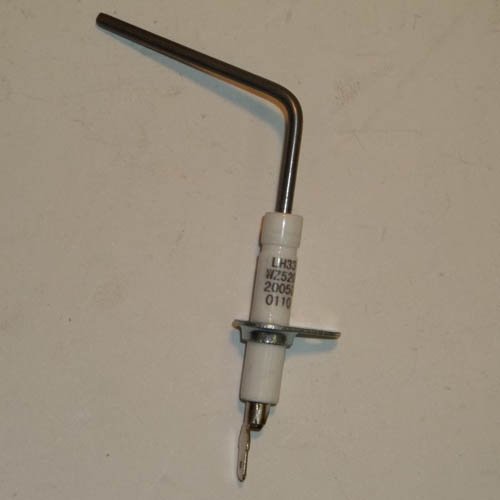
Image: The Tempstar Furnace Flame Sensor 1172827. This image displays the sensor's design, featuring a bent metal rod and a ceramic base with a mounting flange and electrical connector. This component is essential for detecting the presence of flame in a furnace.
Operating Principles
The Tempstar Furnace Flame Sensor operates by rectifying the alternating current (AC) from the furnace's control board into a direct current (DC) signal when exposed to the heat and ionization of the flame. This DC signal is then sent back to the control board, confirming the presence of a flame. The control board uses this signal to ensure safe and continuous operation of the furnace's burners. If the signal is lost or not detected within a specified timeframe after ignition, the control board will shut down the gas valve to prevent uncombusted gas from accumulating, which is a critical safety feature.
Maintenance
Regular maintenance of your furnace, including inspection of the flame sensor, can help prolong its lifespan and ensure reliable operation.
Cleaning the Flame Sensor:
Over time, carbon deposits can build up on the flame sensor rod, insulating it and preventing it from properly detecting the flame. If your furnace is experiencing intermittent shutdowns, cleaning the flame sensor may resolve the issue temporarily.
- Safety First: Always turn off power to the furnace before attempting any maintenance.
- Removal: Follow steps 1-4 from the "Setup and Installation" section to remove the flame sensor.
- Cleaning: Gently clean the ceramic insulator and the metal rod of the flame sensor using a fine abrasive material such as a piece of fine-grit sandpaper or a dollar bill. Do not use steel wool or harsh chemicals, as these can damage the sensor. The goal is to remove carbon buildup without scratching the surface excessively.
- Reinstallation: Reinstall the cleaned sensor by following steps 5-7 from the "Setup and Installation" section.
Note: While cleaning can provide a temporary fix, a flame sensor that frequently requires cleaning or fails shortly after cleaning may indicate it is nearing the end of its operational life and should be replaced.
Troubleshooting
The most common symptom of a faulty flame sensor is the furnace lighting for a few seconds and then shutting off. This is a safety mechanism.
| Symptom | Possible Cause | Solution |
|---|---|---|
| Furnace ignites, runs for a few seconds, then shuts off. | Dirty or faulty flame sensor. |
|
| Furnace does not ignite at all. | Could be ignitor, gas supply, or control board issue (less likely flame sensor alone). |
|
Specifications
| Attribute | Detail |
|---|---|
| Product Name | OEM Upgraded Replacement for Tempstar Furnace Flame Sensor |
| Model Number | 1172827 (CECOMINOD012034) |
| Brand | Tempstar |
| Manufacturer | Replacement for Tempstar |
| Product Dimensions | 6 x 6 x 6 inches |
| Item Weight | 0.53 ounces |
| Style | Modern |
| Measuring Range | Off - On |
| Mounting Type | Flange Mount |
| Date First Available | August 5, 2013 |
Warranty Information
Specific warranty details for the OEM Upgraded Replacement Tempstar Furnace Flame Sensor 1172827 are not provided within this manual. For information regarding product warranty, please refer to the original product packaging, contact the seller from whom the product was purchased, or visit the official Tempstar website.
Customer Support
Should you require further assistance with the installation, operation, or troubleshooting of your Tempstar Furnace Flame Sensor, please contact the retailer or the manufacturer directly. Always provide your product model number (CECOMINOD012034) and any relevant purchase information when seeking support.
Ask a question about this manual
Ask about setup, troubleshooting, compatibility, parts, safety, or missing instructions. Manuals+ will review the question and use this page’s manual context to help answer it.