
1. Product Overview
The Lepy LP-268 is a compact and lightweight Hi-Fi stereo power amplifier designed for versatile audio applications. Its robust aluminum alloy construction ensures durability, while its efficient design provides clear audio output for various devices.
Key Features:
- Compact and Portable Design: Measuring approximately 14 x 9.8 x 4.1 cm and weighing around 240g, the LP-268 is ideal for both home and mobile use, including car or motorcycle installations.
- High-Quality Audio Reproduction: Utilizes an audio amplifier IC for accurate reproduction of sound, minimizing low-frequency distortion.
- Durable Construction: Crafted from lightweight aluminum alloy using CNC machining, offering high strength and a premium feel for long-lasting performance.
- Broad Compatibility: Easily connects to various audio sources such as MP3 players, MP4 players, iPods, and CD players.
- Adjustable Audio Output: Features controls for both high and low frequency output, allowing users to customize sound to their preferences.
- Overvoltage Protection: Includes an overvoltage protection circuit for enhanced safety and reliability during operation.

Figure 1: Front angled view of the Lepy LP-268 Hi-Fi Stereo Power Amplifier.
2. Package Contents
Please ensure all items are present and in good condition upon opening the package. If any items are missing or damaged, please contact customer support.
- Lepy LP-268 Hi-Fi Stereo Power Amplifier x 1
- User Manual (this document) x 1
- (Note: AC power adapter may be sold separately or included depending on the specific product variant.)
3. Controls and Connections
Familiarize yourself with the amplifier's controls and connection ports before setup.
Front Panel:

Figure 2: Front panel of the Lepy LP-268 amplifier, showing controls.
- POWER Switch: Toggles the amplifier on/off.
- POWER Indicator LED: Illuminates when the amplifier is powered on.
- SUPER BASS Button: Activates or deactivates the Super Bass enhancement feature.
- TREBLE Control: Adjusts the high-frequency sound level.
- BASS Control: Adjusts the low-frequency sound level.
- VOLUME Control: Adjusts the overall output volume.
Rear Panel:
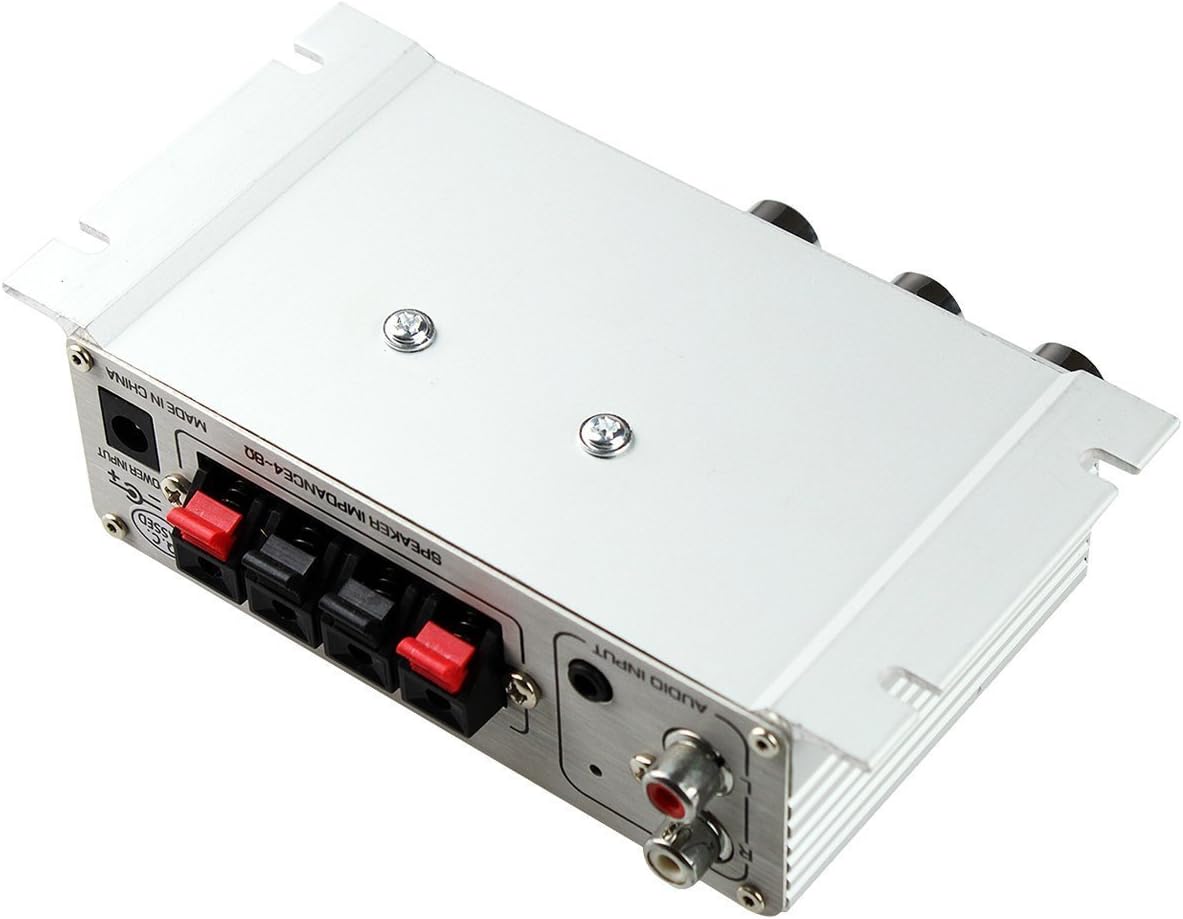
Figure 3: Rear panel of the Lepy LP-268 amplifier, showing connection ports.
- AUDIO INPUT (RCA): Connect your audio source (e.g., CD player, MP3 player) using RCA cables.
- SPEAKER OUTPUT (L/R): Connect your passive speakers to these terminals. Ensure correct polarity (+ to + and - to -).
- DC 12V POWER INPUT: Connect the DC 12V power adapter here.
4. Setup Instructions
Follow these steps to set up your Lepy LP-268 amplifier.
- Placement: Place the amplifier on a stable, flat surface with adequate ventilation. Avoid placing it near heat sources or in direct sunlight.
- Connect Speakers:
- Ensure the amplifier is turned off and unplugged from power.
- Connect your passive speakers to the SPEAKER OUTPUT terminals on the rear panel. Match the left speaker to 'L' and the right speaker to 'R'.
- Observe correct polarity: connect the positive (+) terminal of the speaker to the positive (+) terminal of the amplifier, and the negative (-) terminal of the speaker to the negative (-) terminal of the amplifier. Incorrect polarity can result in poor sound quality.
- Connect Audio Source:
- Connect your audio source (e.g., MP3 player, smartphone, CD player) to the AUDIO INPUT (RCA) ports on the rear panel using appropriate RCA cables. Match the red plug to the 'R' (right) input and the white/black plug to the 'L' (left) input.
- Connect Power:
- Ensure the VOLUME control on the amplifier is set to minimum (fully counter-clockwise).
- Connect a compatible DC 12V power adapter (not always included) to the DC 12V POWER INPUT port on the rear panel.
- Plug the power adapter into a suitable electrical outlet.
Important: Always ensure the amplifier is turned off and unplugged before making any connections to prevent damage to the unit or connected devices.
5. Operating Instructions
Once setup is complete, follow these steps to operate your amplifier.
- Power On: Press the POWER switch on the front panel to turn on the amplifier. The POWER indicator LED will illuminate.
- Play Audio: Start playing audio from your connected source device.
- Adjust Volume: Slowly turn the VOLUME control clockwise to increase the sound level to your desired listening level.
- Adjust Tone: Use the TREBLE and BASS controls to fine-tune the high and low frequencies according to your preference.
- Super Bass Feature: Press the SUPER BASS button to engage or disengage the bass enhancement.
- Power Off: When finished, turn the VOLUME control to minimum, then press the POWER switch to turn off the amplifier.
6. Maintenance
Proper maintenance ensures the longevity and optimal performance of your amplifier.
- Cleaning: Use a soft, dry cloth to clean the exterior of the amplifier. Do not use liquid cleaners or abrasive materials.
- Ventilation: Ensure that the ventilation openings are not blocked. Good airflow prevents overheating.
- Storage: If storing the amplifier for an extended period, disconnect it from power and store it in a cool, dry place.
- Avoid Moisture: Keep the amplifier away from water and high humidity.
7. Troubleshooting
If you encounter issues with your amplifier, refer to the following common problems and solutions.
| Problem | Possible Cause | Solution |
|---|---|---|
| No sound output |
|
|
| Distorted sound |
|
|
| No bass/treble adjustment effect |
|
|
If the problem persists after trying these solutions, please contact customer support.
8. Specifications
Detailed technical specifications for the Lepy LP-268 amplifier.
| Feature | Specification |
|---|---|
| Brand | Lepy |
| Model | LP-268 |
| Material | Lightweight Aluminum Alloy |
| Output Power | 20W x 2 RMS |
| Input Power | DC 12V |
| Speaker Impedance | 4-8 Ω |
| Dimensions (approx.) | 14 cm x 9.8 cm x 4.1 cm |
| Weight (approx.) | 240 g |
| GTIN (UPC) | 701772173199 |

Figure 4: Dimensions of the Lepy LP-268 amplifier.
9. Warranty and Support
For warranty information and technical support, please refer to the documentation provided with your purchase or contact the retailer. Keep your proof of purchase for warranty claims.
For further assistance, you may visit the official Lepy website or contact their customer service directly. (Specific contact details are not provided in this manual.)


