
VILTROX JY-610C
Viltrox JY-610C Mini Flash Light User Manual
Model: JY-610C
1. Introduction
The Viltrox JY-610C is a compact and lightweight mini speedlite designed for Canon DSLR cameras. It supports E-TTL, Manual (M), and Multi (Stroboscopic) flash modes, offering versatile lighting control. This manual provides detailed instructions for the proper setup, operation, and maintenance of your JY-610C flash unit.
2. Safety Information
- Do not disassemble or attempt to repair the unit yourself. Refer to qualified service personnel.
- Keep the unit dry. Do not expose it to rain or moisture.
- Use only specified AA batteries. Do not mix old and new batteries or different types of batteries.
- Avoid direct eye exposure to the flash light, especially at close range, as it can cause temporary vision impairment.
- Keep out of reach of children.
3. Package Contents
Verify that all items are present in the package:
- Viltrox JY-610C Mini Speedlite
- Carrying Bag
- User Manual (English and Chinese)
Note: AA batteries are not included and must be purchased separately.
4. Product Overview
Familiarize yourself with the components and controls of the Viltrox JY-610C Mini Flash Light.
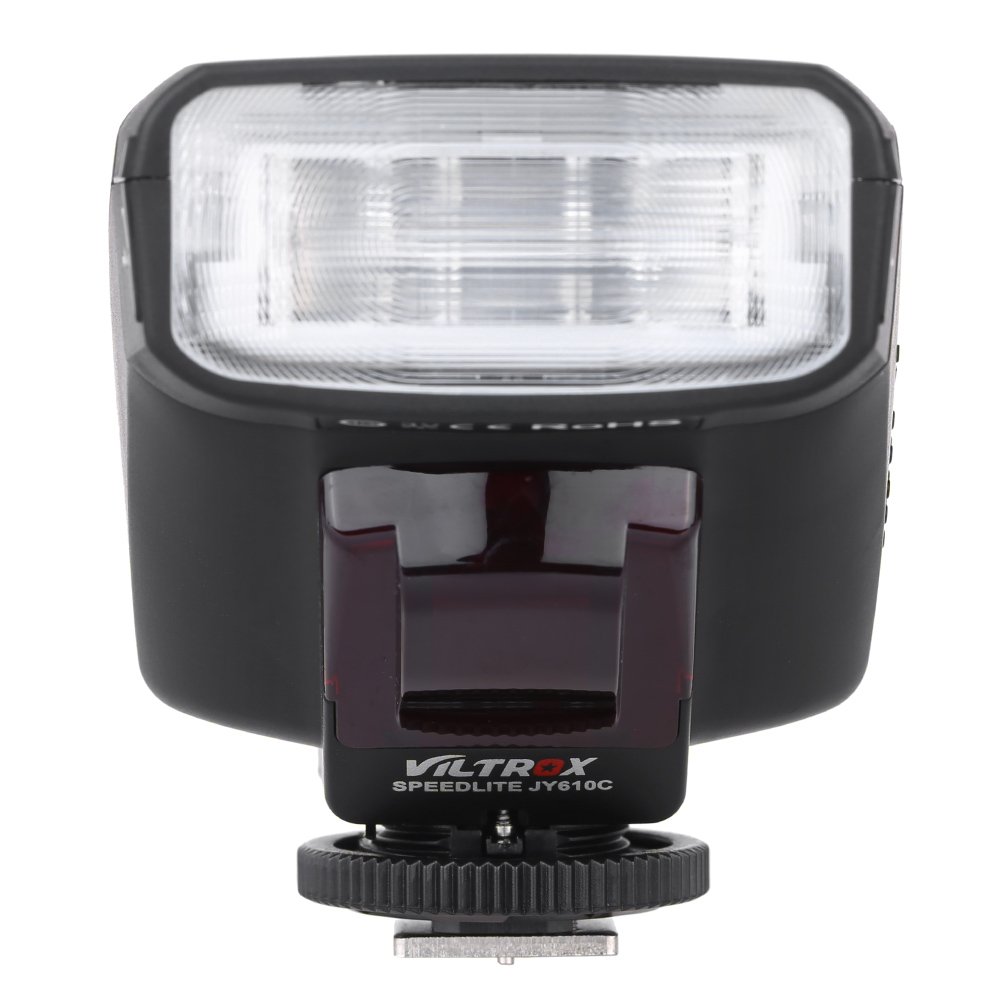
Figure 4.1: Front View
This image shows the front of the Viltrox JY-610C flash unit, highlighting the LCD display, control buttons (Pilot, Mode, T/CH/D, Hz/GR, ON/OFF), and the hot shoe mount with its locking mechanism.

Figure 4.2: Top View
The top view of the Viltrox JY-610C, displaying the "SPEEDLITE JY610C" branding and the flash head. This perspective shows the compact design of the unit.

Figure 4.3: Side View with Battery Compartment Open
This image illustrates the side of the flash unit with the battery compartment door open, revealing the slots for AA batteries. This is where batteries are inserted or replaced.
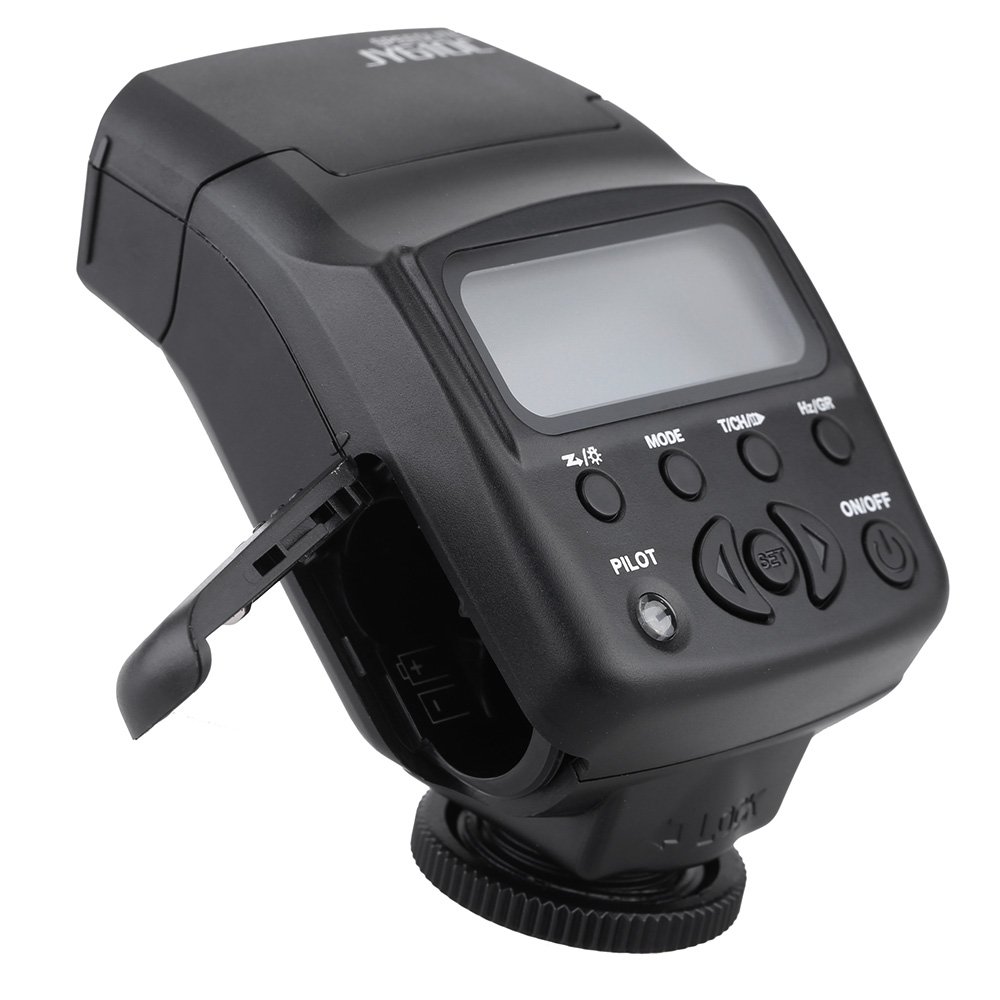
Figure 4.4: Rear View
The rear view of the Viltrox JY-610C, showing the hot shoe connection point for mounting on a camera, the slave sensor (red window), and regulatory markings. The locking ring for secure attachment is also visible.

Figure 4.5: LCD Display Modes
This composite image shows the Viltrox JY-610C flash unit alongside close-ups of its LCD screen displaying different operational modes: Manual (M) with power setting, Multi (Stroboscopic) with frequency and flash count, and E-TTL with exposure compensation. This demonstrates the user interface for mode selection and settings adjustment.
4.1. Control Panel
- LCD Screen: Displays current settings and mode.
- ON/OFF Button: Powers the unit on or off.
- MODE Button: Cycles through E-TTL, M (Manual), and Multi (Stroboscopic) flash modes.
- T/CH/D Button: Used for setting channels/groups in slave mode or other parameters.
- Hz/GR Button: Used for setting frequency in Multi mode or groups.
- PILOT Button: Test flash button. Also serves as a flash-ready indicator (red light).
- Directional Buttons (Up/Down/Left/Right): Navigate menus and adjust settings.
- SET Button: Confirms selections.
5. Setup
5.1. Battery Installation
- Open the battery compartment cover located on the side of the flash unit (refer to Figure 4.3).
- Insert two (2) AA-size batteries according to the polarity indicators inside the compartment.
- Close the battery compartment cover securely.
Note: Ensure batteries are inserted correctly to prevent damage to the unit.
5.2. Mounting to Camera
- Slide the hot shoe mount of the JY-610C into the hot shoe of your Canon DSLR camera.
- Rotate the locking ring clockwise until the flash unit is securely fastened to the camera's hot shoe. Do not overtighten.
- To remove, rotate the locking ring counter-clockwise and slide the flash unit off the hot shoe.
6. Operating Modes
Press the MODE button to cycle through the available flash modes: E-TTL, M (Manual), and Multi (Stroboscopic).
6.1. E-TTL Mode (Automatic Flash)
In E-TTL mode, the flash output is automatically controlled by the camera to achieve optimal exposure. This mode is ideal for general photography.
- Press MODE until "E-TTL" appears on the LCD screen (refer to Figure 4.5).
- You can adjust Flash Exposure Compensation (FEC) using the directional buttons (e.g., +1/3, +2/3, etc.) if needed. Press SET to confirm.
- The flash will fire automatically based on the camera's metering.
6.2. Manual (M) Mode
Manual mode allows you to set the flash output power manually, providing precise control over lighting.
- Press MODE until "M" appears on the LCD screen (refer to Figure 4.5).
- Use the directional buttons to adjust the flash output from 1/1 (full power) to 1/128, with 22 levels of fine tuning.
- Press SET to confirm the power setting.
6.3. Multi (Stroboscopic) Mode
Multi mode fires the flash multiple times during a single exposure, creating stroboscopic effects for capturing motion.
- Press MODE until "Multi" appears on the LCD screen (refer to Figure 4.5).
- Use the directional buttons to set the flash frequency (Hz) and the number of flashes.
- Press SET to confirm.
6.4. Slave Modes (S1/S2)
The JY-610C can function as an optical slave unit, triggered by another flash.
- S1 Mode: The flash will fire in response to the first flash it detects. Suitable for manual flash triggers.
- S2 Mode: The flash will ignore the pre-flash from a master E-TTL flash and fire on the main flash. Suitable for E-TTL master flashes.
- To activate slave mode, press and hold the T/CH/D button until "SLAVE" appears, then use directional buttons to select S1 or S2.
- The unit supports 4 channels in 3 groups for more complex multi-flash setups.
7. Advanced Features
7.1. Exposure Compensation
In E-TTL mode, you can adjust the flash exposure compensation to fine-tune the brightness of your subject. Use the directional buttons to increase or decrease the exposure value.
7.2. Front-Curtain Sync / Rear-Curtain Sync
The JY-610C supports both front-curtain and rear-curtain sync. This setting is typically controlled via your camera's flash menu. Consult your camera's manual for specific instructions on how to enable these features.
- Front-Curtain Sync: The flash fires immediately after the shutter opens.
- Rear-Curtain Sync: The flash fires just before the shutter closes. Useful for creating motion blur effects with the flash freezing the subject at the end of the exposure.
7.3. Adjustable Vertical Angle
The flash head can be tilted vertically to angles of 60, 75, and 90 degrees. This allows for bounce flash photography, directing the light off a ceiling or wall for softer, more natural illumination.
8. Maintenance
- Cleaning: Use a soft, dry cloth to clean the flash unit. For stubborn dirt, a slightly damp cloth can be used, followed by a dry cloth. Do not use strong detergents or solvents.
- Storage: When not in use for extended periods, remove the batteries to prevent leakage and store the unit in its carrying bag in a cool, dry place.
- Battery Care: Replace batteries when the recycle time becomes excessively long or the flash-ready indicator does not light up.
9. Troubleshooting
| Problem | Possible Cause | Solution |
|---|---|---|
| Flash does not fire. |
|
|
| Long recycle time. |
|
|
| Flash output is too bright/dark. |
|
|
| Slave mode not triggering. |
|
|
10. Specifications
| Feature | Detail |
|---|---|
| Guide Number | GN27 (ISO 100/m) |
| Flash Mode | E-TTL / M / Multi |
| Slave Mode | Slave / S1 / S2 (4 channels in 3 groups) |
| Flash Control | 8 levels of output control (1/128 - 1/1), 22 levels of fine tuning |
| Flash-ready indicator | Red pilot light |
| Effective Flash Range | 0.7 - 19.3m (Quick flash: 0.7 - 11.1m) |
| Recycle Time | 0.1 - 4s |
| Flash Times | 100 - 680 times (with fresh AA batteries) |
| Power Supply | 2 x AA batteries (not included) |
| Item Size | 8.5 x 6 x 4.5cm / 3.3 x 2.4 x 1.8in |
| Item Weight | 145g / 5.1oz |
| Adjustable Vertical Angle | 60 / 75 / 90 degrees |
| Sync Support | Front-curtain sync / Rear-curtain sync |
| Exposure Compensation | Supported |
11. Warranty and Support
For warranty information and technical support, please refer to the warranty card included with your product or visit the official Viltrox website. Keep your purchase receipt as proof of purchase for warranty claims.
Ask a question about this manual
Ask about setup, troubleshooting, compatibility, parts, safety, or missing instructions. Manuals+ will review the question and use this page’s manual context to help answer it.