
SadoTech C
SadoTech Wireless Doorbell User Manual
Model: C | Brand: SadoTech
1. Introduction
Thank you for choosing the SadoTech Wireless Doorbell. This product is designed to provide a convenient and reliable doorbell solution for your home or business. Featuring a battery-operated, waterproof push button transmitter and a plug-in receiver, it offers a long operating range and customizable chime options. Please read this manual carefully before installation and operation to ensure proper use and longevity of your device.
2. Package Contents
The SadoTech Wireless Doorbell kit includes the following components:
- 1 x Outdoor Remote Doorbell Transmitter (Push Button)
- 1 x Plug-in Smart Doorbell Receiver
- 1 x A23 Battery (for Transmitter)
- Double-sided Adhesive Tape
- Anchors and Screws (for mounting)

Figure 1: SadoTech Wireless Doorbell Kit components.
3. Setup and Installation
Follow these steps to set up your SadoTech Wireless Doorbell:
3.1. Transmitter (Push Button) Installation
- Battery Installation: The A23 battery is typically pre-installed. If not, or for replacement, gently open the transmitter casing. Refer to Figure 2 for guidance on opening the push button. Insert the A23 12V alkaline battery, ensuring correct polarity.
- Mounting Location: Choose a suitable location for the transmitter near your door. Ensure it is easily accessible to visitors. The transmitter is waterproof and designed for outdoor use.
- Mounting Method:
- Adhesive Tape: Clean the mounting surface thoroughly. Apply the double-sided adhesive tape to the back of the transmitter and firmly press it onto the desired location for at least 30 seconds.
- Screws: Use the provided anchors and screws to securely mount the transmitter to the wall.
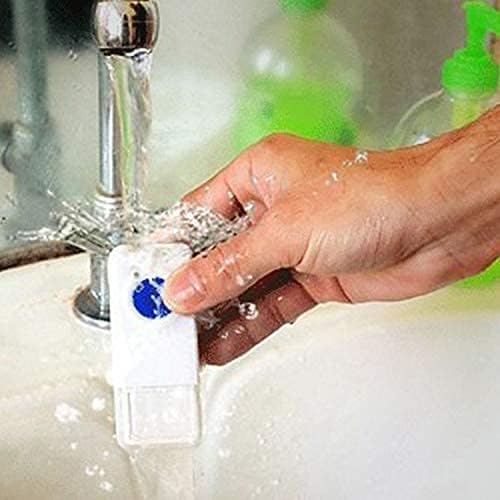
Figure 2: Opening the push button transmitter for battery access.

Figure 3: The transmitter is designed to be waterproof.
3.2. Receiver (Chime Unit) Installation
- Placement: Plug the receiver into any standard electrical outlet within your home. Choose a central location where the chime can be easily heard throughout your desired area.
- Pairing: The doorbell is typically pre-paired from the factory. If re-pairing is needed, consult the operating instructions for pairing mode.

Figure 4: The receiver plugs directly into a standard electrical outlet.
Video 1: Demonstration of SadoTech doorbell features, including volume and chime tone selection. This video provides a comprehensive overview of the product's capabilities and sound options.
4. Operating Instructions
The SadoTech Wireless Doorbell offers customizable settings for volume and chime tones.
4.1. Adjusting Volume
The receiver has 4 adjustable volume settings. To change the volume, locate the volume button on the receiver and press it repeatedly until your desired volume level is reached. The doorbell will cycle through the available volume levels.
4.2. Changing Chime Tones
The doorbell offers over 50 different chime sounds, including 35 chime tones and 17 music tones. To change the chime tone, locate the chime selection button on the receiver and press it to cycle through the available melodies. Once you hear a tone you like, stop pressing the button, and the receiver will save your selection. The doorbell will remember your customized settings even after a power outage.
4.3. Operating Range
The SadoTech Wireless Doorbell utilizes patented technology for a strong signal, offering an operating range of up to 1000 feet (approximately 300 meters) in open areas. This makes it suitable for large homes, apartments, offices, and warehouses. Obstacles such as thick walls or metal structures may reduce the effective range.
5. Maintenance
5.1. Battery Replacement
The transmitter is powered by an A23 12V battery, which typically lasts up to 3 years. When the transmitter's LED flash becomes dim or the doorbell stops working, it's time to replace the battery. To replace the battery, gently open the transmitter casing using a small slot-type screwdriver as shown in Figure 2. Remove the old battery and insert a new A23 12V alkaline battery, ensuring correct polarity. Close the casing securely.
5.2. Cleaning
To maintain the appearance and functionality of your doorbell, wipe the surfaces with a soft, dry cloth. Avoid using abrasive cleaners or solvents, as these can damage the finish or internal components. The transmitter is waterproof, but avoid submerging the receiver in water.
6. Troubleshooting
If you experience issues with your SadoTech Wireless Doorbell, consider the following common solutions:
- No Sound from Receiver:
- Ensure the receiver is properly plugged into a working electrical outlet.
- Check the volume setting on the receiver; it might be set to mute or a very low level.
- Verify that the transmitter battery is not depleted. Replace if necessary (refer to Section 5.1).
- Re-pair the transmitter and receiver if they have lost connection (refer to the product's quick start guide for specific pairing instructions).
- Short Operating Range:
- Ensure there are no large metal objects or thick walls directly between the transmitter and receiver that could interfere with the signal.
- Move the receiver closer to the transmitter.
- Check the transmitter battery. A low battery can reduce signal strength.
- Transmitter LED Not Flashing:
- The transmitter battery may be depleted. Replace the A23 battery (refer to Section 5.1).
7. Specifications
| Manufacturer | SadoTech |
| Model Number | C (ST-FX-C-H2O-MBL) |
| Item Weight | 4 ounces |
| Product Dimensions | 3.25 x 1.5 x 3.5 inches |
| Color | Black |
| Style | 1 push button + 1 receiver |
| Finish | Matte Black |
| Material | ABS Plastic |
| Installation Method | Self-adhesive tape or anchors/screw (included) |
| Number Of Pieces | 2 |
| Type of Bulb | LED |
| Switch Style | Push button |
| Batteries Included? | Yes |
| Battery Cell Type | Alkaline (A23 12V) |
| Operating Range | Up to 1000 feet (approx. 300 meters) |
| Chime Tones | Over 50 (including 35 chime tones and 17 music tones) |
| Volume Levels | 4 |
| Date First Available | July 7, 2016 |
8. Warranty and Support
For detailed warranty information and customer support, please refer to the official SadoTech website or contact their customer service directly. A PDF version of the user manual is also available for download from the product's Amazon page for your convenience.
You can access the official User Manual (PDF) here.
Related documentsC


Ask a question about this manual
Ask about setup, troubleshooting, compatibility, parts, safety, or missing instructions. Manuals+ will review the question and use this page’s manual context to help answer it.