
1. Introduction
Thank you for purchasing the ipega PG-9057 Wireless Game Controller. This manual provides detailed instructions for setting up, operating, and maintaining your device. Please read this manual carefully before use to ensure optimal performance and longevity of your controller.
2. Product Features
- Wireless Connectivity: Enjoy gaming freedom with wireless connection technology.
- Multi-Platform Compatibility: Supports Android devices (smartphones, tablets, TV boxes) and Windows PCs.
- High Durability Buttons: Equipped with high-quality, durable buttons for extended gaming sessions.
- Precision Controls: Features a D-pad with pressure sensitivity and a 360-degree joystick with no dead zone for accurate input.
- Ergonomic Design: Designed for comfortable grip and prolonged use.
- Integrated Phone Holder: Conveniently mount your smartphone for mobile gaming.
3. Package Contents
Please check the package contents upon unboxing:
- ipega PG-9057 Wireless Game Controller
- USB Charging Cable
- User Manual (Japanese version included)
4. Setup
4.1. Charging the Controller
Before first use, fully charge the controller using the provided USB cable. Connect the small end of the USB cable to the controller's charging port and the other end to a USB power source (e.g., PC, USB wall adapter).
4.2. Device Compatibility Overview
The ipega PG-9057 controller supports various devices and connection methods as shown below:

This image displays the ipega PG-9057 Wireless Game Controller, highlighting its compatibility with various devices including smartphones, tablets, personal computers, and VR headsets.
4.3. Connection Methods and System Environment
The controller offers multiple connection options depending on your device and operating system. Refer to the table below for detailed compatibility.

This table outlines the system requirements and connection methods for the ipega PG-9057 controller, detailing compatibility with Android smartphones, tablets, and TV boxes via Bluetooth 4.0 or USB, and PCs via USB.
4.3.1. Bluetooth Connection (Android Devices)
- Ensure the controller is charged.
- Press and hold the HOME button and the A button simultaneously until the indicator light flashes rapidly. This puts the controller into pairing mode.
- On your Android device, go to Bluetooth settings and turn Bluetooth on.
- Search for available devices and select "ipega PG-9057" (or similar name) from the list.
- Once paired, the indicator light on the controller will become solid.
4.3.2. USB Wired Connection (Windows PC / Android Devices)
- Connect the controller to your Windows PC or Android device using the USB cable.
- The device should automatically recognize the controller. No special drivers are usually required for basic functionality.
5. Operating Instructions
5.1. Basic Controls
The ipega PG-9057 features standard gamepad controls for intuitive gaming.

A detailed view of the ipega PG-9057 controller's D-pad, joystick, and A/B/X/Y buttons, illustrating their high sensitivity and precise input capabilities.
- D-Pad: For directional input, offering pressure sensitivity.
- Left/Right Joysticks: 360-degree movement with no dead zone for precise control.
- A/B/X/Y Buttons: Standard action buttons with zero delay response.
- L1/R1, L2/R2 Triggers: Shoulder buttons and triggers for various in-game actions.
- SELECT/START Buttons: For in-game menu navigation and actions.
- HOME Button: To power on/off the controller or return to the main menu.
5.2. Using with a Smartphone
The controller includes an integrated holder for smartphones, allowing for a portable gaming experience.
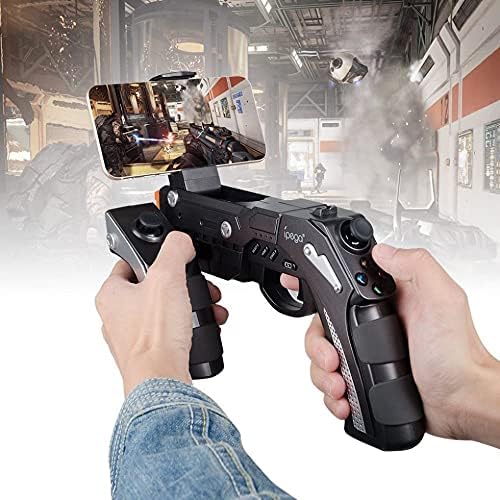
A user is shown holding the ipega PG-9057 Wireless Game Controller with a smartphone securely attached, actively engaged in mobile gaming.
- Extend the phone holder located on the top of the controller.
- Carefully place your smartphone into the holder, ensuring it is securely gripped.
- Connect the controller to your smartphone via Bluetooth as described in Section 4.3.1.
- Launch your desired game and configure controller settings if necessary.
6. Maintenance
To ensure the longevity and optimal performance of your ipega PG-9057 controller, follow these maintenance guidelines:
- Cleaning: Use a soft, dry cloth to wipe the surface of the controller. Do not use harsh chemicals or abrasive cleaners.
- Storage: Store the controller in a cool, dry place away from direct sunlight and extreme temperatures.
- Avoid Drops: Protect the controller from drops and impacts, as this can damage internal components.
- Charging: Do not overcharge the battery. Disconnect the charging cable once the controller is fully charged.

The ipega PG-9057 Wireless Game Controller is shown, emphasizing its construction from high-quality, durable ABS material.
7. Troubleshooting
If you encounter issues with your controller, please refer to the following common solutions:
- Controller not connecting:
- Ensure the controller is fully charged.
- Verify that Bluetooth is enabled on your device and the controller is in pairing mode.
- Try restarting both the controller and your device.
- If using USB, ensure the cable is securely connected and try a different USB port.
- Buttons or joysticks not responding:
- Check if the controller is properly connected to your device.
- Restart the controller and reconnect.
- Ensure the game you are playing supports external controllers.
- Lag or input delay:
- Ensure there are no obstructions or excessive distance between the controller and your device.
- Minimize interference from other wireless devices.
- For critical gaming, consider using a wired USB connection if supported by your device.
8. Specifications
| Specification | Value |
|---|---|
| Brand | ipega |
| Model | PG-9057 |
| Compatible Devices | Android, Windows |
| Controller Type | Game Pad |
| Connection Technology | Wireless |
| Features | Wireless |
| Compatible Items | Android, Windows |
| Connection Method | Wireless |
| Special Features | Wireless |
| Hardware Platform | Set-top box |
| Power Source | Battery Powered |
| Number of Package Items | 1 |
| UPC | 602747571722 |
| ASIN | B018TSBFE4 |
| GTIN | 602747571722 |
9. Warranty and Support
For warranty information and customer support, please refer to the documentation provided with your purchase or visit the official ipega website. Keep your proof of purchase for any warranty claims.


