
Introduction
Thank you for choosing the LyxPro SPA-12BAT 12-Inch Active PA Rechargeable Battery Speaker System. This manual provides essential information for the safe and efficient operation of your speaker system. Please read it thoroughly before use and retain it for future reference.
The LyxPro SPA-12BAT is a versatile, portable PA system designed for various applications, featuring Bluetooth connectivity, MP3 playback via USB and SD card, and integrated wireless microphone support. Its rechargeable battery and wheeled design ensure portability and convenience for both indoor and outdoor use.
Safety Instructions
- Do not open the speaker enclosure. Refer all servicing to qualified personnel.
- Keep the unit away from water, moisture, and extreme temperatures.
- Ensure proper ventilation. Do not block any ventilation openings.
- Use only the power adapter supplied with the unit.
- Protect the power cord from being walked on or pinched.
- Clean only with a dry cloth.
- Avoid prolonged listening at high volume levels to prevent hearing damage.
Package Contents
Verify that all items listed below are included in your package:
- LyxPro SPA-12BAT 12-Inch Active PA Speaker System
- 2 Wireless Hand-held Microphones
- Wireless Remote Control
- Power Cable

Image: The LyxPro SPA-12BAT speaker system shown with its complete set of accessories, including two wireless microphones, a remote control, and a power cable.
Product Overview
Key Features
- 12-inch active PA speaker with built-in amplifier
- Rechargeable battery for portable operation
- Bluetooth connectivity for wireless audio streaming
- MP3 playback via USB and SD card slots
- Integrated EQ control section
- Multiple input options: XLR, 1/4" (Mic/Line), RCA, 3.5mm AUX
- Two wireless microphone inputs with individual volume controls
- Foldable carry handle and easy-carry wheels for portability
- Ability to link multiple speakers via XLR output
Control Panel Diagram

Image: Detailed view of the LyxPro SPA-12BAT rear control panel, illustrating the layout of inputs, volume knobs, EQ controls, and the power switch.
The rear panel houses all essential controls and input/output connections. Familiarize yourself with the layout:
- MP3 Player Section: USB port, SD card slot, Mode button, Play/Pause, Skip tracks, and display.
- EQ Controls: Knobs for adjusting Treble, Bass, and overall Volume.
- Microphone Inputs: XLR and 1/4" inputs with individual volume controls and Mic/Line switch.
- RCA & 3.5mm (1/8") Input: For connecting external audio devices.
- Wireless Mic Controls: Volume knobs for wireless microphones.
- Line Out: XLR output for linking to other active speakers.
- Power Switch: Turns the unit on or off.
- Power Supply: AC input for charging and continuous power.
- DC 12V Input: For external 12V power source.
Setup
Charging the Battery
Before initial use, fully charge the speaker's internal battery. Connect the power cable to the AC input on the rear panel and plug it into a standard wall outlet. The charging indicator light will illuminate. A full charge typically takes approximately 4 hours. The speaker can be used while charging.
Powering On/Off
Locate the Power Switch on the rear panel. Flip the switch to the 'ON' position to power on the speaker. Flip it to 'OFF' to power down the unit.
Mounting the Speaker
The SPA-12BAT features a standard pole mount socket on its base, allowing it to be placed on a compatible speaker stand for optimal sound dispersion.

Image: The LyxPro SPA-12BAT speaker positioned on a tripod speaker stand, demonstrating its compatibility with standard mounting equipment. A close-up shows the secure fit of the speaker onto the stand pole.
Operating Instructions
Bluetooth Connection
- Power on the SPA-12BAT speaker.
- Press the 'MODE' button on the MP3 player section until 'Bluetooth' is displayed.
- On your Bluetooth-enabled device (smartphone, tablet, etc.), search for available devices.
- Select 'LyxPro SPA-12BAT' from the list to pair.
- Once paired, you can stream audio wirelessly from your device to the speaker.
USB/SD Card Playback
- Insert a USB flash drive or SD card containing MP3/WMA audio files into the respective slot on the MP3 player section.
- The speaker should automatically switch to USB or SD mode and begin playback. If not, press the 'MODE' button to select the correct source.
- Use the Play/Pause and Skip buttons on the control panel or remote control to manage playback.
Microphone Usage
The SPA-12BAT supports both wired and wireless microphones.
- Wired Microphones: Connect a wired microphone to either the XLR or 1/4" MIC input. Adjust the corresponding volume knob. Ensure the Mic/Line switch is set to 'Mic'.
- Wireless Microphones: The included wireless microphones are pre-paired. Simply turn them on and adjust their volume using the 'VHF WIRELESS MICROPHONES' volume knobs on the control panel.
Connecting External Devices
Use the RCA inputs or the 3.5mm (1/8") input to connect other audio sources like CD players, laptops, or other instruments. Adjust the 'LINE IN' volume knob as needed.

Image: A detailed view of the LyxPro SPA-12BAT's control panel, emphasizing the various input options including SD card, USB, Bluetooth, 1/4-inch auxiliary, and 3.5mm jack, illustrating its universal connectivity.
Linking Multiple Speakers
To expand your sound system, you can daisy-chain multiple active speakers. Connect an XLR cable from the 'LINE OUT' port of the SPA-12BAT to the 'LINE IN' (or equivalent) of another active speaker. This allows the audio signal from the primary speaker to be sent to additional speakers.

Image: A visual representation of how to connect two LyxPro speakers using an XLR cable, demonstrating the daisy-chaining capability for expanded audio coverage.
Portability
The LyxPro SPA-12BAT is designed for easy transport. It features a foldable carry handle and integrated wheels, allowing you to effortlessly move the speaker to your desired location.

Image: The LyxPro SPA-12BAT speaker highlighting its design features for portability, including robust integrated wheels and a convenient retractable handle for easy transportation.
Maintenance
- Cleaning: Wipe the exterior of the speaker with a soft, dry cloth. Do not use abrasive cleaners or solvents.
- Storage: When not in use for extended periods, store the speaker in a cool, dry place. It is recommended to fully charge the battery every few months to maintain its health.
- Battery Care: Avoid completely draining the battery frequently. Recharge promptly after use.
Troubleshooting
| Problem | Possible Cause | Solution |
|---|---|---|
| No power | Power cable not connected; Battery drained; Power switch off. | Ensure power cable is securely connected and plugged in. Charge the battery. Turn the power switch to 'ON'. |
| No sound output | Volume too low; Incorrect input selected; Device not connected properly; Faulty cable. | Increase master volume and individual input volumes. Press 'MODE' to select correct input. Check all cable connections. Test with a different cable. |
| Bluetooth not connecting | Speaker not in Bluetooth mode; Device too far; Interference; Already paired to another device. | Ensure speaker is in Bluetooth mode. Move device closer to speaker. Disconnect from other Bluetooth devices. Try restarting both speaker and device. |
| Microphone not working | Microphone off; Battery low (wireless mics); Incorrect input volume; Mic/Line switch incorrect. | Ensure microphone is powered on. Replace batteries in wireless mics. Increase mic volume knob. Set Mic/Line switch to 'Mic'. |
| Humming or static noise | Ground loop; Interference from other electronics; Faulty cable. | Try plugging the speaker into a different outlet. Move away from other electronic devices. Test with different cables. |
Technical Specifications
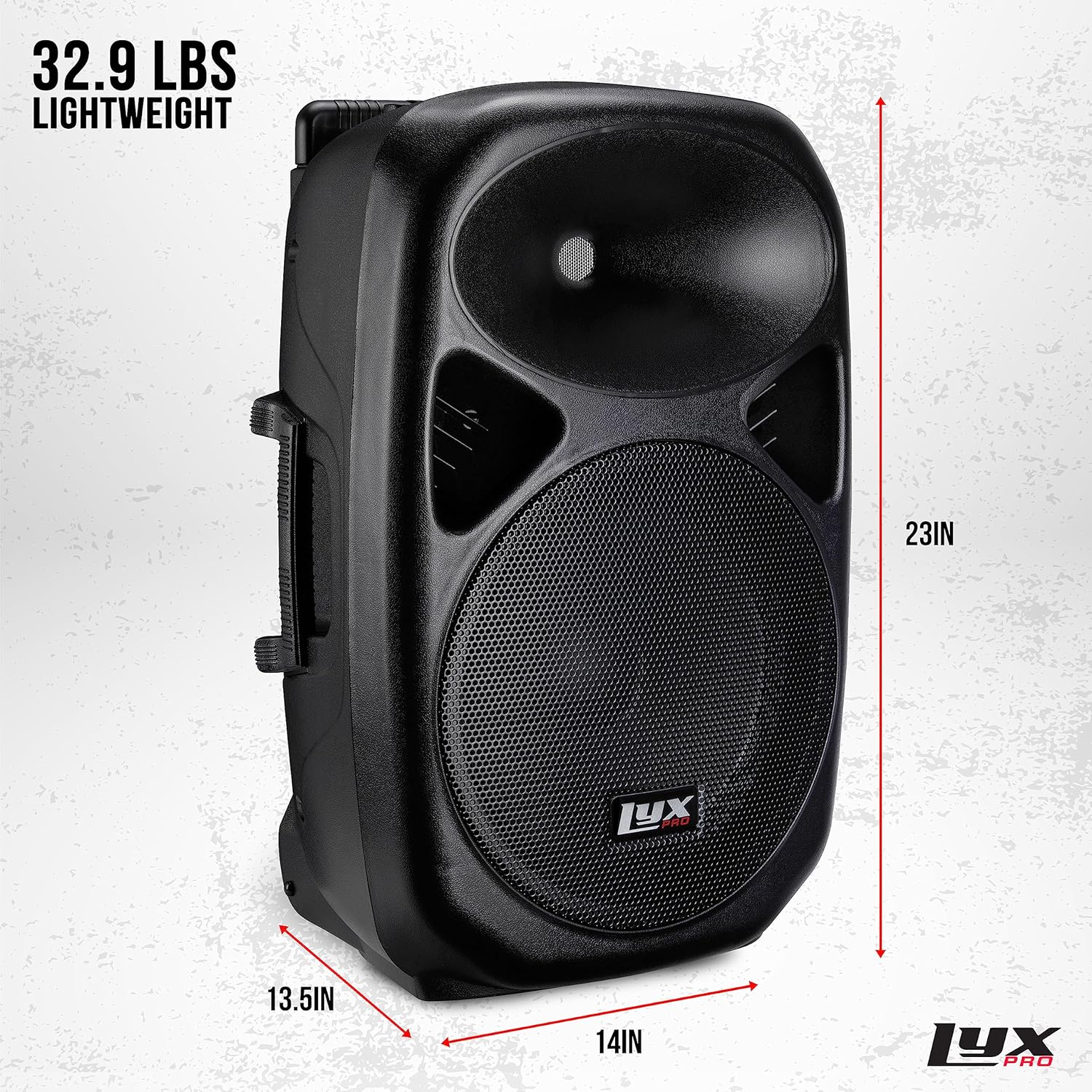
Image: The LyxPro SPA-12BAT speaker displaying its physical dimensions and weight, indicating its compact yet robust design.
- Speaker Type: Active PA Speaker
- Woofer Diameter: 12 Inches
- Speaker Maximum Output Power: 70 Watts
- Impedance: 4 Ohm
- Connectivity Technology: Bluetooth, XLR, 1/4", RCA, 3.5mm
- Power Source: Battery Powered (Rechargeable) / AC
- Battery Charging Time: Approximately 4 Hours
- Material: Plastic
- Color: Black
- Item Weight: 29.1 pounds (13.2 kg)
- Package Dimensions: 25.28 x 16.73 x 13.39 inches (64.2 x 42.5 x 34 cm)
- Model Number: SPA12BAT
- UPC: 840102134698
Warranty and Customer Support
LyxPro products are designed for reliability and performance. This product comes with a limited warranty. For specific warranty details, please refer to the warranty card included with your purchase or visit the official LyxPro website.
For technical assistance, troubleshooting, or any questions regarding your LyxPro SPA-12BAT speaker system, please contact LyxPro customer support. Contact information can typically be found on the LyxPro website or in your product packaging.
